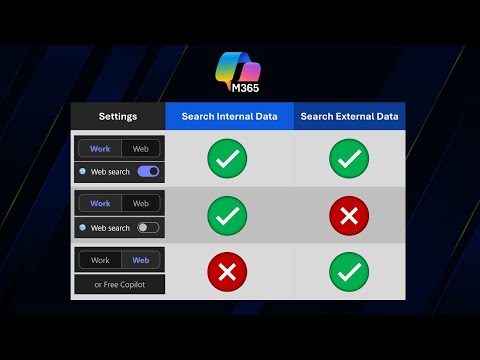
M365 Copilot: When to Use Work or Web
Master Microsoft three sixty five Copilot work versus web toggle for secure, efficient workflows in Excel and Power BI
Key insights
- Dual modes: Microsoft 365 Copilot offers two main modes—Work mode and Web mode—so the assistant can pull from either your organization’s data or the public internet.
- Work mode: Connects to your organization via Microsoft Graph to use emails, documents, calendars and other internal content, making responses relevant to company context and collaboration needs.
- Web mode: Fetches live information from the internet for news, market trends, research, and facts not stored in your work systems, helping with up-to-date or broad-topic queries.
- When to use each: Choose Work mode for confidential or internal tasks (reports, internal emails, meeting prep) and Web mode for external research, fact-checking, or brainstorming with current public information.
- Licensing and sign-in: The Work/Web toggle requires a paid Microsoft 365 Copilot license (about $30 per user/month) and a Microsoft Entra work or school account; free users keep secure enterprise chat but not the dual-mode toggle.
- Security and platform notes: Modes give clear control over data sources for better privacy and accuracy; some advanced features (multi-user document collaboration, admin tools) appear only on web and desktop in the unified Microsoft 365 Copilot app experience.
Video at a glance
In a recent YouTube video, the channel Efficiency 365 by Dr Nitin explains how the new toggle inside the Microsoft 365 Copilot chat—between Work and Web modes—affects productivity and data sourcing. The presenter demonstrates how each mode draws on different data sources and highlights scenarios where one mode outperforms the other. As a result, viewers gain a practical sense of when to rely on organizational content versus live internet information.
Moreover, the video situates this toggle within a broader shift as Microsoft rebrands and consolidates its productivity tools into the Copilot app. Consequently, the discussion covers both technical behavior and user experience, helping teams decide how Copilot fits into daily workflows. The piece frames the toggle as a control that balances security, relevance, and timeliness.
How Work and Web modes differ
According to the video, Work mode queries the organization’s internal data through Microsoft Graph, which includes emails, documents, calendars, and other enterprise records. Therefore, answers generated in this mode are grounded in context that belongs to the user’s workplace and typically respect enterprise controls. In contrast, Web mode reaches outward to publicly available internet sources to fetch current or broader information.
Consequently, each mode serves different needs: internal accuracy and confidentiality versus external breadth and freshness. The presenter points out that this separation helps users understand the provenance of Copilot’s responses. This clarity can reduce mistakes that come from mixing private and public data without oversight.
When to choose each mode
Dr Nitin advises using Work mode for tasks that rely on company files, such as drafting policy-aligned emails, analyzing internal reports, or preparing meeting summaries that must reflect organizational facts. Thus, teams handling proprietary or sensitive work should prefer this setting to keep responses rooted in trusted internal sources. On the other hand, the video recommends Web mode for research tasks where the most recent external facts matter, such as market trends, public news, or general background checks.
Additionally, the presenter highlights hybrid scenarios where one might switch modes during a single activity. For instance, a user might start in Work mode to frame a company-specific brief and then switch to Web mode to add current external context. Accordingly, this flexibility lets knowledge workers combine internal knowledge with fresh external insights as needed.
Tradeoffs and practical challenges
While the split offers clear benefits, it also introduces tradeoffs that organizations must manage. For example, Work mode increases data privacy by relying on internal sources, yet it can miss recent events that only appear online, so users may encounter outdated information. Conversely, Web mode provides up-to-date material but can surface inaccurate or poorly sourced content, which raises verification and compliance concerns.
Moreover, toggling between modes creates a cognitive overhead for users who must decide which context to trust during fast-paced tasks. The video notes that training and policy guidance can reduce mistakes, but implementing those controls takes time and coordination. Finally, integrating Copilot into workflows may reveal gaps in permissions, searchability, or content governance that IT teams must address.
Licensing, platform limits, and deployment notes
The presenter also explains that the toggle functionality is available under paid Copilot licensing and requires sign-in with an organizational account, which affects adoption. Moreover, some advanced features of the Copilot environment work only in web and desktop clients, so mobile users might see a reduced feature set. Therefore, deployment planners should consider platform differences and user needs before rolling the tool out broadly.
In addition, the video points out that the Copilot app aims for a unified experience across devices but that specific collaboration tools are still web-first. Consequently, IT teams must weigh licensing costs against the productivity gains and also prepare guidelines for secure usage. This preparation includes access controls, monitoring, and user education to align the tool with company policies.
What organizations should consider next
Ultimately, the video by Efficiency 365 by Dr Nitin encourages organizations to treat the Work/Web toggle as a strategic choice rather than a simple switch. Hence, leaders should define clear scenarios for each mode, provide training, and create checks to verify information coming from external sources. By doing so, teams can preserve confidentiality while also benefiting from timely, public knowledge when appropriate.
In short, the new toggle enhances control and clarity but also requires thoughtful governance and user guidance. Therefore, organizations that invest in policy, platform readiness, and training will likely gain the most value from the Copilot experience. Lastly, the video serves as a practical primer for teams planning to adopt Copilot and adapt their workflows accordingly.

Keywords
M365 Copilot work vs web, Microsoft 365 Copilot desktop vs web, Copilot work mode vs web mode differences, When to use M365 Copilot web or work, M365 Copilot usage scenarios, Copilot best practices for work and web, Choosing between Copilot for work and Copilot for web, Copilot integration with Teams Office and browser