Microsoft Agents: Practical Use Cases
Software Development Redmond, Washington
Microsoft Agents: bring your own to Microsoft three sixty five Copilot with Copilot Studio, download deck on LinkedIn
Key insights
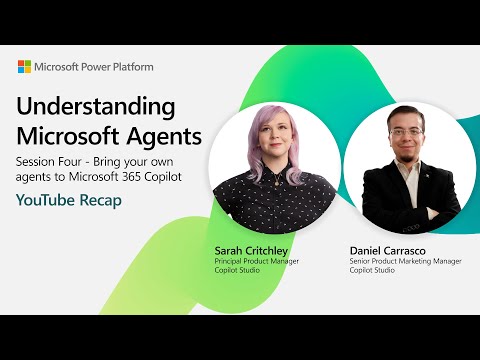
- Session recap: This is a concise recap of the October 1, 2025 YouTube session on "Understanding Microsoft Agents" where presenters explained how to bring your own agents into Microsoft 365 Copilot.
- Microsoft 365 Agents SDK: The SDK acts as a bridge to surface custom or existing AI agents inside Copilot, letting developers connect models and workflows directly to Microsoft 365 apps.
- Copilot Studio: Copilot Studio provides tools to build, test, and deploy agents with ready-made agent flows and scenario libraries, supporting both pro-code and low-code creation.
- Bring Your Own Agent (BYOA): Organizations can integrate their own models and business logic into Copilot, using natural language programming to lower the development barrier and speed adoption.
- Governance and cost controls: Built-in governance, measurement, and spend-management features let IT teams scale agent use safely and avoid unexpected costs.
- Deep reasoning & multi-step orchestration: New agent capabilities support complex, multi-step tasks and multi-agent scenarios across apps like Excel and Word to automate real business workflows.
This article summarizes a recent YouTube video posted by Microsoft that recaps Episode 4 of the "Understanding Microsoft Agents" series, held on October 1, 2025. The session, presented by Sarah Critchley and Daniel Carrasco, explains how organizations can bring their own AI assistants into the Microsoft 365 Copilot environment. In addition, the video highlights new developer tools, governance options, and scenario libraries designed to help teams build and scale agent-driven workflows. Overall, the recording aims to show practical steps for integrating custom agents while balancing real-world constraints.
Key themes and session overview
The video opens by framing the role of Microsoft Agents as autonomous, AI-driven helpers that work inside Microsoft 365 apps. Then, presenters introduce the newly public Agents SDK and the Copilot Studio toolset, which together help developers surface custom models and workflows within Copilot. Furthermore, the session emphasizes a natural language-first approach to building agent flows so that non-developers can participate in design. Consequently, Microsoft positions these agents as central to automating multi-step business tasks across Excel, Word, and other apps.
Speakers also outline the available onboarding resources, such as scenario libraries and adoption guides, to accelerate practical use. Moreover, the presenters describe testing and deployment workflows inside Copilot Studio, and they show examples of agents handling document processing and multi-step reasoning. In addition, the video highlights how agents can orchestrate calls to external models while remaining integrated into Microsoft 365. Thus, the session balances technical detail with guidance for enterprise adoption.
Demonstrations and technical highlights
During demonstrations, the presenters walk through creating an agent that performs document review and then orchestrates follow-up tasks across apps. For example, an agent can extract data from a report, run calculations in Excel, and draft a summary in Word using a single flow. Additionally, Copilot Studio provides visual tools for testing these flows and previewing user interactions before deployment. As a result, developers can iterate faster while keeping user experience in focus.
The session also explains how the Agents SDK connects custom or third-party models to the Copilot interface so organizations can reuse existing investments. Meanwhile, the presenters call out that the SDK supports deep reasoning and multi-step orchestration rather than single-turn commands. They also show how scenario libraries supply templates to accelerate common business processes. Consequently, teams can reduce time-to-value without starting designs from scratch.
Benefits and enterprise advantages
First, the approach offers clear advantages in customization, as businesses can tailor agents to domain-specific workflows and data sources. Furthermore, embedding agents within Microsoft 365 Copilot ensures contextual assistance appears where users already work, which can improve adoption. In addition, the video highlights governance and cost-control features that help enterprises scale usage without sacrificing oversight. Therefore, organizations can pursue automation while preserving compliance and budgetary guardrails.
Second, natural language programming lowers the barrier for subject matter experts to contribute to agent design, which fosters cross-functional collaboration. Moreover, Microsoft’s scenario library and adoption site provide practical templates to guide teams from proof-of-concept to production. Consequently, organizations gain a mix of speed and control that supports both innovation and operational rigor. However, benefits depend on thoughtful planning and governance.
Tradeoffs and challenges
Despite the clear promise, the video candidly addresses tradeoffs such as balancing ease of use with the need for precision and auditability. For instance, natural language flows can speed development but may introduce ambiguity that requires careful testing and validation. Additionally, integrating external models raises questions about data protection and regulatory compliance, especially in highly regulated industries. Therefore, teams must weigh flexibility against the need for robust governance and logging.
Cost management is another practical concern because agent-driven automation can increase compute consumption if not monitored. Meanwhile, enterprise security teams need visibility into how agents access sensitive data and external APIs. Furthermore, organizations must consider the complexity of managing multiple agents and ensuring consistent behavior across scenarios. In short, the power of agents comes with operational responsibilities that require planning and tooling.
Adoption pathway and next steps
The presenters recommend starting with a focused pilot that targets a high-value workflow, using the scenario library to reduce setup time. Next, teams should define governance policies, cost thresholds, and success metrics to measure impact and control risk. Additionally, combining developer-led builds with contributions from business users can speed adoption while keeping technical oversight. As a result, pilots can translate into scalable practices with clear guardrails.
Finally, the video signals that Microsoft intends to expand agent tooling and measurement capabilities over time, which may ease some tradeoffs. Nonetheless, organizations should prepare for iterative improvement as they learn from live deployments. Overall, the YouTube session serves as a practical roadmap for teams that want to bring custom agents into the Microsoft 365 Copilot ecosystem while managing cost, security, and governance considerations.
Keywords
Microsoft Agents, Microsoft Copilot Agents, Azure AI agents, Power Virtual Agents tutorial, Deploying Microsoft agents, Autonomous agents Microsoft, Microsoft agent architecture, Understanding Microsoft agents EP04