
New Microsoft Planner Update Enhances Project Efficiency
Software Development Redmond, Washington
Explore Enhanced Microsoft Planner: AI-Driven Task & Project Management!
Key insights
- Enhanced Project Management: Microsoft Planner's integration with Copilot in Microsoft Teams leverages generative AI to enhance planning, managing, and tracking of projects, making project execution more efficient.
- Generative AI Features: Copilot in Planner can generate tasks, goals, and entire plans from natural language prompts, helping teams streamline their project workflows and stay on track with their objectives.
- Extended Accessibility: The updated Planner, along with Copilot features, are available to users with a Project Plan 3 or Project Plan 5 license, with extended features accessible through a premium plan or a free 30-day trial.
- User-Centric Enhancements: New updates in Microsoft Planner address common user requests with features like task timelines, subtasks, team workload view, custom fields, and more, significantly enhancing usability and team collaboration.
- Updated Regularly: The Planner in Teams will continue to receive regular updates including user-requested features and general enhancements, ensuring the tool evolves with user needs and feedback.
Overview of Microsoft Planner's Latest Enhancements
The new iteration of Microsoft Planner in Teams introduces significant enhancements aimed at improving work management through a smarter, more integrated experience. With the integration of Copilot, powered by generative AI, the Planner has transformed into a more dynamic tool that assists in creating detailed plans, managing tasks, and tracking project progress effectively. This AI enhancement is particularly notable for its ability to understand and execute natural language commands, allowing users to interact with the software in a more intuitive way.
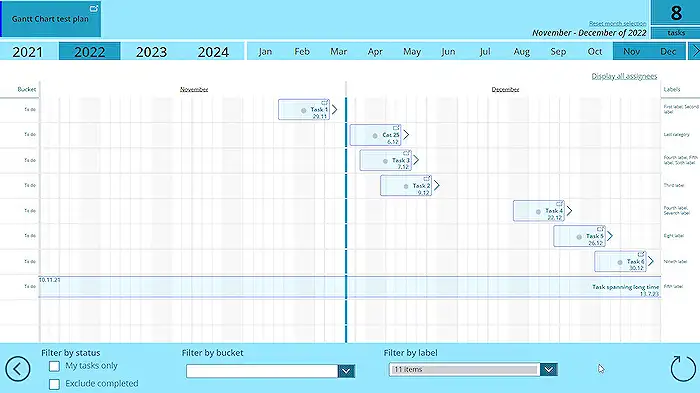
Beyond AI functionalities, the updated Planner also includes highly requested features like timeline management through Gantt charts, the creation of subtasks, and a comprehensive view of team workload, all designed to enhance project management efficiency. Customization options such as custom fields enhance the adaptability of the tool to various project needs. Additionally, integration with Microsoft Teams facilitates better communication and collaboration within teams, embedding task-related discussions directly within the project management interface.
Introduction
The recent revamp of Microsoft Planner, integrated within Microsoft Teams, marks a significant advancement in project management tools. This integration includes the introduction of Copilot in Planner for users with Project Plan 3 or Project Plan 5 licenses. Through the use of generative AI, Copilot in Planner aims to simplify the planning, management, and tracking of projects, thus enhancing work management efficiency.
Planning Enhancements
Effective planning is crucial for the success of any project. The new Planner leverages Copilot to assist teams in creating detailed project plans. This involves generating tasks, setting appropriate goals, and organizing these into manageable buckets based on user inputs. Users can now prompt Copilot to outline a project plan, which it constructs by breaking down the work required.
Streamlined Management
With Copilot functioning as a digital assistant, managing projects becomes more streamlined. It aids in identifying the next steps and converting large tasks into smaller, actionable steps while incorporating feedback to optimize team and AI collaboration. Copilot also assists in modifying plans, tracking new goals, and assessing team workloads, ensuring that project management is both effective and adaptive.
Advanced Tracking Capabilities
Tracking project progress in dynamic and complex environments is often challenging. However, Copilot enhances visibility into project metrics such as progress, priorities, and individual workloads. By providing quick and accurate updates, it helps project managers stay informed and make data-driven decisions.
Key Features of Copilot in Planner
Copilot in Planner is not just about planning but also aids in managing and tracking the entirety of a project lifecycle. From initiating a plan with natural language inputs to adapting plans with new goals and organizing tasks, Copilot ensures a comprehensive management tool. Additionally, it provides essential insights into project progression and task completion, enhancing overall project oversight.
Access and Future Enhancements
While specific pricing details are yet to be announced, users with eligible licenses can preview these new capabilities. Microsoft also plans to progressively rollout these features, ensuring that more organizations can benefit from them in the near future. For those without a premium license, a free 30-day trial is available to explore the advanced features of Copilot in Planner.
Conclusion
Microsoft's integration of Copilot in Planner within Teams represents a significant leap forward in project management software. By harnessing the power of AI, Planner now offers more robust tools for planning, management, and tracking, making it an invaluable asset for teams looking to enhance productivity and efficiency in project execution.
Expanding on Microsoft Planner's Capabilities
The revamped Microsoft Planner now incorporated into Microsoft Teams, significantly enriching the platform's capability to manage work and projects efficiently. With the addition of AI through Copilot, the tool becomes not just a planning utility, but a comprehensive project management solution. This allows for real-time, AI-driven assistance in creating plans, managing tasks, and providing progress updates, which are critical in today's fast-paced work environments.
Moreover, by providing a simplified user interface and integrating powerful project management features such as Gantt charts, subtasks, and custom fields, Planner adapts to the unique needs of any project. It addresses not just the task management needs but also enhances team collaboration within Microsoft Teams. Whether it's a small project team or a larger organizational initiative, Planner is equipped to handle different scales of project management requirements.
The development of Planner also highlights Microsoft's commitment to continuous improvement and user feedback incorporation. Regular updates are planned to introduce more features and enhancements, which suggests that Microsoft aims to evolve Planner to be more in tune with the needs of modern businesses.
For businesses and teams already invested in Microsoft Teams, Planner represents a valuable addition that promises not only to enhance their project management practices but also to bring AI into everyday tasks, helping teams do more with less effort. With the ongoing advancements Microsoft is integrating, Planner is set to become an even more essential tool in project management arsenals worldwide.
Keywords
Microsoft Planner Update, Work Management Efficiency, Project Management Tools, Microsoft 365 Productivity, Team Collaboration Software, Task Management Solutions, Planner Enhancements 2024, Efficient Planning Software