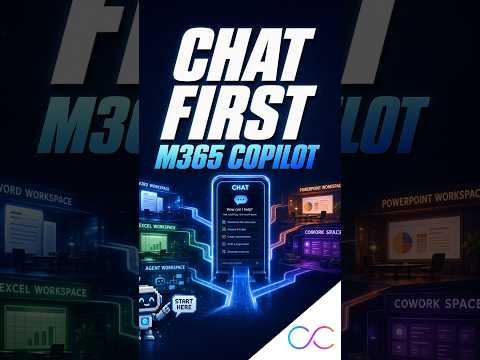
Copilot Chat First changes the starting point
M365 Copilot Connection highlighted Microsoft's Copilot Chat first model, which puts conversation before apps and can reduce switching.
Key insights
- The Short is titled Start in Copilot Chat First.
- The idea is to begin in Microsoft Copilot Chat instead of Word, Excel, Teams, or Outlook.
- Copilot Chat can handle questions, drafts, summaries, search, and agents from one place.
- For work or school accounts, Copilot can use organizational context such as mail, files, chats, and meetings when Work IQ is enabled.
M365 Copilot Connection recently published a YouTube Short titled Start in Copilot Chat First. The clip points to Microsoft’s move toward using Copilot Chat as the first place to start workplace AI tasks, rather than opening a specific Microsoft 365 app first. The main takeaway is simple: describe the outcome you want, then let Copilot route the work.
The material describes Copilot Chat as a central entry point for asking questions, summarizing information, drafting content, finding organizational knowledge, creating or using agents, and moving into Word, Excel, PowerPoint, Outlook, or Teams when needed. It also notes a newer experience that combines Chat and Cowork through a Home starting point, with Microsoft aiming to route requests automatically to Chat, Cowork, or Code.
What's new
The change is not a new standalone app. It is a new starting pattern for work: begin in Copilot Chat, then let the request flow into the right Copilot capability or Microsoft 365 app. Microsoft’s direction shifts the user experience from application-first to conversation-first.
The research notes also say Copilot Chat can work with both web information and, for work or school accounts, organizational information from email, files, chats, and meetings. Microsoft refers to that connected context as Work IQ when it is enabled.
Why it matters
This matters most for people who move between several Microsoft 365 apps during the day. Admins and leaders may see value in a simpler adoption pattern, because users only need one habit: ask first, then refine the task later. Makers and power users may also find it easier to start cross-application work without deciding up front whether the task belongs in Word, Excel, Outlook, or Teams.
The notes do not describe licensing changes, rollout stages, or tenant restrictions. They do say that the answer quality depends on permissions, data quality, and the relevance of the connected information.
How it works
The model is conversational. A user starts with a request such as a summary, briefing, comparison, draft email, or policy search. Copilot then determines whether the request is best handled as a quick answer, a document-generation task, a deeper multi-step workflow, or an agent-based operation.
- Open Copilot Chat first.
- Enter the outcome you want in natural language.
- Let Copilot use available web or organizational context.
- Move into a Microsoft 365 app only if the task needs editing or final production.
The notes also say the newer Copilot experience may route a request automatically to Chat, Cowork, or Code, which reduces the need to choose a mode manually.
Limitations and open questions
The source material is very thin. The YouTube Short description itself contains no transcript beyond a placeholder, so the article relies on the research notes for context. The notes do not confirm whether this is a broadly available change, a preview, or a recommendation rather than a product setting.
We also could not verify any licensing details, rollout timing, or tenant-specific behavior from the material provided. The notes mention that access depends on permissions, but they do not explain which features require which plan.
Sources
Frequently asked questions
What is Copilot Chat first?
It is a usage model where users begin in Microsoft Copilot Chat instead of starting in a specific app like Word, Excel, Teams, or Outlook.
What can Copilot Chat do in this model?
The notes say it can answer questions, summarize information, draft content, find knowledge, create or use agents, and move into Microsoft 365 apps when needed.
Does the material say who can use Work IQ?
No. It says Work IQ applies to work or school accounts when enabled, but it does not give licensing or rollout details.