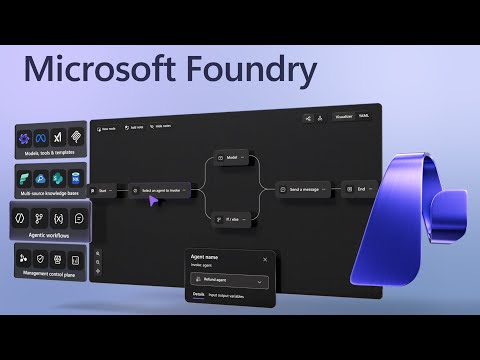
Microsoft Foundry: Build AI Apps & Bots
Software Development Redmond, Washington
Build and govern agentic AI with Microsoft Foundry on Azure AI for secure fleetwide governance and dev productivity
Key insights
- Microsoft Foundry: A unified AI platform that helps teams build, optimize, and govern AI apps and agents that understand business context and drive measurable impact.
It combines development tools, models, and operations in one place to reduce friction between teams. - Model Ecosystem: Access to a broad catalog of models from multiple vendors, giving developers choice instead of locking them into one provider.
Use specialized models for tasks like coding, long-horizon planning, retrieval, and classification to match each use case. - Agent-First: A rebuilt agent framework that makes it easy to create agentic apps, connect tools, and manage knowledge sources.
Agents can use MCP tools, logic app connectors, custom connectors, and multiple knowledge stores while sharing memory and working across multi-agent workflows. - Foundry Control Plane: Centralized governance for security, lifecycle management, and real-time visibility across your AI fleet.
The control plane brings consistent policies and monitoring to agents and integrates signals across the Microsoft Cloud for safer operations. - Developer Portal: A redesigned portal with a Build tab, Workflows, evaluation tools, safety controls, publishing, and post-deployment monitoring.
The portal helps development and operations teams stay coordinated and keeps projects productive and auditable. - Enterprise Benefits: Faster, more interoperable AI development with enterprise-grade governance and visibility.
Teams can prototype, evaluate, and deploy agentic solutions at scale and then manage them throughout their lifecycle from a single platform.
Overview of the Video
The Microsoft-produced YouTube demo highlights a newly rebranded platform called Microsoft Foundry, which aims to simplify building, optimizing, and governing AI applications and agents for business use. The video, presented as part of the Microsoft Mechanics series, outlines how the platform centralizes development tools, model choice, and operational controls into a single portal. Consequently, Developers and IT teams can move from prototype to production with fewer toolchain interruptions, according to the demo. Overall, the presentation frames Microsoft Foundry as a unified environment designed to reduce friction across AI projects.
Moreover, the demo is hosted by Yina Arenas, who explains both the high-level goals and practical workflows that teams will use in day-to-day work. She walks viewers through the portal tour and demos key areas such as build workflows, agent creation, safety features, and post-deployment observability. As a result, the video acts as both an introduction and a hands-on primer for teams evaluating the platform. In short, the demo intends to show how governance, productivity, and visibility are aligned across AI initiatives.
Portal and Build Experience
The redesigned portal is central to the demo and receives significant attention for its streamlined layout and task-oriented tabs. For example, the video highlights a dedicated Build tab where developers design workflows and assemble agent components, while a playground helps test behavior quickly. Thus, the portal focuses on reducing context switching and making common tasks discoverable for both developers and operators. Importantly, the walkthrough emphasizes practical UX changes rather than only branding updates.
Furthermore, the platform supports agentic app creation with drag-and-drop workflows and integrated debugging tools that speed iteration. Developers can attach connectors and tools directly to agents, which allows for richer business logic and external system access without extensive glue code. However, the convenience of built-in connectors comes with tradeoffs: organizations must balance ease of integration with careful review of permissions and data flows. Therefore, the demo stresses the need for collaboration between Development and security teams when configuring production agents.
Model and Agent Ecosystem
Another major point in the video is the expansive model ecosystem that the platform surfaces, which the demo claims includes thousands of models from multiple vendors. This multi-model approach gives organizations the flexibility to choose models optimized for specific tasks like coding, long-horizon planning, or retrieval-augmented generation. As a result, teams can avoid being locked into a single vendor while matching model strengths to business needs. At the same time, choosing among many models introduces complexity in benchmarking and lifecycle management.
The platform’s agent-first architecture is also emphasized, showing how agents can access a range of tools, connectors, and knowledge sources such as Azure AI Search and blob storage. Moreover, the demo explains support for multi-agent workflows and memory features that allow agents to maintain context across interactions. This design enables sophisticated, stateful applications, yet it also increases the need for observability, testing, and structured evaluation. Consequently, organizations must invest in robust testing and monitoring to ensure reliable behavior at scale.
Governance and the Foundry Control Plane
Security and governance receive focused coverage through the demo’s description of the Foundry Control Plane, which provides lifecycle management and fleetwide visibility. The video shows how administrators can monitor agent deployments, apply policies, and review telemetry from a single control surface. Therefore, teams gain centralized insight that can reduce security blind spots and accelerate compliance audits. Nevertheless, centralization can create its own bottlenecks if policy workflows are not aligned with development velocity.
Furthermore, the platform integrates signals across the Microsoft Cloud to inform governance decisions, which can simplify cross-environment controls. Yet, this integration requires careful configuration to ensure the correct balance between strict policy enforcement and developer autonomy. In practice, organizations will need to define roles and approval gates to manage tradeoffs between security and speed. Thus, the demo underscores the importance of clear governance processes alongside technical controls.
Evaluation, Publishing, and Post-Deployment
Yina Arenas also walks through evaluation and publishing steps, demonstrating how agent performance metrics are surfaced and how apps are published to broader teams. The video highlights tools for measuring behavior, safety outcomes, and operational metrics that matter for production systems. Consequently, teams can validate models and agents before publishing, which helps reduce downstream incidents. However, thorough evaluation adds time and cost to development cycles, presenting a tradeoff between speed and reliability.
Post-deployment Monitoring and lifecycle features complete the platform narrative, showing how teams can track agents after release and roll out updates in a controlled fashion. The demo suggests that observability and rollback mechanisms are built into the platform to support continuous improvement. Still, maintaining a diverse set of models and connectors over time will require disciplined change management and testing. Thus, the platform promises convenience, but it also calls for organizational practices to sustain production-grade AI.
Tradeoffs, Challenges, and Outlook
Overall, the video presents Microsoft Foundry as a comprehensive effort to unite model choice, agent design, and governance in one place, and yet the tradeoffs are clear. On one hand, the platform reduces integration work and provides strong governance primitives; on the other, it raises complexity in model selection, performance evaluation, and operational management. Consequently, organizations must weigh faster time to value against the overhead of managing a richer, multi-model ecosystem.
Looking ahead, the demo signals that successful adoption will depend less on tools alone and more on processes and skills. Teams will need testing frameworks, clear governance policies, and cross-functional collaboration between developers, security, and business owners. Ultimately, the platform’s promise is compelling, but realizing business impact requires managing the practical tradeoffs that come with agentic AI at scale. In conclusion, the video offers a useful roadmap while also reminding viewers that real-world deployment involves cultural and technical work beyond the portal.

Keywords
Microsoft Foundry, build AI apps, AI agents platform, Microsoft AI development, AI app development tools, agent-based AI apps, Foundry for developers, Microsoft Foundry tutorial