Microsoft 365 Copilot for Business Guide
Microsoft expert: new Copilot for Business lowers cost for small firms, same AI, quick activation and bundles
Key insights
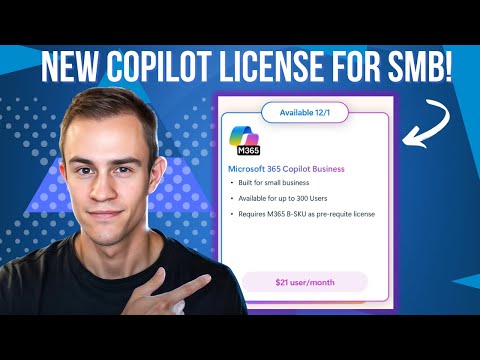
- Microsoft 365 Copilot for Business is a new, lower-cost Copilot SKU built for small and medium businesses (up to 300 users).
It launches worldwide on December 1, 2025, and offers the same core Copilot capabilities as the enterprise version. - Work IQ powers personalized AI across core apps — Word, Excel, PowerPoint, Outlook, and Teams — so the assistant understands roles, context, and common tasks.
It delivers productivity gains while keeping enterprise-grade security and compliance in place. - Key features include Copilot Chat and Agent Modes for iterative document, spreadsheet, and presentation help, plus a Teams Mode that turns chats into group conversations and adds a meeting Facilitator agent.
These agents speed content creation, note-taking, and meeting follow-ups. - Automation and control: the Workflows Agent automates repetitive tasks across Outlook, Teams, SharePoint, and Planner using simple prompts.
Admins use the Copilot Control System to manage usage, apply prepaid credits, and monitor AI risk. - Data and compliance: the service uses Microsoft Graph grounding and connectors for richer, context-aware responses, while Enterprise Data Protection (EDP) keeps data within Microsoft boundaries to support GDPR and other rules.
- Pricing and rollout: Microsoft offers bundled Business plans with Copilot and a limited-time promotion (15% off) from December 1, 2025, to March 31, 2026.
Existing Copilot customers must finish current commitments before moving to the SMB SKU; new licenses can be added anytime.
Nick Ross [MVP] (T-Minus365) published a detailed YouTube video explaining Microsoft's new small-and-medium-business offering, Microsoft 365 Copilot for Business, and our newsroom reviewed that coverage to summarize the key points for readers. The video outlines what this new SKU includes, how to activate it, and answers common questions companies are already raising about cost, features, and management. Furthermore, Ross frames the announcement as a move to bring advanced AI-powered productivity tools to organizations with up to 300 users while preserving enterprise-grade controls.
Overview of the New SKU
According to Ross, the new Microsoft 365 Copilot for Business SKU launches globally on December 1, 2025, and aims to offer the same core Copilot capabilities at a lower price point tailored for small and medium businesses. He emphasizes that the SKU integrates with existing Microsoft 365 Business plans such as Basic, Standard, and Premium, enabling companies to layer AI assistance onto their current subscriptions. In this context, the announcement represents a strategic effort by Microsoft to expand AI adoption without forcing smaller organizations into enterprise licensing.
Moreover, the video notes that the new SKU preserves Microsoft’s broader Copilot investments, so users should expect parity in core functionality even as the offering targets different price sensitivity. Ross highlights that the product is built to balance accessibility with governance, aiming to deliver a familiar Copilot experience while maintaining compliance and data protections. Consequently, smaller organizations can test AI-driven workflows without losing important administrative controls.
Core Features and Capabilities
Ross walks through the feature set with attention to how AI integrates across Microsoft 365 apps, describing capabilities in Word, Excel, PowerPoint, Outlook, and Teams powered by what Microsoft calls Work IQ. This intelligence layer helps the AI understand context from a user’s role and content, so responses and automations feel more personalized and relevant. He explains that the experience includes iterative chat and agent modes that can act on documents, spreadsheets, and presentations to streamline content creation and review.
In addition, the video covers collaborative features such as Teams Mode, which can transform individual Copilot chats into group threads, and a meeting Facilitator agent that manages agendas, notes, and follow-ups automatically. There is also a Workflows Agent intended to automate repetitive tasks across Outlook, Teams, SharePoint, and Planner through simple prompts, which Ross underscores as a way to reduce manual effort without deep developer involvement. He stresses that these agents rely on contextual grounding through the Microsoft Graph to draw from email, chat, document, and meeting data.
Pricing, Bundles, and Promotions
Ross outlines pricing and launch promotions, noting that the SKU is positioned as a lower-cost option for SMBs while preserving enterprise-grade Copilot functions. Microsoft announced bundle options combining base Business plans with Copilot licenses and promotional pricing such as a temporary discount window for early adopters. He cautions, however, that existing customers who have active Copilot commitments must honor those contracts before migrating to the new SMB SKU, although organizations can still purchase additional business-focused licenses during transition windows.
While cost savings appear attractive, Ross highlights tradeoffs surrounding commitment terms and timing. For instance, organizations weighing a switch must consider existing contractual commitments, migration effort, and whether temporary promotions meaningfully offset long-term licensing costs. Therefore, small businesses should model their expected usage and renewal timelines before switching to ensure the decision yields the intended savings.
Administration, Security, and Compliance
Central to Ross’s explanation is how Microsoft preserves administrative control through features such as the Copilot Control System, which gives IT teams tools to manage, tune, and secure AI agents. He points out that administrators can monitor usage, apply prepaid credits, and integrate risk monitoring via Microsoft Purview, providing visibility over AI interactions. Additionally, the offering includes protections described as Enterprise Data Protection (EDP), which keep data within Microsoft boundaries and aim to meet regulatory requirements like GDPR.
Despite these controls, Ross emphasizes the practical challenges of balancing ease of use with governance. Small IT teams may find configuration and monitoring tasks unfamiliar, and the nuanced policy settings require careful planning to avoid either excessive restriction or undue risk. Thus, administrators should allocate time for policy design, testing, and user training to achieve the intended balance between innovation and compliance.
Tradeoffs and Implementation Challenges
Ross’s video does not shy away from discussing tradeoffs: while smaller businesses gain access to powerful AI features, they also assume responsibilities for change management and cost oversight. He notes that automated workflows and AI-assisted content creation can boost productivity, yet they may also introduce reliance on AI outputs that require human review to ensure accuracy and context alignment. Consequently, organizations must design governance and verification steps into their adoption plans.
Furthermore, Ross highlights the tension between rapid feature rollout and the need for stable, well-documented deployment processes. As Microsoft continues to add capabilities, IT teams and business leaders face ongoing decisions about when to adopt new features and how to align them with existing processes. Therefore, successful implementation will likely require phased rollouts, pilot programs, and clear feedback loops between end users and administrators.
Conclusion and What to Watch
In summary, Nick Ross’s video offers a practical, detailed look at Microsoft 365 Copilot for Business, framing it as a timely option for SMBs that want advanced AI without enterprise price tags. He encourages organizations to evaluate licensing timelines, administrative readiness, and use cases that will benefit most from AI automation and collaboration tools. As Microsoft rolls out the SKU globally, IT leaders should track early adopter experiences and available governance controls to inform their own adoption strategies.
Finally, Ross suggests that the new SKU signals Microsoft’s intent to broaden AI access while retaining the controls enterprises expect, and that its success will depend on how well small businesses balance productivity gains with policy and oversight needs. Thus, readers should weigh both opportunities and responsibilities as they consider bringing Copilot capabilities into their organizations.

Keywords
Microsoft 365 Copilot for Business, Copilot for Business features, Microsoft Copilot pricing, Copilot deployment guide, Copilot security and compliance, Copilot productivity tips, Microsoft 365 AI assistant, Copilot integration with Teams