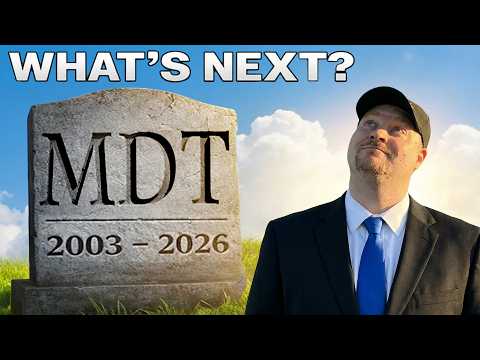
MDTs End: Windows Deployment Lives On
MDT retired, Windows deployment moves to cloud with Autopilot device preparation, Intune and Azure identity provisioning
Key insights
- MDT retired: Microsoft officially retired the Microsoft Deployment Toolkit in January 2026, ending updates and security patches.
Existing MDT setups may keep working but will not be supported for new Windows releases. - Cloud-first provisioning: Windows deployment now centers on identity, policies, and apps instead of disk images and task sequences.
This model removes the need for boot images and reduces on‑premises imaging work. - Windows Autopilot v2 (Device Preparation): Autopilot v2 focuses on device preparation and eliminates hardware hash collection for many scenarios.
It does not reimage devices, so it works differently from classic Autopilot and MDT imaging. - When imaging still matters: Keep imaging or use Configuration Manager OSD when you need full reimage control, complex driver handling, or offline deployments.
Some enterprise and specialized hardware scenarios will still require traditional imaging workflows. - Migration steps for IT: Inventory devices, test Autopilot v2 and Intune workflows, and plan phased migration with validation points.
Keep a fallback imaging process for devices that cannot use cloud provisioning. - Benefits and trade-offs: Cloud provisioning improves scalability, security, and remote management while simplifying updates and compliance.
Expect reduced manual steps, but plan for changes in app delivery, identity integration, and operational procedures.
Overview: A New Era for Windows Deployment
The YouTube video by Azure Academy announces that MDT has been retired and that Windows deployment has decisively moved toward cloud-first models. The presenter explains that after 23 years the toolkit no longer receives updates or patches and that organizations must consider modern alternatives such as Windows Autopilot and Configuration Manager OSD. Consequently, IT teams face a significant change in how they build and maintain devices, shifting focus from image-based approaches to identity and policy-driven provisioning. Overall, the video frames this change as an evolution rather than a failure of the legacy toolset.
What Replaces MDT and Why It Matters
The video highlights that imaging with WIM files and task sequences gave way to provisioning that centers on identity, policies, and apps. In particular, the narrator shows how Windows Autopilot and cloud services like Intune now orchestrate device setup so devices become compliant and ready from first boot without manual reimaging. As a result, organizations can scale deployments more easily, manage remote or hybrid workforces, and reduce reliance on on-premises infrastructure. This matters because modern endpoints demand continuous compliance and quicker access to updates, which the cloud handles more naturally than static images.
Autopilot v2 Versus Classic Autopilot
Importantly, the video draws attention to differences between Autopilot v2 (Device Preparation) and classic Autopilot v1. The presenter explains that v2 eliminates the need to collect hardware hashes for OEM or BYOD devices and uses device preparation flows that work before user sign-in, whereas classic Autopilot remains useful for scenarios that still require user-driven enrollment or certain legacy constraints. Thus, admins should weigh which Autopilot model fits each scenario, because v2 streamlines provisioning but may not cover every edge case. Furthermore, the video clarifies why Autopilot does not perform a traditional reimage and how apps, scripts, and policies now replace task sequences.
Tradeoffs: Cloud Provisioning Versus Traditional Imaging
The video carefully considers tradeoffs when moving away from image-based deployment. On one hand, cloud provisioning reduces on-prem hardware, simplifies remote deployments, and improves ongoing security because services receive regular updates; on the other hand, it demands strong identity controls, reliable internet connectivity, and change in operational skills. For example, organizations that need exact disk images for specialized workloads or secure air-gapped environments may still rely on image-based tools or Configuration Manager OSD, which continues to support full reimages and complex task sequences. Therefore, IT teams must balance the benefits of scalability and agility against the operational cost of retooling processes and training staff.
Challenges and Practical Migration Guidance
The presenter walks through common migration challenges, including how to handle legacy drivers, custom applications, and scenarios where on-prem control remains essential. He recommends testing Autopilot v2 in pilot groups to validate device preparation and to identify when classic Autopilot or Configuration Manager is still required. Moreover, the video underscores that while hardware hashes fade in relevance for many new devices, some environments will still need them, which means migration plans should be nuanced rather than one-size-fits-all. Finally, the narrator suggests maintaining parallel workflows during transition so teams can fallback quickly if unexpected issues arise.
Implications for IT Teams and Next Steps
In conclusion, the video from Azure Academy positions the retirement of MDT as a milestone that pushes organizations toward identity-driven provisioning and continuous compliance. IT teams should evaluate device fleets, map current imaging dependencies, and run pilots to discover gaps in tooling, training, or connectivity. By contrast, organizations that require fine-grained on-prem control or complete offline imaging will need to retain or adopt OSD-style approaches for specific workloads. Ultimately, the shift asks administrators to rethink deployment as an ongoing lifecycle problem focused on security, access, and manageability rather than periodic reimages.
Keywords
MDT alternatives for Windows deployment, Migrate from MDT to Intune, Windows Autopilot vs MDT, Modern Windows deployment best practices, Replace Microsoft Deployment Toolkit, SCCM and Intune deployment strategies, Automated Windows deployment tools, MDT migration guide