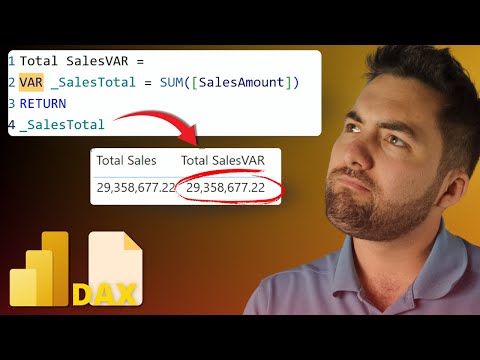
Power BI: Simplify DAX with Variables
Master DAX variables in Power BI to write cleaner measures, boost performance and simplify debugging with Microsoft
Key insights
- DAX variables explained: In the video, Greg Trzeciak shows that DAX variables let you store an intermediate result inside a measure so you can reuse it.
Declare them with VAR and return the final value with RETURN, and they are evaluated once per query. - Performance and readability: Variables reduce repeated calculations, which speeds up queries, and they turn nested logic into clear, named steps.
This makes formulas easier to maintain and faster to run in Power BI. - Practical example: Build a Year-over-Year metric by storing prior-period sales in a variable, then compute growth using that stored value.
Keeping the prior value in a variable avoids recalculating the same expression twice. - Naming and structure tips: Use short, descriptive names and break complex formulas into multiple variables to show logical steps.
Organizing code this way helps with later edits and team handoffs. - Filter context and evaluation notes: Variables can "freeze" values early, which changes how filters and row context apply.
Understand when a variable captures a context to avoid unexpected results in aggregated measures. - When to use — and not: Use variables for clarity, repeated expressions, and debugging.
Avoid unnecessary variables in trivial formulas, and test performance when variables capture large table expressions or change context unexpectedly.
Overview of the video
In a clear, practical tutorial, Pragmatic Works’ presenter walks viewers through mastering DAX variables to improve formulas in Power BI. The video emphasizes cleaner code, easier debugging, and potential performance gains, while also warning about common pitfalls. Consequently, the session balances theory with applied examples so that viewers can follow steps and replicate them in their own reports. Overall, the content aims to help analysts write measures that are both powerful and maintainable.
Core concepts and naming practices
The presenter begins by defining what a DAX variable is and how to declare it using VAR, followed by the final expression introduced by RETURN. He recommends simple, descriptive names and consistent structure so that each variable represents a clear intermediate step. Furthermore, using meaningful names reduces cognitive load and makes formulas easier to hand off to teammates or revisit later. As a result, good naming becomes a small investment that pays off during debugging and maintenance.
Practical examples: building and debugging measures
To illustrate the approach, the tutorial walks through a motivation metric and shows how variables break a complex calculation into logical parts. Step by step, the instructor uses variables to isolate sub-calculations and then recombines them in the final measure, which makes it easier to test each part independently. Moreover, he demonstrates debugging techniques that include returning intermediate results to verify assumptions and trace where logic may diverge. This methodical approach helps reduce errors and speeds up the iterative development of business metrics.
Organizing multiple variables and readability tradeoffs
The video highlights how multiple variables can be chained to organize logic into a readable flow, but it also notes tradeoffs between clarity and verbosity. While more variables can make each step explicit, they can also lengthen a measure and introduce additional names to manage, which might overwhelm a novice reader. Therefore, the presenter advises striking a balance: use variables when they reduce repetition or clarify intent, and avoid them when a small expression is already self-explanatory. Consequently, the recommended practice is pragmatic rather than dogmatic, aimed at maintainability without needless complexity.
Performance, filter context, and common pitfalls
Importantly, the tutorial explains how DAX variables affect evaluation and filter behavior, noting that variables are evaluated once per query evaluation and that they can “freeze” a value in a particular context. This behavior is useful for avoiding repeated calculations, but it can also lead to subtle bugs if the variable captures a context that you expected to change later. Additionally, the presenter addresses situations where variables might not help performance, such as when the underlying expression still forces heavy engine work or when row-by-row logic is required. Thus, understanding how variables interact with filter context and engine evaluation is essential to avoid surprises.
When to use variables and when to avoid them
The video closes by weighing the benefits against limitations and offering practical guidance about when to apply variables. Use them to eliminate duplicated expressions, clarify complex logic, or simplify debugging, but be cautious when the logic depends on changing contexts or when readability would suffer from excessive naming. Furthermore, the presenter encourages testing both functional correctness and query performance after refactoring formulas. Ultimately, the decision to use variables should be based on maintainability, clarity, and measurable performance impacts rather than on habit alone.
Challenges and best practices for teams
In team environments, maintaining consistent naming and structure becomes more important, and the video suggests establishing simple conventions to keep everyone aligned. However, implementing and enforcing those conventions can be difficult in larger teams or when analysts have varying levels of DAX experience. Therefore, training, code reviews, and short examples in shared documentation help reduce friction and improve overall model quality. By combining these practices with the variable techniques shown in the tutorial, teams can deliver clearer, more reliable analytics.
Final assessment
Pragmatic Works’ tutorial offers a balanced and actionable guide to using DAX variables in Power BI, mixing immediate tips with deeper warnings about evaluation and context. It excels at demonstrating stepwise debugging and practical structuring while reminding viewers to measure performance changes rather than assume improvement. Consequently, analysts who apply these techniques with attention to context and naming will likely see gains in clarity and maintainability, though they must remain mindful of the tradeoffs described. In short, the video is a useful resource for practitioners looking to write cleaner, more dependable DAX measures.

Keywords
Power BI DAX variables,Power BI DAX tutorial,DAX VAR examples,optimize Power BI formulas,DAX variable scope,improve Power BI performance,advanced DAX techniques,DAX best practices