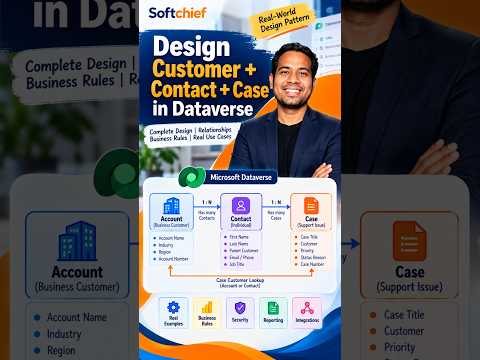
Microsoft Dataverse customer contact case model
Learn how to take advantage of your business data with Microsoft Dynamics 365 & Power Platform & Cross Technologies. My name is Sanjaya Prakash Pradhan and I am a Microsoft Certified Trainer (MCT) and
Softchief Learn recently showed the Customer-Contact-Case model in Dataverse, a core structure for service data in Dynamics 365.
Key insights
- The short focuses on designing Customer, Contact, and Case in Dataverse.
- The model uses Account, Contact, and Case tables as the core service records.
- A case can be linked to either an account or a contact as the customer.
- Dataverse relationships connect customers, cases, activities, notes, and attachments.
- The pattern supports service continuity, reporting, security, and automation.
Softchief Learn published a YouTube Short on designing Customer, Contact, and Case in Microsoft Dataverse for Dynamics 365 customer service scenarios. The clip is brief, but the topic is a common one: how to structure customer data so service teams can track people, organizations, and issues in one model. The takeaway is that the Customer-Contact-Case pattern gives service apps a consistent way to link records and work history.
The material provided for the short is thin, so the article below leans on the surrounding research notes to explain the pattern. The notes describe Account, Contact, and Case as the three core tables in the model. They also show why this structure matters for customer support, reporting, and access control.
What's new
The short is about the standard customer-service data pattern used in Dataverse. In that pattern, Account represents a company, Contact represents an individual, and Case represents a service request, question, complaint, or incident. The model lets a case point to either an account or a contact as the customer.
That relationship is what makes the model useful in Dynamics 365 Customer Service. Agents can see the customer record, prior interactions, related cases, activities, entitlements, and knowledge suggestions in one place. The research notes also mention Microsoft’s Case Management Agent as part of current AI support for creating, updating, resolving, and closing cases.
Why it matters
For admins and makers, this is not about a new feature so much as a standard way to design service data. Using the built-in Dataverse tables helps keep the data model consistent across model-driven apps and service processes. It also supports reuse of forms, views, dashboards, workflows, and business rules.
For support teams, the value is continuity. When cases are linked properly to accounts and contacts, another authorized agent can pick up the work without hunting through email or relying on one person’s memory. That can help with daily case handling, reporting, and permission-based access to records.
How it works
The notes describe a simple record structure:
- Use Account for the organization customer.
- Use Contact for the individual person.
- Use Case for the service issue or request.
- Connect cases to either an account or a contact through the customer lookup.
- Link activities, notes, and attachments back to the relevant records.
Dataverse relationships then connect one account to many contacts, one account to many cases, and one contact to many cases. Activities such as emails, phone calls, tasks, and appointments can be tied to those records to preserve the service history. Security roles, teams, business units, and record sharing control who can read or change the data.
Limitations and open questions
The YouTube Short description does not provide a step-by-step build, a demo, or a detailed explanation of the exact table setup shown on screen. It also does not state any licensing, rollout scope, or version details. The research notes describe the pattern as standard Dataverse practice, but they do not confirm what specifically was shown in the video.
Because the source clip is only 2 minutes 38 seconds, there is also no evidence of edge cases such as complex customer hierarchies, multiple contacts per case, or custom table extensions. The material mentions that organizations can extend standard tables, but it does not show how Softchief Learn handled that in the short.
Sources
Frequently asked questions
What tables does the model use?
The notes describe Account, Contact, and Case as the three core Dataverse tables for this pattern.
Can a case be linked to a person or a company?
Yes. The customer on a case can reference either an account or a contact.
What does the model help service teams do?
It helps teams keep customer identity, previous interactions, related cases, and work history in one place.
Did the short show a full implementation?
No full implementation is described in the source text. The short is brief, and the published description does not give build steps.