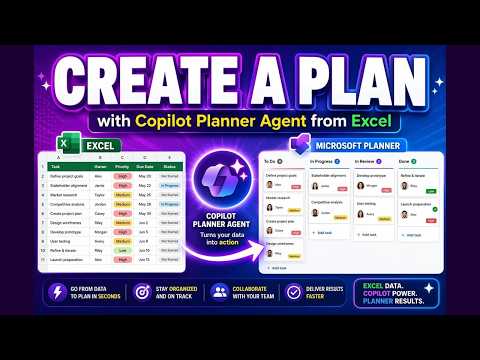
Copilot Planner: Excel to Plan in 30s
M365 Adoption Lead | 2X Microsoft MVP |Copilot | SharePoint Online | Microsoft Teams |Microsoft 365| at CloudEdge
Microsoft Copilot Planner Agent turns Excel and Word into Planner boards with AI automation for Microsoft cloud PM
Key insights
- Planner (Frontier) Agent: An AI tool inside Microsoft 365 Copilot that turns scattered notes, spreadsheets, emails, and meeting content into a structured Microsoft Planner plan. It builds tasks, buckets, dates, and hierarchy automatically.
- Natural-language request: You tell Copilot what to do in plain language (for example, “Create a plan from this brief”), and the agent interprets the intent and starts drafting a plan from your input.
- Grounded enterprise content: The agent uses real workplace sources—Excel sheets, chats, emails, files, and meeting notes—to create accurate, context-aware tasks instead of relying on generic prompts.
- Excel to Planner: Upload or reference an Excel file and the agent maps rows to tasks, assigns owners, sets due dates, and organizes buckets, cutting manual copy-paste and setup time dramatically.
- Automation: The agent drafts complete plans and can refine them with follow-up prompts, reducing repetitive setup and helping teams scale project onboarding and migrations faster.
- Human-in-the-loop: The system drafts plans for review, asks clarifying questions when needed, and requires user approval before saving, keeping control and accuracy in business workflows.
A new YouTube walkthrough by Ami Diamond [MVP] demonstrates how to convert an ordinary spreadsheet into a ready-to-use project board with striking speed. In the video, he uses the Copilot Planner (Frontier) Agent to turn a raw Excel file into a complete Planner plan, showing the end-to-end process in under a minute. He explains each step clearly, and he emphasizes how this shift reduces manual work for project teams. As a result, the clip offers a practical glimpse of where AI-driven planning can go next.
What the video shows
First, Ami walks viewers through preparing an unstructured or semi-structured data source, usually an Excel sheet with items like actions, owners, and dates. Then, he issues a natural-language prompt to the Planner (Frontier) Agent and watches the agent interpret the data and suggest a plan layout. Next, the agent drafts tasks, places them into logical buckets, assigns owners where possible, and proposes timelines so the plan looks ready for review. Finally, Ami refines the results interactively, accepting changes and demonstrating how to polish the board before saving.
Throughout the video, he stresses that the agent creates a draft for human review rather than committing changes automatically, which keeps control in the hands of the team. He also highlights how the tool understands common patterns in spreadsheet columns and maps them to Planner fields like task name, due date, and checklist items. Moreover, the demonstration includes examples of editing and reassigning tasks once the plan appears, showing the balance between automation and manual oversight. Consequently, the clip reads as both a tutorial and a practical assessment.
How the Planner (Frontier) Agent works
The video introduces the Planner Agent as an agentic layer inside Microsoft 365 Copilot that can interpret context from files, chats, and meeting notes. It grounds prompts in enterprise content so the agent does not only rely on generic models, and it can ask clarifying questions during the conversion process when needed. Then, the agent produces a structured plan rather than a flat task list, creating hierarchy, buckets, and supporting notes that align with project logic. This approach signals a shift from content-only assistance to workflow-oriented automation.
Ami notes that the agent’s ability to map columns and infer owners depends on how clean and consistent the source data is, which is why proper column headers and consistent naming help results. He also points out that the agent runs in Microsoft’s early-access Frontier environment for experimental features, so availability depends on tenancy and licensing. Furthermore, he shows how the agent provides a draft for user review, preserving human checks and approvals before any plan becomes operational. Thus, the technology aims to streamline work but retains governance controls.
Practical benefits for teams
According to the video, the most immediate benefit is speed: teams can move from scattered notes or exports to a usable plan much faster than by doing manual entry. Consequently, project onboarding and migration scenarios become less tedious and more repeatable, freeing people to focus on decisions rather than data wrangling. Additionally, the agent supports scaling work practices by applying consistent rules across similar spreadsheets, which improves standardization across projects. As a result, organizations can push consistent task structures to many teams with far less manual labor.
Beyond time savings, Ami highlights that the tool reduces error-prone copy-paste steps that typically introduce mistakes into plans, and it can capture context from supporting documents to enrich task descriptions. He also notes that the AI can suggest owners based on content cues, although he recommends verifying assignments. In short, the benefit is not only speed but also fewer routine mistakes and better initial task clarity, which helps teams start work with a stronger shared understanding.
Tradeoffs and challenges
Despite the clear gains, Ami is candid about tradeoffs and constraints, including accuracy risks when data is messy or ambiguous. The agent’s inferences can misassign owners or misinterpret timeline intent, requiring active review and correction by a human project owner. Moreover, because the feature lives in the experimental Frontier program, tenant eligibility and feature maturity vary, which limits immediate adoption for all organizations. Therefore, teams should plan for a period of validation before relying on the agent for mission-critical workflows.
Security and governance are also central concerns, since the agent may need access to files, chats, and other enterprise sources to ground its output. Ami emphasizes the need to align tenant policies, access controls, and compliance checks before enabling broad use, and he advises testing in a controlled environment first. Finally, he notes that edge cases like complex dependencies or nuanced responsibilities may still require human planning skills, so the agent works best as a force-multiplier rather than a full replacement. This balanced view helps viewers set realistic expectations.
When to adopt and next steps
Ami recommends teams start with simple, well-structured spreadsheets to build trust in the agent’s outputs, and then expand to more complex scenarios as patterns emerge. He suggests creating a pilot that includes governance checks, a small set of users, and a review workflow so the team can measure time savings and error reduction. Additionally, he encourages documenting column conventions and common task templates so the agent learns to map fields consistently across projects. By following those steps, organizations can gain quick wins while managing risk.
Looking forward, Ami predicts that agent-driven planning will become more capable, with tighter integrations and smarter grounding in enterprise content over time. However, he reiterates that successful adoption will hinge on clear policies, good source data, and ongoing human oversight. For now, his video offers a practical demonstration that makes the potential tangible while reminding viewers to apply careful governance. Overall, the clip is a useful resource for project leads and IT teams exploring AI-assisted planning.
In conclusion, Ami Diamond’s walkthrough provides a clear, hands-on look at how the Copilot Planner (Frontier) Agent can convert an Excel file into a functional Planner board quickly, and it balances optimism with practical cautions. He shows the workflow step by step, highlights benefits in speed and consistency, and raises important tradeoffs around accuracy, governance, and tenant readiness. As a result, viewers can assess whether to pilot the capability within their own environments and prepare the right safeguards. Ultimately, the video frames agentic planning as a promising tool that requires thoughtful, controlled adoption.

Keywords
Copilot Planner Frontier Agent, Excel to Planner automation, Build Microsoft Planner from Excel, Copilot Planner tutorial, Copilot for Microsoft Planner, Planner automation 30 seconds, Frontier agent tutorial, Convert Excel rows to Planner tasks