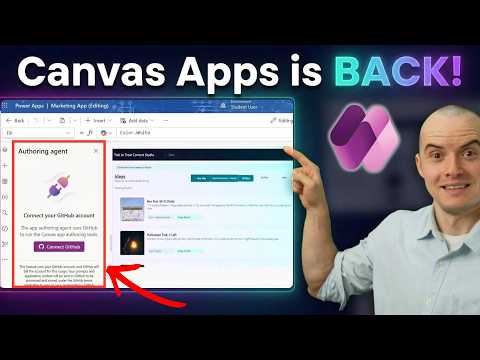
Power Apps agentic coauthoring gets a hands-on test
Solutions Architect, YouTuber, Team Lead
Sean Astrakhan tests an AI agent in a canvas app workflow, including SharePoint and Dataverse data, and flags where human edits remain necessary.
Key insights
- The video description says the agent builds a canvas app that makers can still edit directly.
- Astrakhan outlines a marketing app using SharePoint and Dataverse performance data.
- The described tests include a bulk update and joining Dataverse data.
- The publisher flags OData fields, loops, and a save issue as areas needing human attention.
- The video description says it covers enabling agentic coauthoring in the tenant and GitHub AI usage.
Sean Astrakhan of Untethered 365 recently published a 10-minute video about agentic coauthoring in Power Apps canvas apps. The video description says an AI agent can build an app while the maker retains the ability to edit it directly, and outlines tests involving SharePoint, Dataverse, a bulk update, and GitHub AI usage. The practical takeaway is that the workflow is presented as a collaboration between agent and maker, not as a replacement for hands-on app development.
What's new
The video focuses on an AI agent working on a canvas app and how that changes the authoring process. Rather than only offering suggestions, an agentic workflow is intended to take instructions and make changes to the app, while the maker can inspect and adjust the result. The publisher’s description frames this as a way to build an app from a prompt and then continue with direct edits.
The example app combines SharePoint data with Dataverse performance data for a marketing scenario. The listed tests include connecting GitHub and adding SharePoint data, making an initial build from one prompt, trying a bulk update, and joining Dataverse data. These are the scenarios the video says it covers; the supplied material does not include a transcript with the exact prompt wording or a step-by-step record of the screen demonstration.
The description also points to specific areas where the agent did not remove the need for human work: OData fields, loops, and a save issue. OData is a standard for querying and working with data services; in this case, the description identifies OData fields as one area requiring attention, without specifying the exact failure. It also says the presenter fixed a save bug by hand.
Why it matters
For makers, an agent that can create and change canvas app elements could reduce some manual setup, especially when starting from a clear prompt or making repetitive changes. The described SharePoint and Dataverse example is relevant to makers whose apps combine information from more than one business data source. The video’s emphasis on retaining direct editing is important: a maker can still intervene rather than treating the generated app as finished.
For developers and consultants, the scenarios offer a reason to evaluate where an agent can help in an existing build process, and where review remains necessary. A bulk update may sound like a natural task to delegate, but the publisher specifically says the agent added a loop that he removed. That makes the example useful as a reminder to assess the generated approach, not just whether it produces a visible result.
Admins may be interested in the video’s segment on enabling agentic coauthoring in the tenant. However, the supplied description does not identify the precise setting, prerequisites, licensing, rollout status, or tenant controls. It also mentions GitHub AI usage and cost, but gives no figures in the material provided here. Those details should not be inferred from the topic list alone.
How it works
The publisher describes an iterative process in which a maker asks the agent to create or change a canvas app, then checks the result and makes corrections. The video’s outline indicates the following progression:
- Turn on agentic coauthoring in the admin center, as covered in the video.
- Set up the marketing app scenario using SharePoint and Dataverse data.
- Connect GitHub and add SharePoint data, then make an initial app from a prompt.
- Test a bulk update and a Dataverse data join, reviewing the agent’s work and making manual corrections where needed.
The outline describes the stages, but the available source text does not specify the exact configuration steps, prompts, or implementation details. It does say that the presenter removed a loop the agent created and manually fixed a save issue. Those examples make human review part of the workflow shown in the description, rather than an optional extra.
The video also compares canvas apps with code apps in terms of choosing between AI assistance and direct clicks. The material does not provide enough detail to assess that comparison or to establish how the agent handles every app component. Its clearest practical signal is narrower: the agent can contribute to app creation, but the maker may need to correct its choices.
Limitations and open questions
The description identifies OData fields and loops as trouble spots, and notes a save bug that the presenter fixed manually. It does not explain the cause of the save problem, which OData fields were involved, or whether the same behavior occurs in other apps. These are observations from the publisher’s described test, not evidence that every user will encounter the same issues.
Important deployment questions remain unanswered in the supplied material. It does not state the licensing requirements, availability by region or tenant, supported agent configurations, or the exact steps admins need to enable the experience. The publisher says the video discusses GitHub AI usage and actual cost, but the description provides no amount or usage figures.
Because no transcript was supplied, this article relies on the video description and the accompanying background notes rather than claiming to reproduce every on-screen action. Readers deciding whether to try the workflow should verify current prerequisites and tenant settings through their own Power Apps environment. The available material supports a cautious conclusion: agentic authoring may help with app work, but inspection and manual correction remain part of the process.
Sources
- Sean Astrakhan’s video on agentic coauthoring in Power Apps canvas apps
- Sean Astrakhan’s publisher profile
Frequently asked questions
Can the maker still edit the app directly?
Yes. The video description says the AI agent builds the canvas app and the maker can still click in and fix things.
What data sources are part of the example?
The publisher describes a marketing app using SharePoint and Dataverse performance data.
What problems did the publisher flag?
The description mentions OData fields and loops as areas needing human attention, plus a save issue the presenter fixed manually.
What does agentic coauthoring require?
The video outline says it covers turning the feature on in the admin center. The supplied material does not specify licensing, prerequisites, or availability.