Introduction
Andrew Hess - MySPQuestions published a YouTube video that walks viewers through the new Copilot Studio experience, with a focus on creating and managing reusable skills. The video serves as a practical tutorial and a design argument for why skills should be treated as first-class artifacts when building agents. Consequently, the presentation mixes hands-on demonstrations with explanations about governance, reusability, and operational readiness. Viewers can follow a step-by-step build while also learning the broader conceptual benefits behind the approach.
What the Video Demonstrates
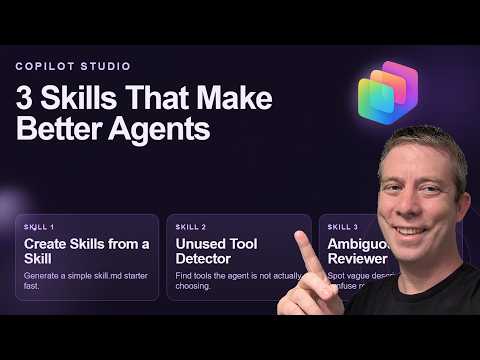
In the tutorial, Hess builds three concrete skills: a Skill Creator Skill, an Unused Tool Detector Skill, and an Ambiguous Review Skill, illustrating how skills encapsulate repeatable logic. He then shows how to attach those skills to an agent, test tool usage, and observe how modular skills make agent behavior explicit rather than hidden inside large prompts. The video includes time-stamped chapters to help viewers jump to the most relevant sections of the walkthrough. These chapters clarify where each demonstration begins and where the agent integration steps occur.
- 0:00 Introduction
- 0:40 Skill to Create Skills
- 2:38 Unused Tool Skill Detector
- 6:59 Ambiguous Reviewer Agent
- 12:49 Using the Tools in an Agent
Why Skills Matter in Copilot Studio
Hess emphasizes that skills are essentially markdown-based, reusable instructions that an agent can load on demand to perform a task. This modular approach reduces duplication and makes behavior easier to review, test, and update, which is especially important as agents grow beyond simple prototypes. Furthermore, skills align with enterprise needs by enabling clearer governance and a more maintainable codebook of agent actions. As a result, teams can scale agents with reduced risk and clearer ownership of specific capabilities.
At the same time, skills encourage makers to separate intent from implementation: instructions, tools, and knowledge each have their own place within the new builder experience. Hess demonstrates how encapsulated skills interact with the redesigned Agent Builder interface to make flows and tools visible and manageable. Importantly, he notes that skills improve collaboration because reviewers and auditors can read a skill file and understand an agent’s purpose without parsing complex prompt logic. This clarity supports better testing and safer deployments across business units.
Tradeoffs and Challenges
While skills bring clear benefits, they also introduce tradeoffs that teams must balance. For example, modular skills improve reuse and governance, but they add overhead in versioning, discovery, and orchestration that teams must manage. Additionally, breaking logic into many small skills can complicate debugging because behavior becomes distributed across multiple files and runtime calls. Therefore, makers must decide how granular skills should be and invest in conventions and tools for traceability and logging.
Hess also addresses specific functional challenges, such as detecting unused tools and identifying ambiguous instructions, which he solves with the Unused Tool Detector and Ambiguous Review skills. However, these solutions surface another tradeoff: automated checks help catch issues early, yet they require maintenance as tools and requirements evolve. Moreover, choosing models and prompt strategies remains an architectural decision; tradeoffs between cost, latency, and accuracy demand experimentation and telemetry to inform selection. In short, the path to robust agents requires operational work beyond authoring the initial skills.
Practical Tips and Best Practices
Throughout the video, Hess provides practical recommendations that align with Microsoft’s broader guidance on agent development, such as designing skills with clear purpose, rules, and examples. He suggests using consistent naming and documentation so teams can reuse skills across agents and audit them more easily. In addition, he underscores the need for telemetry, feedback loops, and safety checks to ensure agents behave reliably in production scenarios. These practices help teams balance rapid iteration with the governance required by enterprise deployments.
For teams that want to replicate the demonstrations, Hess points viewers to a companion repository where the sample skills are available for download and study. However, viewers should treat those samples as starting points and plan to adapt them to their own tooling, policies, and operational controls. Ultimately, the demonstration shows that skills can accelerate development, but success depends on disciplined versioning, testing, and governance. With those pieces in place, organizations can move from simple prototypes to more complex, multi-step agents that meet real business needs.
Conclusion
Andrew Hess’s walkthrough offers a clear, actionable view of how the new Copilot Studio experience centers on reusability and governance through skills. Consequently, teams gain faster authoring and clearer scaling paths, yet they must accept the additional work of organizing, testing, and monitoring modular behaviors. By highlighting both practical builds and the challenges involved, the video helps makers plan realistic steps for adopting skills in a production context. In the end, the tutorial balances encouragement with caution, showing that thoughtful structure and operational discipline are essential to creating reliable agents.
Related resources
Further reading and tooling references: