Copilot Studio: Autonomous Agent Flows
Software Development Redmond, Washington
Copilot Studio and Microsoft Copilot power Graebel to automate high‑volume orders with AI workflows and Power Platform
Key insights
- In the video, Graebel shows how it uses Copilot Studio to automate more than 50,000 service order requests a year, demonstrating autonomous multi-agent workflows as the main approach.
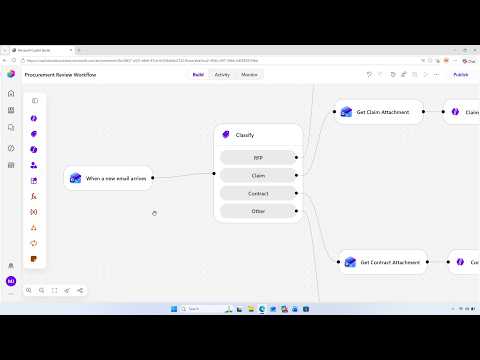
- Workflows coordinate agents: AI classification routes events to the right systems, while branching logic and specialist agents handle targeted tasks and decision paths.
- August 2026 updates move several multi-agent features to general availability and add evaluation automation APIs so teams can measure and operationalize workflows at scale.
- Copilot Studio now supports broader integration and orchestration across Microsoft Fabric, the Microsoft 365 Agents SDK, MCP-compliant tools, and open Agent-to-Agent (A2A) communication so agents can share context and pass work.
- Key benefits include stronger automation, simplified integrations, clearer governance with admin controls, and improved measurable outcomes through analytics and evaluations.
- Operational practice shown in the video: workflows act as glue — they listen for triggers, use inline testing and monitoring, and route logic end-to-end to turn manual processes into efficient autonomous operations.
Overview of the video and source
Microsoft published a YouTube video demonstrating how enterprise teams can build autonomous multi-agent workflows with its Copilot Studio platform, and this article summarizes the key points for editorial review. The video highlights a customer example from Graebel, which uses the platform to automate a large volume of service order requests. Consequently, the demonstration frames Copilot Studio as a practical orchestration layer rather than a simple single-agent tool.
How Graebel applies multi-agent workflows
In the video, Graebel shows how it routes and resolves over 50,000 service orders a year by chaining specialist agents inside workflows. First, classification agents label incoming requests and then route tasks to downstream specialist agents that handle scheduling, approvals, or data retrieval. In this way, Copilot Studio acts as the conduit that listens for triggers, shares context between agents, and runs structured business processes end-to-end.
Key capabilities highlighted in the August 2026 updates
Microsoft’s August 2026 update emphasizes that Copilot Studio moves beyond isolated assistants toward orchestrated agent systems that share context and invoke one another as workflow steps. The release also makes several multi-agent features generally available, including evaluation automation APIs and tighter integrations with Microsoft services, which help teams measure and operationalize agent outcomes at scale. Moreover, the platform supports invoking agents as workflow nodes, connecting to tools, and integrating governance rules to manage large deployments.
Technical tradeoffs and design choices
The move to multi-agent orchestration brings clear benefits but also notable tradeoffs. On one hand, splitting responsibility across agents improves modularity and lets teams optimize each agent for a specific role, which increases flexibility and can reduce the time needed to update a single component. On the other hand, this approach raises complexity: developers must manage state sharing, coordinate inter-agent communications, and ensure consistent data formats across workflow branches.
Operational challenges in production
Running many agents in coordinated workflows introduces operational burdens such as testing, monitoring, and governance overhead. For example, while inline testing and monitoring help detect regressions, they add runtime and evaluation costs that teams must balance against the benefits of continuous improvement. Security and privacy concerns also increase because more agents and integrations mean more places where sensitive data may traverse, so organizations must invest in access controls and auditing.
Governance and measurement considerations
Microsoft’s updates include admin rules for bulk installing agents and APIs for automated evaluation, which aim to address governance and scale issues. Consequently, teams gain tools to reassign ownerless agents, enforce consent, and track performance, and this helps reduce the risk of unmanaged agent sprawl. Nevertheless, adopting these governance features requires upfront policy work and ongoing oversight, which can slow down initial deployment even as it improves long-term reliability.
Benefits for enterprise automation
Despite the challenges, the video makes a clear case for the business value of orchestrated agent workflows, especially in high-volume, repeatable processes like Graebel’s service orders. By routing requests automatically and invoking specialist agents for targeted tasks, companies can reduce manual labor, accelerate processing times, and improve consistency. Additionally, integrating with tools such as Microsoft 365 Copilot and storage services allows workflows to create documents or update records as part of end-to-end automation.
Tradeoffs in integration and vendor choices
Integrating across the Microsoft ecosystem can streamline adoption but also introduces potential vendor lock-in and constraints tied to specific SDKs and connectors. While broad support for Microsoft Fabric, the Microsoft 365 Agents SDK, and agent-to-agent protocols improves interoperability within the ecosystem, organizations must weigh the long-term costs of binding core processes to a particular vendor stack. Alternatively, pursuing more open or custom integrations can preserve portability but demand greater engineering effort and operational investment.
Monitoring, evaluation, and continuous improvement
Finally, the video stresses the importance of evaluation automation APIs and inline testing as mechanisms to iterate agent behavior and workflow logic. Continuous monitoring lets teams detect drifts in classification accuracy or workflow performance, while automated evaluations provide measurable outcomes that link technical improvements to business value. However, achieving effective measurement requires well-defined metrics, sufficient telemetry, and a governance posture that balances transparency with cost.
Outlook and implications for adopters
Overall, the YouTube video from Microsoft presents Copilot Studio as an advancing platform that turns single-purpose assistants into collaborative agent systems for enterprise automation. For organizations considering this approach, the benefits include greater automation, modular development, and measurable outcomes, while the tradeoffs involve added complexity, governance demands, and integration choices. Accordingly, careful planning, investment in testing and monitoring, and clear policies will determine whether these multi-agent workflows deliver the expected operational gains.

Keywords
autonomous multi-agent workflows, Copilot Studio updates August 2026, multi-agent AI workflows, autonomous agent orchestration, Copilot Studio workflow automation, building autonomous agents, enterprise AI workflow tools, Copilot Studio August 2026 features