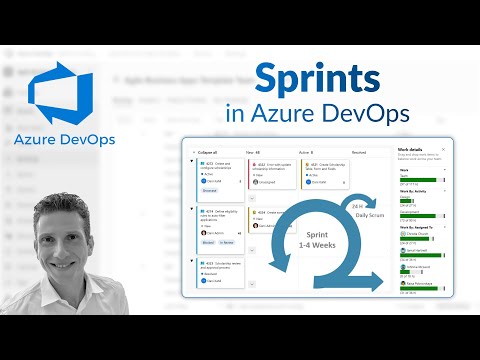
Azure DevOps: Sprint Planning Tips
Microsoft guide to Azure DevOps Sprints: set dates, add work items, manage capacity and track via Sprint Board
Key insights
- Sprint dates
Video shows how to set sprint start and end dates and map iterations so the team plans work in fixed timeboxes.
Set iteration paths for each sprint to keep backlogs and reports aligned. - Work Items
Demonstrates adding user stories, tasks, and bugs to a sprint and filling fields like effort and acceptance criteria.
Link work items to commits or pull requests to keep traceability clear. - Sprint Board
Explains using the sprint board to track progress with columns, swimlanes, and drag-and-drop updates.
Use board filters and the work details pane to focus on priority items and blockers. - Sprint capacity
Shows how to set individual and team capacity, record remaining hours, and balance workload across the sprint.
Adjust capacity to help predict velocity and avoid overcommitment. - GitHub and Pipelines
Highlights linking branches, commits, and pull requests to work items and viewing YAML pipeline status on boards for build visibility.
Improved pipeline dependency views help teams spot blocked deliveries sooner. - Security & Updates
Notes recent platform changes: stricter OAuth and HTTPS (SNI) requirements and previews for local Copilot integration to boost productivity.
Apply these updates to keep sprint workflows secure and compliant.
Overview of the video by Dani Kahil
In a clear, step-by-step YouTube tutorial, author Dani Kahil walks viewers through practical usage of Azure DevOps sprints. The video focuses on four core tasks: setting sprint dates, assigning work items to iterations, adjusting sprint capacity, and tracking progress on the Sprint Board. As a result, the tutorial suits teams that want hands-on guidance for daily sprint operations and immediate implementation tips.
Moreover, the author places these practical steps within the context of recent platform changes that emphasize deeper integration, improved pipeline visibility, and tighter security. Therefore, viewers not only learn the mechanics of sprints but also gain a sense of how platform updates might affect their workflows. Overall, the video aims to help teams use Azure Boards more effectively while weighing newer features against real-world needs.
Setting up sprints and managing work items
Kahil starts by demonstrating how to set sprint dates and organize iterations, showing where to update timeboxes so the team calendar matches delivery expectations. Then, he assigns user stories to specific iterations and explains how that mapping helps teams keep work aligned to timeboxed goals. Consequently, teams can reduce confusion about what belongs in each sprint and how work progresses from backlog to completion.
Next, the video covers adding and editing work items, highlighting practical details like fields to complete and the value of consistent naming and descriptions. This step improves traceability, but it can also introduce administrative overhead if teams over-customize fields or use too many policies. Therefore, teams must balance the need for detailed reporting with the desire to keep sprint entry quick and frictionless.
Capacity planning and the Sprint Board
Kahil then shifts to sprint capacity, demonstrating how to enter team and individual capacity to make realistic commitments. He shows how capacity numbers interact with assigned work and how the Sprint Board reflects those assignments in near real time, which helps teams spot overloads early. However, capacity tracking requires disciplined updates; otherwise, the data can mislead rather than guide decisions.
Finally, the tutorial walks through the Sprint Board and its swimlanes, highlighting how drag-and-drop updates and filtering help daily standups and status checks. While the board provides visibility, it can also create noise if too many automations or widgets are enabled at once. Thus, teams must choose which views and widgets truly add value, and they should prune excess features to keep the board actionable.
Integrations, pipelines, and visibility improvements
Beyond basic sprint operations, the video explains recent improvements that strengthen links between work items and code, such as tighter GitHub integration and improved display of build status for YAML pipelines. Such integrations help trace commits and pull requests back to sprint work, which improves accountability and speeds root-cause analysis when issues arise. On the other hand, universal linking increases surface area and can overwhelm teams with signals unless governance and naming conventions are defined.
Moreover, Kahil highlights enhanced pipeline visibility that makes dependencies and stage progress easier to track during a sprint delivery. This visibility helps teams identify pipeline bottlenecks earlier, but it also raises the bar for pipeline hygiene and testing so that dashboards present useful information. Therefore, teams must invest time to standardize pipelines and measure only the metrics that drive decisions.
Security, AI integrations, and compliance tradeoffs
The video also touches on security and compliance trends affecting sprint work, such as tightened rules around OAuth app registrations and mandatory HTTPS settings. These changes enhance protection for project data and pipelines, yet they may require administrative updates and planning to avoid disruption. Consequently, IT and security teams must coordinate closely with development teams when such platform-level changes roll out.
In addition, Kahil discusses the emerging preview of local server options that link AI tools like GitHub Copilot to Azure DevOps artifacts, which can speed routine tasks like filling work item details or suggesting test cases. While AI can boost productivity, it introduces tradeoffs in data residency and model governance that teams must weigh carefully. Thus, adopting AI features should follow a phased approach that balances productivity gains with privacy and compliance requirements.
Practical takeaways and next steps for teams
Overall, Dani Kahil’s video serves as a practical guide for teams that want to use Azure DevOps sprints effectively while understanding how platform updates influence daily work. Teams should start by implementing the basics—sprint dates, assignments, capacity, and board usage—then gradually enable integrations and widgets as processes stabilize. This staged approach reduces disruption and allows teams to measure the value of each added capability.
Furthermore, teams should plan for ongoing governance: agree on field standards, review pipeline hygiene, and coordinate with security for compliance changes. In summary, the video delivers a balanced, actionable walkthrough that clarifies both the mechanics of sprint work and the broader tradeoffs teams face when enabling integrations, security updates, and AI-assisted features.
Keywords
Azure DevOps sprints, Sprint planning Azure DevOps, Azure Boards sprints, Manage sprints Azure DevOps, Azure DevOps sprint retrospective, Agile sprints Azure DevOps, Create sprint Azure DevOps, Sprint burndown Azure DevOps