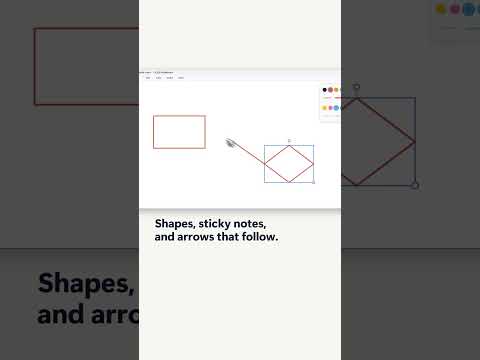
SQLBI Whiteboard: make arrows follow shapes
SQLBI Whiteboard connectors stay attached to shapes when you move them, helping presenters keep technical diagrams readable as they change.
Key insights
- Connectors attach to shapes and update their position when a shape moves.
- Use connectors for relationships in data-model diagrams, process flows, and technical sketches.
- SQLBI Whiteboard is described as a free, open-source Windows application.
- The available material does not state specific licensing, regional availability, or setup requirements.
SQLBI Whiteboard connectors stay attached to shapes when you move them, keeping diagram relationships visible without redrawing arrows. This is useful for Power BI and data professionals, educators, and presenters who revise technical diagrams while explaining them. SQLBI demonstrates the shape-and-arrow behavior in a short Whiteboard post.
What it does
A connector is an arrow or line linked to a shape, rather than a separate mark that happens to touch it. When the shape moves, the connector adjusts to preserve the visual relationship. That distinction matters when a diagram changes during a lesson or presentation: a table, process step, or system component can be repositioned while its connection remains in place.
The source material describes the feature in the context of SQLBI Whiteboard, a standalone whiteboard application. It identifies shapes, sticky notes, and arrows that follow shapes as the subject of the demonstration. The research notes describe connected arrows as useful for data-model diagrams, process flows, architecture sketches, and other technical explanations.
For a Power BI presenter, a connector can make a relationship between diagram objects easier to preserve while arranging the canvas. It does not change anything in a Power BI report or semantic model: the material describes a drawing behavior in SQLBI Whiteboard, not a Power BI modeling feature.
Who it is for and what you need
This technique is aimed at people who create or explain diagrams, including data professionals and technical educators. It may be relevant when a presenter builds a diagram live and expects to move objects as the explanation develops. The publisher describes SQLBI Whiteboard as free and open source.
The research notes describe it as a Windows application, but do not establish a specific Windows version requirement. They also do not state installation steps, hardware prerequisites, licensing conditions beyond the free and open-source description, or regional availability. No Microsoft licensing or tenant requirement is stated in the supplied material.
There is no official Microsoft source in the supplied source list for this application or connector behavior. The available evidence is SQLBI’s post and website, so readers should not treat the behavior as a Microsoft Whiteboard feature or as a change to Power BI itself.
How it works
The essential operation is to use a connector tool rather than drawing an independent arrow. The research notes describe a workflow in which the pointer indicates available connection locations on a shape, with a location highlighted before the connector is placed. The supplied post description does not provide a menu path or specific button name, so the exact labels in the application are not confirmed here.
- Place the shapes you want to relate on the whiteboard canvas.
- Choose the connector or arrow tool, if available in your application view.
- Point to the target shape and select a connection location shown by the interface.
- Draw the connector to the other shape, then move a shape to check that the connection follows.
The steps summarize the mechanics described in the research notes; they are not a verified menu-by-menu walkthrough. Because the post itself does not include a transcript, it does not establish the exact interaction sequence, control names, or whether every shape type behaves identically.
In practice, this is most helpful when the layout is still in flux. For example, moving a table box to create room for a label should not leave an arrow behind pointing at its old position. The value is continuity: viewers can keep reading the intended relationship as the diagram changes, instead of waiting while the presenter redraws separate lines.
Limitations and open questions
The source material is brief and does not document connector settings, keyboard shortcuts, supported shape types, or behavior when a connected shape is deleted. It also does not explain whether connectors can be styled or labeled, whether they attach at specific points or anywhere on a shape, or how to change an existing attachment.
The research notes include further technical and product details, but the supporting URLs for those claims are not present in the supplied source list. This article therefore leaves out claims about release versions, particular interface refinements, export options, autosave, live application capture, and comparisons with Microsoft Whiteboard. They are not necessary to understand the demonstrated behavior and cannot be independently linked here.
SQLBI Whiteboard’s connector behavior should also be distinguished from freehand arrows: the practical difference described is that a connected arrow remains associated with the shape as it moves. The material does not describe a way to convert existing freehand lines into connectors, nor does it say whether users can turn the behavior off.
If you need the exact controls for your installed version, check the application itself and its current documentation. The available material does not establish version-specific availability or rollout status, and it does not say that this is a preview feature.
Sources
Frequently asked questions
How do I make an arrow follow a shape in SQLBI Whiteboard?
Use a connector linked to the shape rather than an independent line. The supplied material does not give exact control names or a verified menu path.
Does SQLBI Whiteboard require a Power BI license?
No Power BI license requirement is stated. The material describes SQLBI Whiteboard as a standalone application, but does not give detailed licensing or installation requirements.
Is SQLBI Whiteboard available for Windows?
The research notes describe it as a Windows application. The supplied sources do not specify a Windows version requirement or availability by region.