Microsoft Intune: Automate Agents & Fix
Software Development Redmond, Washington
Microsoft Intune agents enable expert policy automation and remediation with Defender AI guidance and change review
Key insights
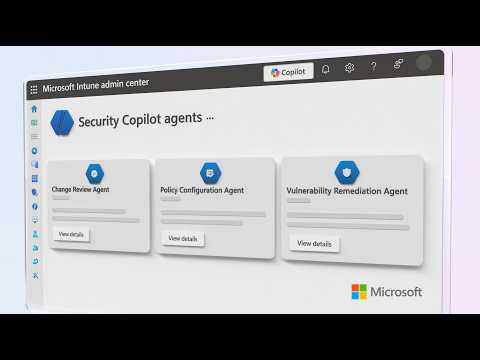
- Microsoft Intune agents: The video shows new AI-driven agents inside Intune that turn written compliance needs into policies and actionable steps.
They help automate policy creation, device checks, and troubleshooting so admins spend less time on routine tasks. - Policy Configuration Agent: Use natural language to draft and refine configuration profiles, then review AI suggestions with confidence scores before deploying.
The demo covers creating a knowledge source and generating a new policy draft from text inputs. - Change Review Agent: This agent evaluates admin change requests and flags risky or disruptive changes before they reach devices.
Admins can review agent recommendations, approve or block changes, and keep control over deployments. - Vulnerability Remediation Agent: The agent prioritizes vulnerabilities reported by Defender and turns them into Intune remediation steps you can schedule.
Note: the video states this agent is in limited public preview while others may be in public preview. - Admin control and governance: Agents supply confidence scores and require admin review before publishing, so IT stays in charge of final actions.
Windows AI settings let admins configure agent workspaces, connectors, and minimum policy values for safe rollout. - Practical benefits: Teams gain faster, proactive protection, reduced manual effort, and clearer audit trails for compliance.
The agents integrate with existing Intune features to scale security and simplify endpoint management.
Microsoft published a YouTube video that outlines a set of new capabilities for Microsoft Intune, and our newsroom reviewed the material to summarize the key points. The video, presented by Intune lead Jason Githens, demonstrates how AI-driven agents can turn written compliance requirements into actionable policies, draft and refine configuration profiles, and suggest remediation steps for vulnerabilities. Consequently, organizations may be able to move from reactive security work to more continuous, proactive protection while retaining administrative control. Importantly, the presenters note that some agents are still in preview, which affects rollout and adoption plans.
Overview of Intune Agents
The video introduces a trio of agents that aim to automate policy creation, change review, and vulnerability remediation within the Intune admin experience. In particular, the Policy Configuration Agent converts natural-language requirements into policy drafts while offering confidence scores to help admins judge suggested changes. Meanwhile, the Change Review Agent evaluates admin change requests and can block harmful scripts before they reach devices, and the Vulnerability Remediation Agent prioritizes findings and translates those into Intune remediation steps. Together, these agents integrate with Security Copilot to provide chat-based guidance and centralized recommendations.
How the Agents Operate
First, the workflow begins with writing or importing requirements into a knowledge source, after which the system generates policy drafts that admins can inspect and refine. The video shows how drafts surface suggested settings and the underlying reasoning, and it highlights confidence scores that indicate how strongly an agent recommends a change. In addition, the Change Review Agent can evaluate scripts and admin actions to stop risky changes, thereby reducing human error and malicious activity. Finally, the Vulnerability Remediation Agent prioritizes vulnerabilities, maps them to remediation actions in Intune, and allows teams to schedule ongoing fixes to reduce exposure.
Key Benefits and Integrations
The presenters emphasize efficiency gains, noting that automation reduces repetitive configuration work and frees IT staff for higher-value tasks. Moreover, integrating these agents with existing tools like Endpoint Privilege Management and remote help services helps maintain consistent controls across the device estate. Administrators also gain centralized visibility through an admin tasks view that consolidates approvals, elevation requests, and high-priority security items. Consequently, organizations can scale policy management while retaining oversight and auditability.
Tradeoffs: Automation Versus Control
While automation speeds processes, it also forces teams to balance convenience with control, and the video addresses this tradeoff directly. For example, relying too heavily on agent suggestions risks policy drift or inappropriate changes if agents misinterpret context, so organizations must maintain review gates and approval workflows. Additionally, preview features mean limited support and potential stability or compatibility issues, which requires staged testing before wide deployment. Therefore, administrators should weigh the benefits of faster remediation against the overhead of governance, logging, and human review.
Challenges and Operational Considerations
Adopting agentic AI raises operational challenges that the video highlights, such as the need for clear knowledge sources, accurate environment context, and well-defined escalation paths. Furthermore, false positives in vulnerability prioritization or change blocking can disrupt users and cause unnecessary remediation work if thresholds and confidence parameters are not tuned carefully. Security teams must also manage the security posture of agent workspaces and connectors to prevent supply-chain or account-level risks. Ultimately, successful adoption demands collaboration among security, endpoint, and operations teams to align controls and expectations.
Deployment, Preview Status, and Next Steps
The presenters clarify that the Change Review Agent and Policy Configuration Agent are available in public preview, while the Vulnerability Remediation Agent is in limited public preview, so organizations should plan pilots accordingly. In practice, IT teams should start with conservative policies, test agent recommendations in non-production rings, and track metrics such as time-to-remediate and false-positive rates. Training and clear runbooks help teams trust agent outputs and respond quickly when human intervention is needed. As the features evolve, admins will need to revisit settings like agent workspaces and connector permissions to keep operational risk low.
In summary, the YouTube presentation outlines promising steps toward automating device and security policy workflows in Microsoft Intune, but it also underscores the importance of governance, staged deployment, and ongoing tuning. Consequently, organizations that pilot these agents now can learn how to balance automation and control, refine confidence thresholds, and integrate agent workflows into broader security operations. Finally, IT teams should expect a steady rollout and plan for incremental adoption while measuring impact and maintaining oversight.

Keywords
Microsoft Intune agents, Intune policy automation, Automate Intune policy creation, Intune troubleshooting guide, Intune fix guidance, Intune agent deployment, Endpoint management with Intune, Intune automation best practices