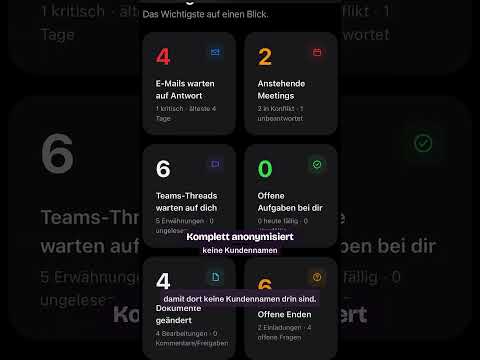
Copilot Agent builds a daily work dashboard
Daniel Rohregger’s short shows a Copilot agent turning Microsoft 365 signals into a daily work dashboard.
Key insights
- Daniel Rohregger (365 Checkpoint) published a short about a Copilot agent dashboard.
- The agent is described as gathering calendar, email, tasks, and work context.
- The goal is a daily view of urgent work, decisions, and items that can wait.
- Microsoft’s approach is presented as more proactive than a normal chat assistant.
Daniel Rohregger (365 Checkpoint) recently published a YouTube Short about a Copilot agent that builds a daily work dashboard. The short frames the idea as a move from a chat-first assistant to a more proactive work helper. The takeaway is simple: the agent is meant to collect signals from Microsoft 365 and turn them into a prioritized view of the day.
What's new
The short describes a Copilot agent that can pull together information from calendar items, email, tasks, priorities, deadlines, and open decisions. Rather than asking for each update separately, the agent is shown as producing one daily overview. The research notes also say Microsoft is positioning Copilot toward more proactive work support, not just question-and-answer chat.
That matters because the dashboard is not presented as a static report. It is meant to be built from current work context, so the output changes with meetings, messages, and tasks. Microsoft also describes template-style agents that can review calendar, email, and tasks each morning and create a prioritized day plan.
Why it matters
For admins and makers, the practical interest is in how Copilot can be used to reduce routine information gathering. For end users, the value is a single place to see what needs attention first. The notes say the agent may work across Microsoft 365 information and connected business data, depending on permissions and configuration.
The material also suggests a broader shift in daily work. Instead of checking several apps one by one, a user could start the day with an agent-generated summary of urgent items, upcoming decisions, and work that can wait. The short does not say this is broadly available, so rollout and licensing details remain unclear from the material provided.
How it works
The notes describe four steps in the basic flow:
- The agent gathers relevant signals from Microsoft 365 and connected work services.
- It reviews context such as meetings, deadlines, messages, and tasks.
- It ranks work into urgent items, decisions, and lower-priority topics.
- It suggests next actions or carries them out if the user has authorized that.
The notes also say Copilot’s start page is intended to be a central entry point. It combines chat and work content, shows recently used items, suggests actions, and helps users continue work they already started. Microsoft also mentions agent accounts and process memory in the research notes, which would let an agent work with controlled credentials and keep context across repeated runs.
Limitations and open questions
The YouTube Short description itself is very thin, so most of the detail comes from the background notes. The material does not confirm a release date, licensing model, or tenant-wide availability. It also does not say exactly which Microsoft 365 apps are required for the dashboard to work in practice.
Another open point is control. The notes say the agent can act only if it is authorized, but they do not spell out the admin controls, governance rules, or data boundaries. That means readers should treat the dashboard concept as an explained direction rather than a fully documented product setup.
Sources
Frequently asked questions
What is the main idea of the short?
It shows a Copilot agent that can turn Microsoft 365 signals into a daily work dashboard. The emphasis is on prioritizing what needs attention.
What information does the agent use?
The notes mention calendar items, email, tasks, priorities, deadlines, and open decisions. They also mention information from Microsoft 365 apps and connected business data.
Does the material explain licensing or availability?
No. The material does not confirm licensing, rollout status, or where the feature is available.
Can the agent act on its own?
The notes say it can suggest next actions and, if authorized, carry out certain tasks. The exact controls are not described.