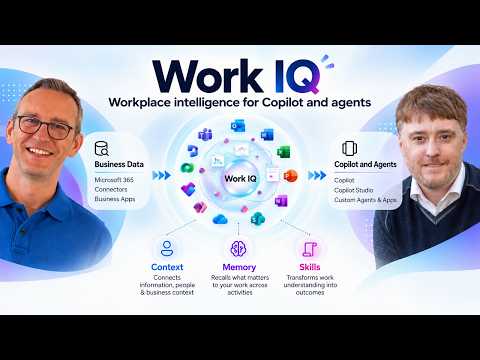
SharePoint MCP tools let agents act on SharePoint
Work IQ lets agents discover SharePoint operations and read or change content under a user's permissions.
Key insights
- Agents discover SharePoint operations and inspect their schemas at runtime through Work IQ.
- WorkIQ.Read supports read scenarios; WorkIQ.Act is needed for actions that change content.
- Operations run in the context of the signed-in user and their SharePoint permissions.
- A demonstrated prompt created a project tracking list, added fields and assigned a task.
Work IQ SharePoint MCP tools let agents discover SharePoint operations and read or change content through a single agent-oriented interface. They matter to developers building agents that need to work with SharePoint sites, lists, files or libraries, rather than conventional line-of-business applications. Microsoft 365 Developer demonstrates a prompt-driven example and discusses the tools' permissions and their distinction from Microsoft Graph.
What's new
SharePoint MCP tools expose SharePoint capabilities to agents through Work IQ, Microsoft's agent-facing interface described in the source material. MCP, or Model Context Protocol, provides the interface through which the agent discovers and uses available SharePoint operations. Instead of requiring developers to present a fixed catalog of SharePoint-specific tools to an agent, the agent can discover available paths and inspect the relevant schema at runtime.
That runtime discovery is central to the design. The agent can identify an operation for the requested task, learn what parameters it needs, and then call it. The official documentation describes a set of generic Work IQ tools, including , and , for finding an operation, inspecting its inputs and executing it. This keeps the interaction agent-oriented rather than requiring developers to wire each operation into a separate tool definition.
The capability covers both retrieval and action. The video’s example uses a natural-language request to create a SharePoint project tracking list, add fields and create an assigned task in the list. The description also names files, folders, lists, document libraries and collaboration workflows as scenarios. This is more than asking an agent to find or summarize content: with the appropriate scope, it can make changes.
Who it is for and what you need
The feature is aimed at developers building agents that work with SharePoint Online. In the demonstration, the agent receives a prompt, targets a SharePoint site and creates a list and item. The speaker contrasts this agent-focused approach with Microsoft Graph, which he describes as a fit for traditional line-of-business applications and other conventional app development.
Access depends on two OAuth scopes. WorkIQ.Read is for reading SharePoint information; WorkIQ.Act allows actions such as creating or changing content. The video stresses that operations run in the context of the current user. That means the agent’s request is subject to the user’s existing SharePoint permissions, rather than granting the agent independent access to everything in the tenant.
The research notes describe the SharePoint tools as being in public preview. The supplied material does not specify a required Microsoft 365 license, a region, a minimum plan, or a general rollout date. It also does not provide implementation steps for setting up an app registration or granting the scopes, so developers should consult the linked Microsoft documentation for setup details rather than assume the demo’s configuration applies to their environment.
How it works
The tool flow starts with the agent identifying the operation that matches a user’s request. It then obtains the operation’s schema, which describes the required inputs, before invoking the operation. Work IQ therefore lets the agent select a capability as needed instead of loading a long, static menu of SharePoint functions up front.
- Give the agent a SharePoint task, such as creating a list and adding a task item.
- Have it discover an appropriate SharePoint operation through Work IQ’s available paths.
- Inspect that operation’s schema to determine the required parameters and request structure.
- Call the operation with the supplied details. The action runs under the signed-in user’s access and the relevant scope.
In the demonstrated case, the resulting project tracker contains an Assigned To field, Notes and Due Date fields, plus a kickoff task assigned to the user. It illustrates a multi-step outcome from one prompt, not a guarantee that every request or site will produce the same result. The key design difference is that the agent discovers and invokes operations dynamically, while a traditional Graph integration uses a more fixed API contract that the application developer builds against.
Limitations and open questions
The feature is described as public preview in the research notes, so the available functionality and implementation details may change. The provided material does not establish which operations are available in every environment, nor does it specify all tenant policy controls, license requirements or consumption costs. Those details should be checked against Microsoft’s documentation before planning a production deployment.
Scope choice is a practical limit: read-only scenarios need the read scope, while actions that modify content require the act scope. The video’s presenter says a read token does not provide the ability to perform write operations. Even with the act scope, the operation remains constrained by the signed-in user’s SharePoint permissions.
Work IQ MCP is presented as a strong fit for agentic solutions, not as a replacement for Microsoft Graph in every application. The speakers characterize Graph as suitable for traditional applications and Work IQ as the direction for agents. The supplied material does not provide a detailed feature-by-feature comparison, performance benchmark or migration guide, so it does not establish that every SharePoint workload should move to Work IQ.
Sources
- Microsoft documentation for SharePoint tools in Work IQ
- Microsoft 365 Developer’s SharePoint MCP tools demonstration
Frequently asked questions
What can Work IQ SharePoint MCP tools do?
They let agents discover SharePoint operations and use them to read or act on content. The demonstrated task created a list, added fields and created an assigned item.
What permissions do SharePoint MCP tools require?
The material identifies WorkIQ.Read for reading and WorkIQ.Act for actions that change content. Operations run with the signed-in user's SharePoint permissions.
Are SharePoint MCP tools generally available?
The research notes describe the capability as being in public preview. The supplied material does not give a general availability date or specify regional availability.
Should agents use Work IQ or Microsoft Graph?
The speakers position Work IQ for agentic solutions and Microsoft Graph for traditional line-of-business applications. The material does not provide a detailed comparison for every workload.