- All of Microsoft
Microsoft 365 Copilot WorkIQ Persona
Microsoft MVPs, YouTube Creator youtube.com/giulianodeluca, International Speaker, Technical Architect
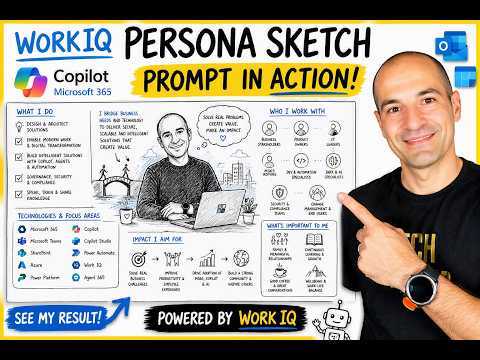
Solutions Architect demos Microsoft Copilot Work IQ prompt that crafts a persona sketch of work life in Teams and Azure
Key insights
- WorkIQ — The intelligence layer that connects your work signals to Copilot.
It uses your emails, chats, meetings, files and calendar to build context and a simple memory of your work style. - Microsoft 365 Copilot — An AI assistant powered by WorkIQ that acts as a workflow-aware collaborator.
The video demos how Copilot uses WorkIQ to generate a visual "persona sketch" of your daily work life. - Integration — WorkIQ pulls data from core Microsoft 365 sources like Outlook, Teams, OneDrive/SharePoint and your calendar.
This unified view helps Copilot surface relevant files, people and meeting context without extra input. - Context-aware — Copilot delivers personalized, relevant answers that match your projects and communication style.
It can suggest next steps, draft messages, and highlight items tied to recent meetings or documents. - Workflow automation — The persona sketch prompt shows how Copilot can summarize roles, collaborators and priorities visually and quickly.
You can run the prompt in Copilot chat or Teams and adapt it to hide names or sensitive details. - Security & compliance — WorkIQ respects enterprise controls and does not use customer data to train foundation models.
IT admins manage access with policies like DLP and sensitivity labels so Copilot stays within your organization's rules.
Video Snapshot: What Giuliano De Luca Demonstrates
In a recent YouTube video, Giuliano De Luca [MVP] demonstrates the WorkIQ Persona Sketch prompt for Microsoft 365 Copilot, showing how the tool can visualize a user’s work life as a photorealistic, cartoon whiteboard-style sketch. He frames the prompt as the PnP community’s "Prompt of the Week," crediting its authorship and curation by contributors in the community. Consequently, the clip mixes a practical walkthrough with a live reveal of his own persona sketch, and it highlights why the prompt has attracted attention on professional networks.
De Luca positions himself as a Solutions Architect who uses Microsoft 365, Azure, and Copilot daily, and therefore tests the prompt from an applied, practitioner viewpoint. His demonstration includes step-by-step guidance for running the prompt inside Copilot Chat and Teams, along with suggestions for adapting the output. Thus, the video serves both as a tutorial and a showcase of how WorkIQ maps workplace signals into expressive visuals.
How WorkIQ Grounds Copilot in Real Work Context
The video explains that WorkIQ is the intelligence layer that connects Copilot to the signals in your Microsoft 365 environment, such as emails, chats, meetings, files, calendars, and organizational structures. By combining those signals, WorkIQ builds a context-aware memory that helps Copilot generate replies and suggestions that align with your role, projects, and collaboration patterns. As a result, Copilot can produce outputs that look and read more like the user’s own voice and that relate to real, ongoing work.
De Luca describes how WorkIQ merges both structured and unstructured data to form a richer understanding of daily work, pointing to integrations with services like Microsoft Graph and Dataverse. Consequently, the system can surface relevant documents, recall recent meetings, and identify frequent collaborators without requiring the user to paste or summarize context manually. Therefore, the experience shifts from a generic chatbot interaction to a workflow-aware assistant that anticipates useful next steps.
Demo Walkthrough and the Persona Sketch Reveal
During the demo, De Luca reuses the community prompt on his tenant and walks viewers through the GitHub-sourced prompt, showing how to invoke it in Copilot Chat and in Teams. He times the execution, navigates the prompt parameters, and then reveals the generated persona sketch on screen to demonstrate the visual output. The live reveal is meant to illustrate not only the aesthetics but also how effectively WorkIQ’s contextual signals translate into descriptive, visual storytelling about a person’s work life.
Importantly, he also demonstrates the persona sketch dashboard that aggregates insights about role, collaborators, values, and priorities, and he discusses how the visual summary could support quick onboarding or team understanding. In doing so, De Luca emphasizes that the prompt can save time by visually summarizing complex work contexts, thereby helping stakeholders get aligned faster. At the same time, the video underscores that the quality of the result depends on the richness of the underlying data and the way the prompt is customized.
Privacy, Governance, and Tradeoffs
De Luca raises several practical tradeoffs, especially around personalization versus privacy, and he provides tips to avoid exposing colleague or customer names in the visual output. While WorkIQ enhances personalization by relying on internal signals, it must operate within security boundaries such as sensitivity labels and Data Loss Prevention policies to prevent improper disclosure. Therefore, organizations must balance the advantage of highly contextual assistance against the risk that visual summaries or prompts could surface sensitive identities or content.
Moreover, the video discusses governance mechanisms like the Copilot Control System that administrators can use to restrict or monitor agent behavior, highlighting a tension between IT control and end-user agility. Consequently, enterprise adoption depends on clear policy settings and thoughtful prompt design to limit exposure while preserving value. This balancing act becomes central when organizations decide how open to be with collaborative data and how tightly to enforce restrictions.
Practical Tips, Challenges, and Next Steps
Finally, De Luca offers pragmatic tips for teams that want to try the prompt: anonymize names, tweak wording to focus on roles rather than individuals, and test on demo tenants before wider rollout. He also points out challenges such as variability in output quality when data is sparse, the need to avoid hallucinations by validating key facts, and the importance of iterative prompt refinement. Thus, practical adoption calls for both technical safeguards and a measured user training plan.
Overall, the video by Giuliano De Luca [MVP] presents the WorkIQ Persona Sketch prompt as an accessible example of how Copilot can visualize workplace context, while simultaneously acknowledging the tradeoffs between personalization, security, and accuracy. For organizations considering this approach, the message is clear: the technology can accelerate insight and alignment, but success depends on careful governance, prompt hygiene, and ongoing validation of the results.

Keywords
Microsoft 365 Copilot, Copilot WorkIQ, WorkIQ persona sketch, persona sketch prompt, visualize work life, Microsoft Copilot prompts, prompt templates for Copilot, AI productivity visualization