Power Apps: choose Canvas, model-driven or code apps
Principal Program Manager at Microsoft Power CAT Team | Power Platform Content Creator
Match Canvas, model-driven, code or Copilot Managed Runtime apps to the task, data model, development skills and lifecycle you need.
Key insights
- Canvas apps start with the user experience and can use standard connectors without requiring Dataverse.
- Model-driven apps require Dataverse; the interface is generated from tables, relationships, forms and views.
- Code apps use JavaScript or TypeScript with a framework such as React and require Power Apps Premium for each user.
- Copilot Managed Runtime apps are separate from Power Apps and were described as public preview in the demonstration.
- Managed Runtime build use consumes Copilot Credits; users can run apps with Premium or Copilot Credits.
Power Apps offers Canvas, model-driven and code apps for different development needs, while Copilot Managed Runtime provides a separate prompt-led route to a governed application. Makers, developers and platform decision-makers should choose based on the job, data, user experience and lifecycle their organization needs. Reza Dorrani demonstrates these distinctions and compares governance and licensing in a YouTube video.
What's new
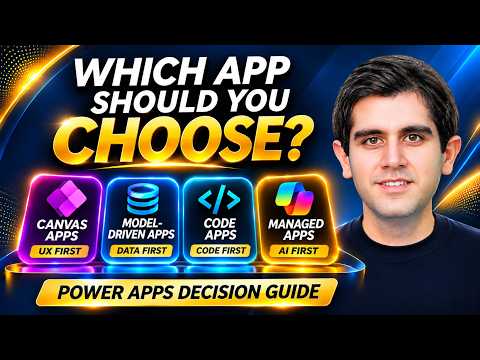
The important distinction is not simply how much code an app uses. Each approach starts from a different place: Canvas starts with the screen, model-driven apps start with the data, code apps start with the developer’s code, and Copilot Managed Runtime apps start with a prompt.
The first three are Power Apps app types. Copilot Managed Runtime is a separate Microsoft-managed runtime, not another Power Apps type. It follows the prompt-to-app experience previously called Vibe Power Apps, according to the demonstration, and has its own administration, lifecycle and licensing approach.
AI authoring is not limited to the prompt-first route. The demonstration describes a Canvas App MCP Server, model-driven generative pages and a Dataverse MCP server, and developer tooling for code apps. These are distinct ways to bring AI-assisted authoring into the broader app toolbox; they do not make the four options interchangeable.
Who it is for and what you need
Canvas suits makers who need a custom, task-focused interface and are prepared to arrange screens and define behavior with Power Fx. It can connect to data sources such as SharePoint, Dataverse and SQL, and the transcript says Dataverse is not required. The same app can run on the web, mobile, Teams and SharePoint.
Model-driven apps suit work organized around related records, role-based access or multi-stage processes. They require Dataverse: makers define tables, relationships, forms and views, and the application interface is generated from that model. The trade-off is less pixel-level design control than a Canvas app.
Code apps target professional developers who want to work in an IDE with JavaScript or TypeScript and a framework such as React. The demonstration also names Vue and other web frameworks, plus the Power Apps SDK and CLI. Code apps need to be enabled per environment, and users need Power Apps Premium to run them, regardless of connectors used.
Copilot Managed Runtime is aimed at makers or developers who want to describe an application and build from a prompt. The demonstration identifies it as public preview and says broader lifecycle processes are still evolving. It does not establish the licensing or availability requirements for every tenant, region or user; check current Microsoft documentation and your organization’s configuration before planning a deployment.
How it works
Use the task to select a starting point, then confirm the data and operational model. For a small focused activity, screen-first design may be appropriate; for a record-centric process, begin with the data structure; for a bespoke interface, begin with code; and for a prompt-led, quickly assembled application, consider Managed Runtime with its preview caveats.
- Describe the job. State the situation, the action users need to take and the outcome they need. This helps distinguish a task experience from a process, a custom interface or a speed-oriented build.
- Choose the design starting point. In Power Apps Studio, Canvas makers arrange screens and controls and wire behavior with Power Fx. For a model-driven app, configure Dataverse tables, relationships, forms and views so the interface follows the data model.
- Check the development approach. Code app developers work in an IDE and use the SDK and Power Apps CLI to connect their JavaScript or TypeScript project to the platform. For Managed Runtime, the demonstration describes prompt-based creation through Copilot experiences, or development using its SDK and CLI.
- Plan governance, lifecycle and cost before release. Canvas, model-driven and code apps use Power Platform controls and solution-based ALM, including pipelines or DevOps tooling. The transcript describes Managed Runtime as using a Git-based inner loop and sitting outside current solution-based ALM.
These choices affect who can build and support the app, not just the first release. The transcript says Canvas licensing depends on capabilities and connectors: standard features can use Microsoft 365 seeded rights, while premium connectors require Power Apps Premium for users running the app. Model-driven and code apps require Premium per user.
Managed Runtime has separate build and run considerations. Building with Copilot consumes Copilot Credits through usage-based billing. For app use, the transcript says users can have Power Apps Premium or the app can consume Copilot Credits as people launch and use it.
Limitations and open questions
The Managed Runtime status and lifecycle are the main planning cautions. The demonstration calls it public preview and says its broader lifecycle is evolving; organizations standardized on solutions and pipelines should account for its Git-based approach. Preview details can change, and the provided material does not specify a general rollout date or tenant-by-tenant availability.
The transcript gives a high-level comparison rather than a complete implementation guide. It does not provide a full connector-by-connector licensing analysis, detailed environment enablement steps for code apps, or exact Copilot Credit rates. Validate those particulars against current Microsoft guidance and your licensing arrangements.
Finally, an app may not complete a business process by itself. The demonstration separates apps as the user experience, workflows as automated process steps, and agents as sources of reasoning and action. Teams can combine these components where the job requires them, while choosing a lifecycle the organization can maintain after launch.
Sources
- Microsoft Learn: Get started with canvas apps
- Microsoft Learn: Model-driven apps overview
- Microsoft Learn: Code apps overview
- Microsoft Learn: Microsoft 365 managed apps
- Reza Dorrani’s app-type comparison and demonstration
Frequently asked questions
Which Power Apps type requires Dataverse?
Model-driven apps require Dataverse because their interface is generated from the data model. Canvas and code apps do not have a hard Dataverse requirement in the demonstration.
What license do users need for Power Apps code apps?
The demonstration says each user running a code app needs Power Apps Premium, regardless of the connectors used.
Is Copilot Managed Runtime generally available?
The demonstration describes Copilot Managed Runtime as public preview and says details can change. It does not establish current availability for every tenant or region.
How are Copilot Managed Runtime apps licensed?
Building with Copilot uses Copilot Credits through usage-based billing. For running an app, users can have Power Apps Premium or the app can consume Copilot Credits as they use it.