Agent Tip: Map Customer Complaints Fast
Microsoft expert demos Copilot agents mapping addresses on interactive maps using Microsoft cloud and Azure Maps
Key insights
-
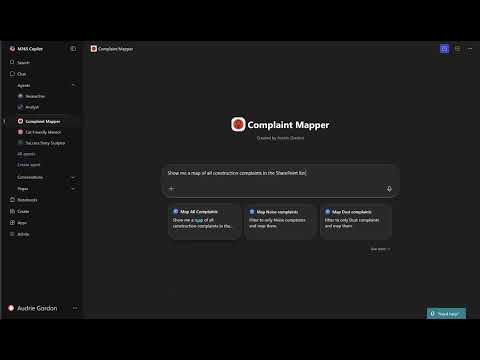
The video demo by Audrie shows how to map customer complaints on an interactive map using M365 Copilot agents.
It walks through extracting addresses from complaint text and plotting them visually for quick review. -
Agents perform data extraction to pull address fields, then use geocoding to convert those addresses into map points.
The process runs inside familiar Microsoft 365 apps so teams can stay in one workflow. -
Visual maps help teams spot hotspots and recurring issues faster, improving prioritization and response times.
Mapping also makes it easier to assign cases and track resolution trends over time. -
The feature integrates with tools like Teams, Outlook and Power Platform so you can share maps and agent insights without exports.
This tight Microsoft 365 integration cuts manual steps and keeps context with the original complaint. -
The video highlights governance matters: use Microsoft Purview and access controls to keep complaint data private and compliant.
Apply masking and role-based permissions before sharing maps outside the support team. -
Quick tips from the demo: prepare structured complaint fields, prompt agents to extract addresses, run address validation, and color-code points by severity.
Review agent results before broad sharing and iterate prompts to improve accuracy.
Overview of the video
In a concise how-to clip, Audrie Gordon presents Microsoft 365 Copilot #3 - Mapping Complaints, a practical demonstration focused on visualizing complaint locations. She shows how an agent can take address data and display it on an interactive map to reveal geographic patterns. Consequently, the video highlights a quick win for support teams that want to spot clusters and trends without heavy manual effort. Moreover, Gordon frames the technique as an example of what can be achieved with modern productivity agents.
What the demonstration shows
Gordon walks viewers through feeding address data into an agent and then rendering those addresses on a map, emphasizing simple, repeatable steps. She uses plain instructions and a familiar workflow so viewers can follow along and reproduce the result within their environment. In this way, the demonstration translates technical capabilities into a practical task that frontline staff can try quickly. Furthermore, the video emphasizes interactivity, where clicking or filtering can change the visual focus and aid analysis.
Technology behind the approach
The video implicitly relies on the capabilities of Microsoft 365 Copilot and other AI agents that parse and act on data inside familiar apps. These agents can categorize complaints, geocode addresses, and push results into embedded maps or dashboards, which reduces the need to export data to third-party tools. In addition, the new governance and data controls available through Microsoft Purview can help organizations manage privacy and compliance when automating such tasks. Thus, the approach combines automation, visualization, and governance to make complaint data more actionable.
Benefits and practical tradeoffs
Mapping complaints delivers clear benefits: teams can detect hot spots faster, prioritize responses, and allocate resources more efficiently. However, the technique also introduces tradeoffs that organizations must weigh carefully. For example, automated mapping improves speed but depends on data quality; incomplete or inconsistent addresses can produce misleading maps and poor decisions. Similarly, while integration within Microsoft tools reduces friction, it can lock teams into a single ecosystem and make cross-platform collaboration more complex.
Challenges and governance considerations
Address mapping raises several operational and ethical challenges, beginning with the accuracy of geocoding and the need to clean input data before visualization. Ambiguous entries, PO boxes, or missing locality fields often require human review, so teams must balance automation with manual validation. In addition, privacy concerns surface when complaint locations tie to identifiable individuals, so firms must implement data minimization and apply rigorous access controls. Finally, organizations must be mindful of API costs, latency, and scalability when maps are refreshed frequently or fed large datasets.
Practical guidance for adoption
To start safely, organizations should pilot mapping on a small, non-sensitive dataset and involve both business and compliance stakeholders from the outset. Next, they should create a simple data-cleaning step to standardize addresses and flag anomalies before geocoding. Furthermore, teams ought to set clear rules for retention and permissioning so that maps do not expose personal data to unauthorized users. Over time, monitoring the agent’s outputs and soliciting feedback from frontline staff will help tune rules and reduce false positives.
Balancing automation and human oversight
Automation speeds repeatable tasks, yet human judgment remains essential for contextual interpretation and exception handling. For instance, while an agent can cluster complaints, human agents must interpret whether clusters reflect product faults, regional service gaps, or reporting bias. Therefore, organizations should adopt a hybrid model in which agents perform routine processing and humans handle nuanced decisions. By doing so, teams capture the efficiency benefits of AI while preserving accountability and domain expertise.
Conclusion and next steps
Audrie Gordon’s video offers a compact, practical example of how visualizing complaints can drive better operational decisions when combined with AI agents and Microsoft tooling. While the method shows promise for faster insights, success depends on careful data handling, governance, and a clear plan for human review. Ultimately, teams that approach adoption thoughtfully can turn location-based complaint mapping into a reliable component of their customer-response workflow. Consequently, organizations should consider piloting the technique, refining data processes, and building oversight into any automated pipeline.
Keywords
mapping complaints for agents, complaint mapping techniques, customer complaint mapping, complaint categorization best practices, agent tips mapping complaints, mapping customer feedback to complaints, complaint workflow mapping, root cause analysis for complaints