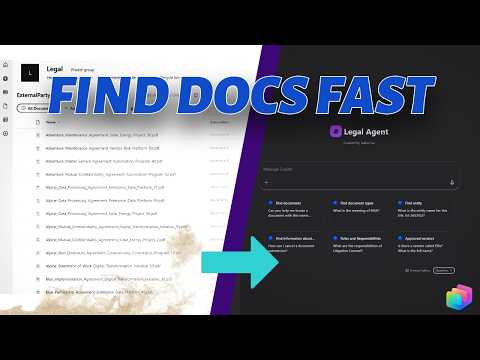
SharePoint Copilot: Legal Assistant Demo
Power Platforms Consultant | Content Creator
Turn SharePoint into an AI legal assistant with Copilot Studio and Power Platform, powered by Microsoft three sixty five
Key insights
- SharePoint grounding: Turn SharePoint into a single, searchable knowledge layer so users ask natural questions instead of digging through sites and libraries.
- Copilot Studio agent: Build an agent that uses tool-based retrieval and connectors to fetch documents and structured data, returning precise answers and direct links to the source.
- Key capabilities: Retrieve executed agreements, show document status, look up entity info like EIN, and explain terms such as MSA or SOW — all delivered in a conversational UI.
- Hallucination control: Ground answers with structured metadata and connectors so the agent cites source documents and avoids inventing details.
- Self-service legal operations: Empower legal and compliance teams to get fast, consistent answers, reduce repetitive work, and speed decision-making without manual searches.
- Tech stack: Uses Copilot Studio, SharePoint Online, Power Platform connectors, and Microsoft 365 — suited for legal teams, compliance groups, and enterprise knowledge managers.
Overview: A Practical Demo from Isabel Liu
In a recent YouTube video, author Isabel Liu demonstrates how to turn SharePoint into an AI-powered legal assistant using Copilot Studio. The walkthrough shows a working “Legal Agent” that answers common legal queries by retrieving grounded information from scattered files and lists. As a result, legal teams can move from manual searches to instant, structured answers with links back to the source. Consequently, the demo frames this approach as a shift from a document repository to an interactive knowledge system that supports self-service.
How the Demo Works
The video explains that the agent uses tool-based retrieval to find documents, check statuses, and look up entity data across SharePoint Online libraries. First, the system indexes or queries structured lists and document metadata, and then it uses connectors to fetch the exact file or field needed. Next, the agent composes concise, source-linked responses so users receive both an answer and a path to verify it. Therefore, the setup reduces repetitive questions and limits the need to open multiple sites or libraries.
Importantly, Liu shows several live examples, such as locating executed agreements, reporting document status, and answering entity questions like EIN lookup. These demonstrations highlight how the agent combines metadata queries with direct document retrieval to provide fast, actionable results. Also, the agent can explain acronyms such as MSA or SOW by pulling definitions from the same grounded sources. Consequently, teams gain consistency in answers while keeping citations intact for audit and compliance.
Technical Stack and Implementation
The video lists a compact tech stack that centers on Copilot Studio, SharePoint Online, Power Platform Connectors, and the wider Microsoft 365 ecosystem. Liu emphasizes that connectors turn SharePoint lists and libraries into a reliable grounding layer, while Copilot Studio orchestrates retrieval and response formatting. Moreover, the Power Platform helps bridge permissions and query logic so that results respect existing access controls. In short, the integration relies on native Microsoft tools to minimize custom infrastructure and leverage known enterprise security controls.
However, the video also notes practical setup steps such as mapping metadata fields, designing prompt templates, and testing edge cases to avoid failures. Liu demonstrates how structured fields reduce hallucinations because the agent references precise columns rather than free text alone. Consequently, teams must prepare their SharePoint environment with consistent metadata and clear ownership to ensure reliable results. Therefore, the implementation requires upfront effort to pay off in daily productivity gains.
Benefits and Use Cases
The approach suits legal and compliance teams that face repeated, predictable queries about documents and entities. For example, users can immediately ask where an executed agreement lives, what the status of a draft is, or which entity matches a contract line item. As a result, the agent saves time, reduces miscommunication, and centralizes knowledge that often lives in silos across an enterprise. Additionally, developers on the Power Platform can extend the agent to include approvals, status workflows, or notifications to make the system more proactive.
Furthermore, the demo shows how this pattern supports enterprise knowledge management beyond legal use, since the same grounding approach applies to HR, procurement, and compliance. Because the agent links answers to sources, audit trails remain intact and compliance teams can validate decisions. Thus, organizations can scale the pattern to many domains while keeping provenance and permissions clear. However, balancing scope with complexity is key to avoid overloading the initial rollout.
Tradeoffs and Challenges
While the demo highlights clear advantages, Liu also presents tradeoffs that teams must consider before adopting the approach. On one hand, grounded retrieval reduces hallucinations and improves trust, but on the other hand, it requires disciplined metadata and consistent content structures to work well. If SharePoint content is messy or permissions are inconsistent, the agent may return incomplete or misleading answers despite connector-based grounding. Consequently, organizations must invest in content hygiene and governance to make the agent reliable.
Additionally, the video discusses operational challenges such as connector limits, query latency, and maintenance of prompt templates as policies or contracts change. Teams must weigh the cost of ongoing curation against the time saved by automation, and they must design monitoring to catch errors early. Finally, governance and access control remain central, because even the best agent must respect confidentiality and legal privilege. Therefore, careful planning and staged rollouts help balance innovation with risk control.
Final Takeaway
Overall, Isabel Liu’s demo provides a pragmatic blueprint for converting SharePoint into an AI assistant that helps legal teams work faster and more consistently. By combining grounded retrieval, Copilot Studio, and Power Platform connectors, the solution focuses on accurate, source-linked answers rather than abstract chat. Nevertheless, success depends on clean data, clear governance, and ongoing maintenance to manage tradeoffs. In the end, organizations that prepare their content and controls can turn a passive repository into an active knowledge system that scales across teams and use cases.

Keywords
SharePoint AI legal assistant, Copilot Studio agent demo, SharePoint Copilot legal, AI legal assistant for SharePoint, Microsoft Copilot Studio SharePoint, Legal document automation SharePoint, SharePoint for law firms AI, Build Copilot agent SharePoint