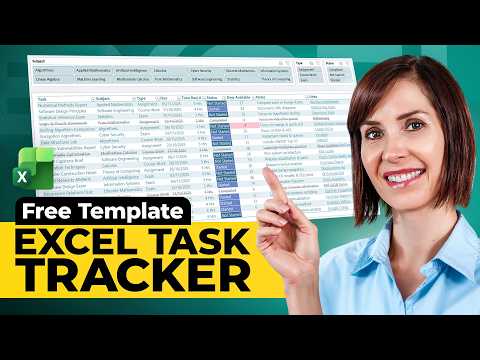
Excel: Free Template Replaces Task Apps
Microsoft Excel task tracker template replaces paid apps with free drop-downs color-coded status auto schedule no macros
Key insights
- Free Excel template provides a ready-made task tracker that can replace paid apps and runs without extra subscriptions.
It works offline and stores tasks, due dates, and status in one familiar spreadsheet. - Core features include drop-downs for Subject and Type, automatic Days Available, color-coded Status, and highlighted overdue tasks.
The template also shows a compact calendar-style schedule for quick overview. - Filters and views let you focus by subject, work type, or status to see what’s due next.
Use simple sorting and filtering to prioritize and plan daily work. - No macros — this specific template runs without macros, making it safer and easier to share.
Other Excel templates can add automation with macros when you need self-updating features. - Cost savings and familiarity make Excel a practical option: you avoid new subscriptions and work in a tool many people already know.
Templates are flexible so teams can tailor fields, colors, and rules to fit workflows. - Tutorials and example files speed setup and help users customize the tracker, and you can extend it with Gantt/timeline elements for larger projects.
Step-by-step guides reduce setup time and help preserve clarity as the tracker grows.
Mynda Treacy of MyOnlineTrainingHub, identified as an MVP, recently published a YouTube video that walks viewers through building a free Excel assignment and task tracker. In clear, step-by-step guidance, she shows how to set up drop-downs for subject and type, automatic calculations for days available, colour-coded Status markers and highlighted overdue tasks. Importantly, the template creates an automatic calendar-style schedule view without relying on macros, which makes it easier for many users to adopt and modify. Overall, the video positions the spreadsheet as a practical alternative to paid task-management apps.
What the template delivers
The tracker includes familiar project fields such as task description, due date, subject, type and status, all arranged in a clean, filterable table so users can focus quickly on what matters next. Additionally, it uses conditional formatting to colour-code status and overdue items, which improves visual scanning and reduces the time spent hunting for urgent tasks. The built-in schedule view provides a compact calendar-like snapshot that helps users plan across days without leaving the workbook. Consequently, these features combine to replicate many of the functions people expect from standalone task-management tools.
Moreover, the template supports filtering by subject or task type so students, freelancers or small teams can zero in on specific areas of work. It also calculates "Days Available" automatically, giving a quick sense of lead time for each assignment and helping prioritize tasks. Since the design avoids macros, it remains compatible with locked-down environments and many cloud-hosted spreadsheet viewers that limit macro execution. As a result, the template offers broad portability while retaining useful automation.
How it works without macros
Treacy relies on built-in Excel functions such as data validation for drop-downs, conditional formatting for visual cues and formulas to compute days remaining and to populate the schedule grid automatically. For example, lookup functions and date arithmetic feed the calendar view, while filters and structured tables keep the data tidy and responsive to changes. These formula-driven techniques reduce security friction because users do not need to enable macros, which can be blocked in some corporate or education environments. Consequently, the workbook stays simpler to share and easier to audit.
However, relying solely on formulas brings tradeoffs: while formulas are transparent and editable, complex formula logic can become harder to maintain as requirements grow. Furthermore, without macros, certain interactive behaviors—like one-click batch updates—are less straightforward to implement, requiring creative formula workarounds. Therefore, the no-macro approach favors portability and safety at the expense of some advanced automation. Still, for many users the balance favors accessibility and customization.
Benefits and tradeoffs
Using a spreadsheet template eliminates subscription costs and leverages a familiar interface, which can speed adoption for people already comfortable with Excel. At the same time, templates provide high flexibility: users can add fields, change rules or adapt the design to specific workflows without buying additional software. Nevertheless, that flexibility also requires a willingness to tinker; teams expecting turnkey, managed services may find the spreadsheet approach demands more manual setup and governance. Hence, the approach is best suited to small teams, students and solo professionals who value control and low cost.
On the other hand, commercial task-management apps often offer stronger collaboration features, mobile clients and integrations with other tools, which spreadsheets do not match out of the box. They also provide centralized syncing and conflict resolution that spreadsheets can struggle with when multiple people edit the same file. Thus, while the template can replace many paid features for single users or small groups, organizations with heavier collaboration needs may face scaling challenges. In short, there is a practical tradeoff between cost and collaborative power.
Practical challenges and best uses
One notable challenge is version control: when several people edit a file, tracking changes and merging updates can become messy unless users adopt disciplined workflows or use a shared cloud workbook with co-authoring. Additionally, mobile editing experiences can vary, and complex formula-driven displays may not render identically across all devices. Security and backup are further considerations because important assignments stored in a single file are vulnerable without proper storage policies. Consequently, teams should evaluate whether the spreadsheet will be a single source of truth or part of a broader process.
Despite these limitations, the template shines in contexts where offline access, low cost and fast customization trump deep integrations. Teachers assigning homework, freelancers juggling client deliverables and project leads coordinating small initiatives will likely find the design practical and efficient. Meanwhile, organizations that need audit trails, advanced permissions or extensive automation might move toward dedicated apps later. Therefore, users should view the template as a flexible starting point rather than an all-or-nothing replacement.
Tips for adoption and next steps
To adopt this approach effectively, start by customizing a copy of the template to match your naming conventions and priority rules, and then pilot it with one team or class to identify gaps. Also, establish simple versioning practices like dated file names or cloud-stored versions to reduce merge conflicts and data loss. If you need more automation, consider incremental upgrades such as protected sheets, helper tables or, where safe, carefully designed macros to automate repetitive tasks. These steps balance immediate benefits with longer-term maintainability.
In conclusion, Mynda Treacy’s video demonstrates how a thoughtfully designed Excel template can replicate many features of paid task-management apps while keeping costs low and control high. Still, teams must weigh collaboration limits and maintenance overhead against the financial and flexibility benefits. For many users, the template presents a strong, practical option that can scale modestly with clear governance and small, deliberate improvements. Ultimately, the choice depends on the size of the team, the need for integration and the appetite for ongoing customization.

Keywords
free Excel task management template, Excel task tracker free template, replace task management apps with Excel, free Excel project management template, Excel to-do list template free, free Excel Kanban template, Excel productivity template free, free Excel task planner template