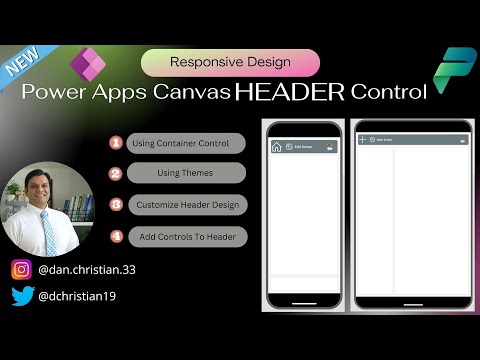
New Header Control Feature in Power Apps Canvas
Lead Infrastructure Engineer / Vice President | Microsoft MCT & MVP | Speaker & Blogger
Discover new features in the Power Apps Canvas New Header Control with this expert guide. Learn how to customize app details, navigation buttons and more.
A Comprehensive Overview of Power Apps Canvas New Header Control
A recently launched function in Power Apps, another creation from Microsoft, is the header control. This YouTube clip by "Daniel Christian [MVP]" demonstrates the innovative details, along with a complete guide on how this new feature works in the Power Apps canvas studio. Comprehend how to integrate it within a header container and the benefits that accompany it with this tutorial.
In the tutorial, the author begins with an introduction, proceeds to creating a new app, and enables the modern controls. With gradual progression, you are shown how to add the header control and its notable characteristics.
One of the key highlights of the video is the step-by-step demonstration on utilizing the header control and how it can replace the default header in Power Apps to create a more diverse appearance or function.
The author articulates that the control is responsive when used in a layout container, as it adapts to varying widths of the app when in use. This canvas component copies the style and conducts the original header and can substitute it.
Key properties like the main text displayed within the control center, the visibility of back button or LeftButtonImage, and enabling the RightButtonImage have been well explained. It also includes the width of the content within the control.
Furthermore, the author gets in-depth with the style properties – color of the header's fill and control center text, the width of the control, and theme configuration guidance.
The video also covers the event properties and explains what actions are executed when the left button, right button, or the back button are selected. The behavior and limitations of the header control are also addressed in the tutorial, giving a comprehensive understanding to the audience with regard to its utilization.
Another beneficial part is where the author explains how to conceal the default navigation bar in Power Apps player by sharing the app link with the query parameter hideNavBar. The need of this feature is clarified and the video ends with exploring the potential limitations of this canvas component.
Be sure to check out the full video for a closer look at all these functions at this link. Enjoy understanding and exploring what the new Power Apps canvas studio header control has to offer for your app customization!
General Say on Power Apps Canvas New Header Control
The recent addition of a new header control in Microsoft's Power Apps canvas studio has revolutionized the customization process for app interfaces. By providing a diverse look and behavior, it gives developers more freedom to design their apps according to their preferences. Various properties of this tool make it highly flexible and responsive. Equipped with this new functionality, developers can now explore an array of possibilities and enhance the user experience. Overall, this new feature defines a benchmark in app customization and development.
Learn about Power Apps Canvas New Header Control!
Hello Everyone,
Let's dive into an exciting topic! We will be discussing the freshly released Header Control feature now available in the Canvas studio of Microsoft's application creation service (Note: using 'Power Apps' keyword for the last time). This comes along with multiple exciting features that add more depth and flexibility to your app-building journey.
Our journey through this topic, which is neatly organized into sectioned nuggets, is as follows:
- Introduction of the new service
- Creating a new app
- Enabling modern controls
- Adding the header control
- Understand properties of the header control
- Add enhancements
- Adding Power Fx formula
- Wrapping up
Organized like that, it's easy to navigate directly to the specific information you need!
If you're using anything but Microsoft Edge, we recommend switching now. Edge ensures optimal use of the studio's latest features, not to mention great security and technical support.
An exciting introduction to our topic is the experimental Header Control. A versatile feature, it is usually employed to exhibit global app details such as the app or page name and navigation actions. With its varying width, it ensures a responsive experience when used with layout containers.
The new Canvas component maintains the look and feel of the default application creation service header. It comes equipped with many key properties, including:
- Text visibility
- Back button visibilty
- Left and right button image and visibility
- Content width
The exciting part? It also has style-related features such as color, header fill, width, and theme configuration.
The icing on the cake, however, are the event properties! They allow actions to be executed when any of the buttons are selected.
So, want to replace the default application creation service navigation bar? The canvas component allows you to hide it by sharing the app link, with the query parameter hideNavBar activated.
Despite being developed exclusively for use in canvas apps, the Header component can be utilized in custom pages too. However, it may not be necessary in pages embedded in model-driven apps.
In this era of constant development, your feedback is invaluable. Don't hesitate to share your thoughts and suggestions. Remember, there is always room for growth!
Interested to learn more? Check the 'additional resources' section for a deeper dive into this domain.
Happy explorations!
More links on about Power Apps Canvas New Header Control!
- Header control reference (experimental) - Power Platform
- Sep 1, 2022 — A Header is commonly used to display global app details (e.g., app name or page name) and navigation actions (e.g., navigation to home or back ...
- Header modern control in Power Apps
- Oct 11, 2023 — The Header control is a fundamental control that lets you design a user interface for a common app with ease. With minimal configuration ...
Keywords
Power Apps Canvas, Header Control, Canvas app development, New Header Control, Power Apps update, Power Apps features, Microsoft Power Apps, Customizing Canvas, Canvas Header Management, Power Apps header control feature