Passkeys: Phishing-Proof Until Malware
Product Manager @ Microsoft 👉 Sign up to Entra.News my weekly newsletter on all things Microsoft Entra | Creator of cmd.ms & idPowerToys.com
Passkeys phishing-resistant but malware can bypass Windows; patch, use Entra, CA and device trust to secure passwordless
Key insights
- Passkeys phishing‑resistant: Passkeys use public‑key cryptography and are origin‑bound, so a fake site cannot reuse credentials.
However, that protection depends on the browser enforcing origin checks—if malware skips the browser and calls native APIs, the guarantee weakens. - Pass‑the‑Passkey research: Researchers found Windows logged a full passkey assertion and Microsoft Entra ID accepted replays for up to ten minutes, letting someone with log access impersonate a user, even a Global Admin.
Microsoft patched this by truncating logs (CVE‑2026‑34348) and by having Entra validate authenticator signature counters, so applying updates matters. - Malware‑initiated attacks: Demonstrated threats include modal prompts that loop until a user approves, synced passkey export risks in password managers, and a browser‑hook "passkey detour" that redirects a valid assertion to an attacker session.
All of these require malware already running on the device. - Defensive controls: Because attacks assume endpoint compromise, prioritize device hardening: use privileged access workstations, Conditional Access that requires compliant devices and EDR, and follow the clean source principle to limit credential exposure.
- Microsoft Entra rollout: Microsoft will make passkeys the default in Entra ID starting September 1, 2026, and retire Microsoft‑provided SMS/voice on February 1, 2027, nudging users to register passkeys and move away from weaker channels.
- Practical takeaway: Passkeys are far better than passwords and resist remote phishing, but they are not a cure‑all—maintain strong endpoint security, update systems, and review your threat model as passkeys become the default.
Video summary and core findings
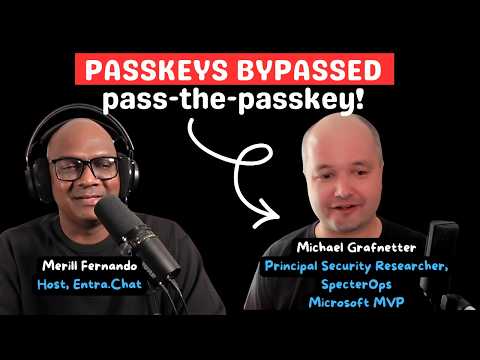
In a recent YouTube episode hosted by Merill Fernando, security researcher Michael Grafnetter outlines a set of vulnerabilities he calls Pass-the-Passkey, a family of attacks that weaken passkey protections when malware bypasses the browser. The episode includes three on-screen demonstrations that make the techniques easier to follow than audio alone, and it focuses on implementations in Windows, Microsoft Entra ID, browsers and password managers. Grafnetter shows how an attacker with local access can abuse logged assertions and replay them, and how modal prompts or browser hooks can trick users or redirect legitimate sign-ins.
How passkeys normally prevent phishing
Passkeys rely on public-key cryptography and strict origin binding, so a credential created for one site cannot be used by a different site, which is why they are widely described as phishing-resistant. Moreover, authenticators typically refuse to release credentials to a fake relying party, and browsers enforce the origin checks that make this strong in practice. However, Grafnetter and the episode emphasize that those protections depend on the browser acting as the gatekeeper, and the model changes if attackers skip that gate.
The Pass-the-Passkey research: vulnerabilities and patching
Grafnetter walked through a vulnerability chain he reported to Microsoft in which Windows wrote a full passkey assertion into the event log and Microsoft Entra ID would accept a replay of that assertion for up to ten minutes. As a result, any local or remote user who could read those logs could impersonate the original signer, including high-privilege accounts; Microsoft addressed part of the problem by truncating the logged message and by enforcing signature counters, leading to a recorded fix identified as CVE-2026-34348. Consequently, patching the platform and service mattered because the attack relied on an unpatched chain spanning OS logging and cloud acceptance.
Demonstrations and diverse attack techniques
Through demonstrations, Grafnetter showed three practical attack patterns: malware-initiated passkey phishing that repeatedly reappears until a user approves it, the export risk posed by synced passkeys stored in password managers, and a browser-hooking "passkey detour" that redirects a legitimate assertion into the attacker’s session. Each demo highlights a different tradeoff: for example, syncing increases user convenience but also expands the attack surface if password manager exports or cloud sync are abused. Likewise, a modal prompt that looks normal on the screen can be extremely convincing, which makes UX design a security consideration as well as a usability one.
Defensive strategies and tradeoffs
The consistent defensive thread in the episode is that most of these attacks require malware on the device, so defenders should prioritize reducing endpoint compromise. Therefore, Microsoft and Grafnetter point to device trust approaches such as privileged access workstations, Conditional Access policies that require compliant devices, endpoint detection and response (EDR), and the clean source principle as key mitigations. However, these controls bring tradeoffs: they increase complexity and cost, may affect user productivity, and require disciplined deployment and monitoring to be effective.
Microsoft’s policy shift and the broader outlook
Separately, Microsoft has started to make passkeys the default experience in Entra ID and plans policy changes that nudge or require users away from SMS and voice delivery in favor of cryptographic methods. This shift reduces reliance on weaker channels but also heightens the need to secure endpoints that hold or broker keys, because device-bound credentials are only as strong as the device itself. In short, passkeys remain far superior to passwords and phishable MFA, yet organizations must balance the gains in phishing resistance with investments in device security and identity hygiene.
What organizations should take away
First, adopt passkeys to reduce remote phishing risk, while simultaneously improving endpoint defenses to address threats that bypass the browser. Second, apply patches and configuration changes promptly because mitigations such as logging truncation and signature counter checks materially reduce attack windows. Finally, design conditional access and privileged access programs with realistic tradeoffs in mind: stronger device controls lower risk but demand operational effort and clear user communication.
Final assessment
Overall, the YouTube episode presented by Merill Fernando frames passkeys as the future but insists on honest threat modeling that includes device compromise. While the reported attacks do not negate passkeys’ benefits, they shift attention from remote phishing to local and remote malware scenarios, and they emphasize that the browser’s role in enforcing origin binding is essential. As organizations roll out passkeys more broadly, the dual focus should be on adopting cryptographic sign-in methods and on hardening the endpoints and services that support them.
Keywords
passkeys phishing-resistant, passkeys malware threat, passkeys security risks, passwordless authentication vulnerabilities, FIDO2 passkeys malware, phishing-resistant login methods, malware bypass browser passkeys, protecting passkeys from malware