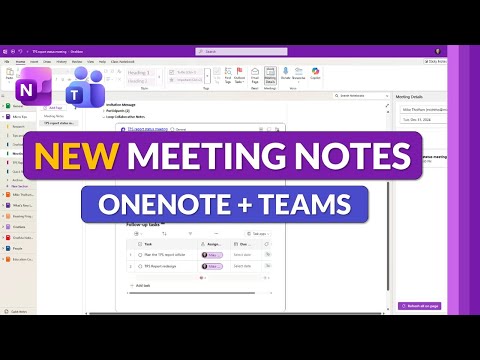
OneNote + Teams: Meeting Notes 2025
Principal Group Product Manager - Microsoft Education
OneNote and Microsoft Teams meeting notes with Meeting Details, Loop integration, faster syncing, AI summaries and tasks
Key insights
- OneNote + Teams Meeting Notes: The tutorial video explains the 2025 updates that link OneNote and Microsoft Teams for meeting note-taking.
It shows faster ways to add agendas, tasks, summaries and AI-powered notes during meetings. - Meeting Details pane and Loop integration: The Meeting Details pane now shows agendas, participants and live Loop notes inside OneNote and Teams.
Loop components update in real time so everyone can co-author notes and track tasks during the meeting. - Automatic syncing: Recordings, transcripts, agendas and attachments now sync and embed automatically into OneNote notebooks.
This removes manual file copying and keeps meeting content in one searchable place. - OneNote editing tools: New features include table cell merging, a “paste text only” option, and improved pen tools (Fountain, Brush, eyedropper, and handwriting straightening).
These make formatting, ink notes and clean copying easier during meetings and brainstorming. - Notes tab in Teams: Teams now includes a default Notes tab powered by OneNote in standard channels, replacing the older wiki.
Each channel gets a dedicated OneNote section and users can open notebooks or sections directly inside Teams for faster access. - Microsoft 365 LTI 1.3 and multitasking: Educators can access OneNote Class Notebook, assignments and Teams meetings inside learning platforms via LTI 1.3, reducing app switching.
Teams also lets meeting chat, notes and the AI Copilot pop out into separate windows for better multitasking and clearer meeting workflows.
Overview: Mike Tholfsen’s YouTube walkthrough
In a recent YouTube video, Microsoft education and productivity specialist Mike Tholfsen demonstrates the 2025 updates to OneNote and Microsoft Teams meeting notes. The video aims to show educators, students, and professionals how the new Meeting Details experience, improved syncing, and Loop integration work in practice. Consequently, viewers receive a step‑by‑step guide that highlights practical ways to add agendas, tasks, summaries, and AI‑powered notes during meetings. Overall, the presentation focuses on real workflows rather than marketing claims, and it frames the updates as tools to reduce friction across meeting preparation and follow‑up.
Key new features explained
First, the update modernizes the Meeting Details pane so that agendas, participants, recordings, and live Loop components appear in a unified view. Moreover, notes taken in OneNote now sync in real time with meeting content in Teams, which supports co‑authoring while a meeting is in progress. In addition, Microsoft added practical editing tools such as table cell merging, a “paste text only” option, and richer pen tools that include Fountain, Brush, and an ink eyedropper. These changes together are meant to streamline note taking and make it easier to capture context during fast meetings.
Integration and workflow improvements
The video emphasizes tighter integration between OneNote and Teams, noting that a default Notes tab now appears in standard channels and replaces the older wiki model. Consequently, each channel can have a dedicated OneNote section, and users can open specific sections directly within Teams to stay in context. Furthermore, meeting recordings, transcripts, agendas, and attachments are automatically embedded into notebooks so teams do not need to copy files manually. As a result, the consolidated approach reduces app switching and centralizes meeting artifacts for easier follow‑up.
Benefits, tradeoffs, and the role of AI
On the positive side, real‑time co‑authoring and embedded meeting artifacts support unified collaboration and faster handoffs. However, the greater dependence on cloud syncing and live components introduces tradeoffs: while teams gain convenience, they also rely more on stable connectivity and consistent permissions management. Additionally, the video highlights AI‑powered summaries and the ability to pop out chat, notes, and a Copilot pane, which can boost productivity but raise questions about accuracy, context, and how teams validate AI suggestions. Therefore, organizations should weigh the productivity gains against the need for review processes and clear data handling policies.
Education focus and technical considerations
Tholfsen points out that educators will benefit from the integration of Microsoft 365 LTI 1.3, which links OneNote Class Notebook, assignments, and Teams meetings inside learning management systems. Consequently, teachers and students can work inside a single environment while maintaining assignment and grading workflows in the LMS. Nevertheless, this convenience has tradeoffs related to institutional IT setup, such as configuring LTI links, syncing class lists, and ensuring privacy controls meet local requirements. Thus, schools should plan rollouts and testing carefully, and they should provide training to limit disruption during the academic term.
Challenges, practical tips, and recommendations
While the new features offer clear benefits, Tholfsen’s demo also reveals practical challenges, including version conflicts when multiple authors edit the same Loop component and the occasional delay in syncing larger meeting recordings. Therefore, teams should establish simple conventions for note ownership and naming, and they should use summary checkpoints to confirm AI outputs and meeting decisions. Finally, the video recommends a phased adoption: pilot the new workflow with a small team, gather feedback, and then expand usage once permissions, sync behavior, and training needs are resolved.
Conclusion
In summary, Mike Tholfsen’s YouTube video provides a clear, hands‑on look at how OneNote and Microsoft Teams meeting notes have evolved for 2025. The update emphasizes integration, live collaboration, and education‑centric features, and it delivers tools that can reduce friction in meeting preparation and follow‑up. Yet, as the walkthrough makes clear, organizations must balance convenience with governance and validation, particularly when relying on AI summaries and cloud syncing. Therefore, teams that combine careful planning with incremental rollouts will likely gain the most value from these changes.
Keywords
OneNote Teams meeting notes tutorial, OneNote new features, Teams meeting notes integration, How OneNote works with Teams, OneNote Teams sync, Meeting notes best practices, Collaborative meeting notes Microsoft 365, OneNote meeting templates for Teams