Copilot Managed Runtime: Build and deploy an app
Power Platform Cloud Solutions Architect @ Microsoft | Microsoft BizApps MVP 2023 | Power Platform | SharePoint | Teams
Microsoft 365 Copilot Cowork can turn a photo and a prompt into a deployed app, but running it requires separate runtime coverage.
Key insights
- The demonstrated app started with a photo of an airport departures board and a prompt in Copilot Cowork.
- Cowork published the app to Copilot Managed Runtime; the rebuild took 6 minutes 26 seconds.
- The departures were sample data, not live flight information.
- The demonstrated build used 108 Copilot credits; running the app needs runtime credits or a Power Apps Premium license.
- The Microsoft 365 admin center provides a list of managed apps and Copilot cost management.
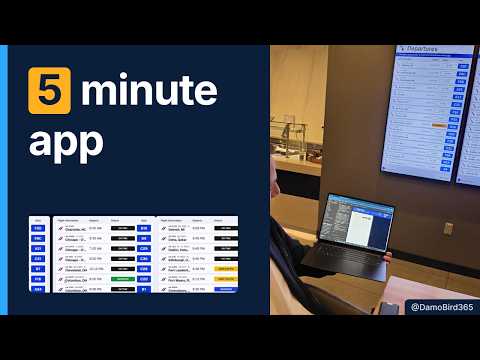
Copilot Cowork can use a photo and a natural-language prompt to create an app and publish it to Copilot Managed Runtime. This matters to makers and developers who want to turn a visual reference into a working prototype, and to admins responsible for app inventory and runtime spending. Damien Bird demonstrates the workflow by building an airport departures board app in Microsoft 365 Copilot.
What it does
Copilot Cowork takes an image and an instruction as the starting point for an application. In the example, the image was a Philadelphia airport departure board, and the prompt asked for a similar app that cycled through cities alphabetically every five seconds. A follow-up line specified Philadelphia as the airport.
Cowork planned the board, wrote code, checked the app for errors, and published it to Copilot Managed Runtime. The result had two side-by-side panels, status pills, code shares, and blue gate boxes. The listed flights were not live departures: the app used details from the photo and filled the list with about 50 realistic sample flights.
Managed Runtime is the hosting destination in this example. Bird says Microsoft hosts the apps and handles sign-in and sharing, regardless of which tool created them. He also describes a path for developers to clone an app locally, make changes in a coding app, and push the revised app back to production.
Who it is for and what you need
The workflow may interest makers who need a quick starting point and developers who may later extend the generated code. It also has an administrative side: managed apps appear in a tenant list in the Microsoft 365 admin center, and Copilot cost management shows the spending policy coverage.
The demonstration distinguishes building from running. Building in Cowork uses Copilot credits from the organization’s spending policy. Running an app requires Copilot credits or a Power Apps Premium license, according to Bird; users do not need a Copilot seat to run the app. The documentation links below are Microsoft’s references for managed apps and licensing, but the available material does not establish exact eligibility for every tenant or region.
A spending policy that covers Cowork alone may pay for the build without covering runtime use. In Bird’s example, the account had a policy for Cowork but not Managed Runtime, so the app displayed a notice that runtime credits were not available. Admins should check the policy scope rather than assume that a successful build also covers running the result.
How it works
- Provide a photo that shows the interface or real-world reference you want to reproduce.
- In Copilot Cowork, describe the app’s behavior in a prompt. Bird asked for a board like the attached image and specified that it should roll through cities from A to Z every five seconds.
- Add any context the image cannot supply. Bird added that he was at Philadelphia so the app would represent departures from that airport.
- Let Cowork plan, generate, check, and publish the app. The demonstration says each step can be opened for inspection; Bird did not manually press a separate publish control.
- Open the app from the user-facing managed apps site at managedapps.cloud.microsoft. The example’s app listing offered play and share actions.
- For administration, review managed apps and Copilot cost management in the Microsoft 365 admin center, including whether the spending policy covers Managed Runtime.
The first build was described as taking about five minutes, but Bird’s stopwatch rebuild reached 6 minutes 26 seconds. That rebuild used 108 Copilot credits. The publisher’s description converts that amount to about US$1.08, using a rate of 100 credits per dollar; treat that as the demonstrated calculation, not a general price guarantee.
Limitations and open questions
The example is a prototype, not a live airport information system. Its flights were sample data, and connecting a live flight feed would require further development. The transcript says a developer could clone the app, modify it in a coding app, and publish it back, but it does not provide the code, integration steps, or details of a flight-data source.
The five-minute framing is also not a service-level promise. The timed rebuild took more than six minutes, and no broader success rate or production-readiness assessment is provided. The material does not specify which tenant settings, regions, or other prerequisites are needed to use Cowork or Managed Runtime.
For administrators, the practical distinction is between an app being built and users being able to run it. The demonstration shows a runtime coverage warning and a policy that covers Cowork but not Managed Runtime. The linked Microsoft licensing documentation is the place to verify current requirements; the demonstration alone does not answer every licensing or rollout question.
Sources
- Microsoft documentation: manage apps
- Microsoft documentation: apps licensing FAQ
- Damien Bird’s Copilot Managed Runtime demonstration
Frequently asked questions
Does running an app built in Copilot Cowork require a Copilot license?
The demonstration says users do not need a Copilot seat to run the app. Running requires Copilot credits or a Power Apps Premium license.
Does a Cowork spending policy cover Copilot Managed Runtime?
Not necessarily. The example’s policy covered Cowork but not Managed Runtime, so the app could be built but lacked runtime coverage.
Can Copilot Cowork build an app from a photo?
The demonstrated workflow used a photo and a natural-language prompt to create and publish an app. The example produced a departure board with sample rather than live flight data.
Where can admins find apps built with Copilot Cowork?
The demonstration places managed apps in a list in the Microsoft 365 admin center and points admins to Copilot cost management for spending policy coverage.