
NEW Microsoft Teams Channel Experience
A Microsoft MVP 𝗁𝖾𝗅𝗉𝗂𝗇𝗀 develop careers, scale and 𝗀𝗋𝗈𝗐 businesses 𝖻𝗒 𝖾𝗆𝗉𝗈𝗐𝖾𝗋𝗂𝗇𝗀 everyone 𝗍𝗈 𝖺𝖼𝗁𝗂𝖾𝗏𝖾 𝗆𝗈𝗋𝖾 𝗐𝗂𝗍𝗁 𝖬𝗂𝖼𝗋𝗈𝗌𝗈𝖿𝗍 𝟥𝟨𝟧
In this video you will discover Microsoft Teams' new channel experience Join me as we explore features like the top-page compose box
Deep Dive into the NEW Microsoft Teams Channel Experience In this video you will discover Microsoft Teams' new channel experience Join me as we explore features like the top-page compose box, engaging post conversions, an improved information pane, and simplified badging. Streamline collaboration, focus, and productivity in your Teams.
- Explore Microsoft Teams' new channel experience
- Features include top-page compose box and engaging post conversions
- Improved information pane
- Simplified badging
- Streamline collaboration, focus, and productivity in your Teams
Start a post at the top of the channel: You can start a post or make an announcement at the top of any channel.
Reply to a post: You can easily go to a channel post, scroll to the bottom of the post and the most recent replies, and then select Reply.
View posts from top to bottom: The most recent post will be at the top of the channel, and you can scroll down to see the rest of the posts.
Quickly see the most recent replies to a post: When you go to any post, you'll see the three most recent replies. This feature makes it easy to quickly catch up on the latest activity.
See the full conversation: It's now easier to immerse yourself in a conversation without distractions. By selecting the link below a channel post, you'll be fully immersed in the conversation, with the most recent replies at the bottom.
Pop out a conversation: There are two ways to pop out a conversation into a separate window. This allows you to resize or reposition the window, enabling you to multitask effectively.
Please note that these features might undergo further changes before being released publicly
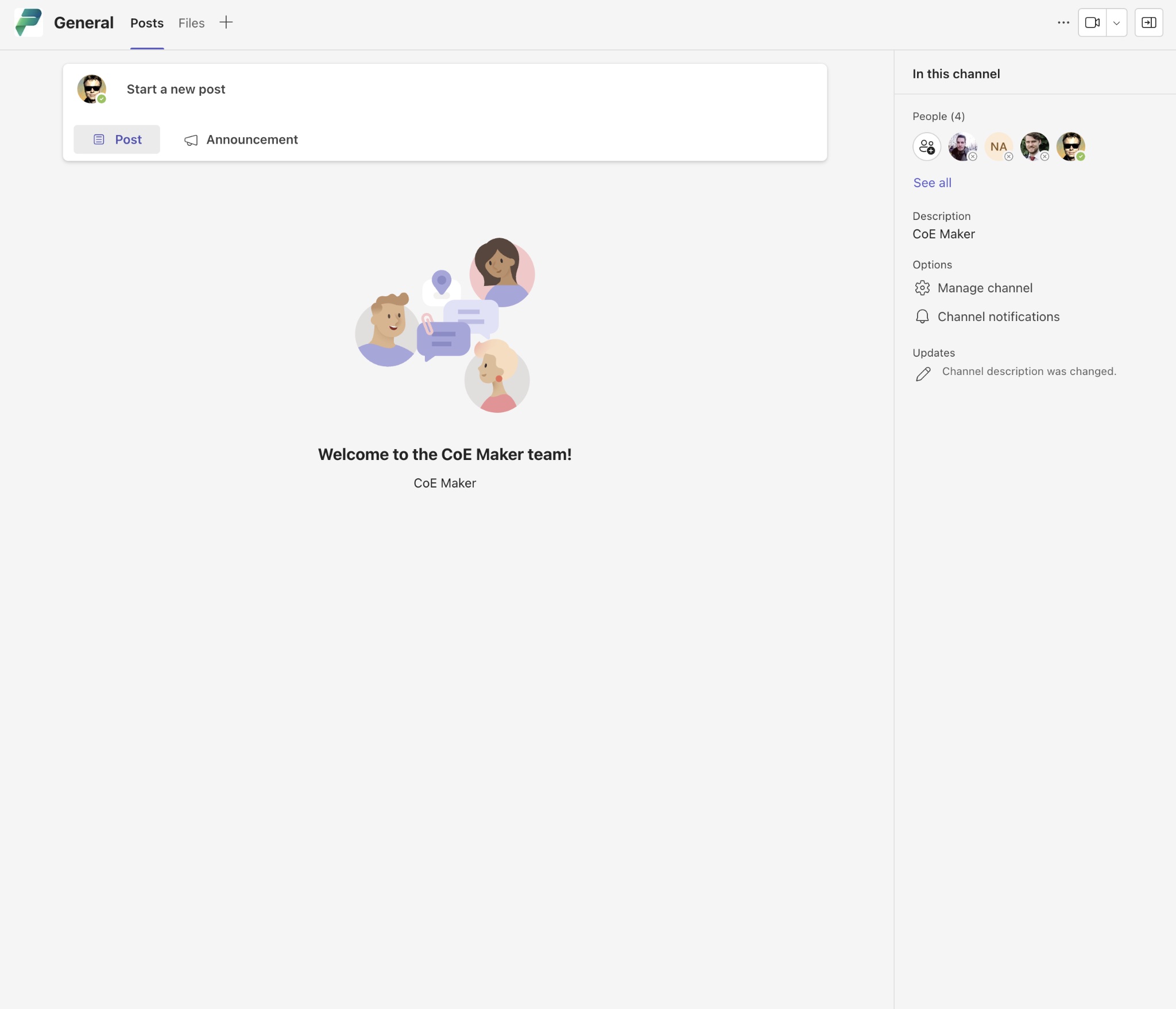
Discover the New Microsoft Teams Channel Experience
The new Microsoft Teams channel experience offers enhanced features that streamline collaboration, improve focus, and boost productivity for teams. Explore the top-page compose box for easier post creation, delve into engaging post conversions to make the most out of team communication, and utilize the improved information pane for better organization. Additionally, simplified badging makes it all more user-friendly.
Learn about Deep Dive into the NEW Microsoft Teams Channel Experience
Microsoft Teams has recently introduced a new channel experience that promises to streamline collaboration and boost productivity. In this video, you will learn about features such as the top-page compose box, engaging post conversions, an improved information pane and simplified badging. These features aim to help users focus and collaborate more effectively within Teams. Additionally, if you enjoyed this video then you may be interested in checking out my daily newsletter for more content on the subject.
More links on about Deep Dive into the NEW Microsoft Teams Channel Experience
- Session: Deep dive into Microsoft Teams Channels
- Microsoft Teams consist of three main channel categories: Standard, Private, and Shared. In this session, we will review the functionality and differences ...
- Episode 96 - Microsoft Teams New Channel Experience
- Up now on the #M365Voice: A deep-dive on the new Microsoft Teams channel experience ✓ User interface improvements ✓ Pinning channel posts ✓ Easy post &…
- Deep Dive into Microsoft Teams
- Feb 1, 2017 — At the core of Microsoft Teams is an Internet Relay Chat-style experience that provides persistent, threaded discussions. In other words, you ...
Keywords
Microsoft Teams Channel Experience, Collaboration, Focus, Productivity, Streamline, Badging