Teams
Jan 27, 2025 12:00 AM
Microsoft Teams Revolutionizes Meetings: Pop Out Any Element Effortlessly!
by HubSite 365 about Darrell Webster Modern Work Mentor
Modern Work Mentor, Change Consultant, Content Creator, Community Conduit.
Teams meetings, Pop-out features, Panelize meetings, Meeting chat, Presented content, Meeting notes, Resize windows
Key insights
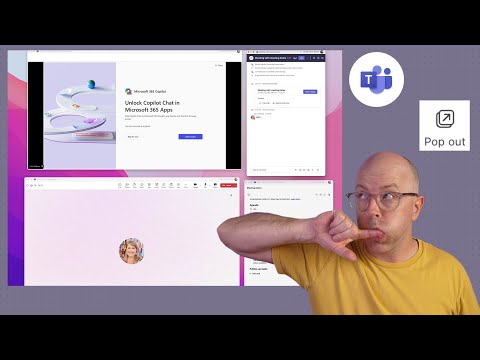
- Pop-Out Feature Overview: Microsoft Teams now allows users to detach specific panes like Chat, Notes, and Copilot from the main meeting window for a more organized workspace.
- Benefits of the Pop-Out Feature:
- Enhanced Multitasking: Users can engage in side conversations or take notes without disrupting the main meeting view.
- Improved Focus: Separating the Copilot pane helps maintain a clear and focused workspace by avoiding overlap with other content.
- Customized Layouts: Users can resize and position windows to optimize screen space according to their preferences.
- How to Utilize the Pop-Out Feature: During a meeting, click the pop-out icon on Chat, Notes, or Copilot panes to open them in separate windows for independent functionality.
- Availability: As of January 2025, this feature is available in Teams Public Preview or Microsoft 365 Targeted release programs on Windows or Mac. The Copilot pane requires a Microsoft 365 Copilot license.
- User Experience Enhancement: The pop-out feature offers greater flexibility and control over meeting interactions, improving engagement and productivity during virtual collaborations.
Introduction to the Pop-Out Feature in Microsoft Teams
Microsoft Teams has been a pivotal tool for virtual collaboration, and its evolution continues to enhance user experience. The latest innovation in this domain is the "pop-out" feature, which allows users to open various meeting components in separate windows. This advancement is designed to improve productivity and focus during meetings by enabling users to manage multiple elements simultaneously.Understanding the Pop-Out Feature
The pop-out functionality in Teams is a game-changer for multitasking. It enables users to detach specific panes such as Chat, Notes, and Copilot from the main meeting window. This separation creates a more organized workspace, allowing participants to monitor multiple aspects of a meeting without cluttering a single interface.- Enhanced Multitasking: By popping out the Chat pane, users can engage in side conversations or address queries without disrupting the main meeting view. Similarly, detaching the Notes pane allows for real-time note-taking alongside active participation in discussions.
- Improved Focus: Separating the Copilot pane enables users to interact with AI-driven assistance without overlapping other meeting content, thereby maintaining a clear and focused workspace.
- Customized Layouts: Users can resize and position the popped-out windows according to their preferences, optimizing their screen real estate and tailoring the meeting environment to their needs.
How to Use the Pop-Out Feature
Utilizing the pop-out feature in Teams meetings is straightforward. During a meeting, users can easily pop out panes by following these steps:- Chat Pane: Click on the pop-out icon located at the top of the Chat pane.
- Notes Pane: Select the pop-out icon at the top of the Notes pane to open it in a separate window.
- Copilot Pane: For users with a Microsoft 365 Copilot license, the Copilot pane can be popped out by clicking the corresponding icon.
Availability and Requirements
As of January 2025, the pop-out feature for Chat, Notes, and Copilot panes is available to users enrolled in the Teams Public Preview or Microsoft 365 Targeted release programs. This functionality is accessible through the new Teams client on Windows or Mac. However, it's important to note that the Copilot pane is exclusive to users with a Microsoft 365 Copilot license within the Worldwide environment. Organizations may need to enable preview features through their IT administrators to access this functionality.Challenges and Considerations
While the pop-out feature offers numerous benefits, there are challenges and considerations to keep in mind. Balancing multiple windows can be overwhelming for some users, particularly those who are not accustomed to multitasking in this manner. Additionally, organizations must ensure that their IT infrastructure supports the necessary updates and licenses required for this feature. Moreover, there is a tradeoff between enhanced multitasking and potential distractions. Users must find a balance that allows them to leverage the pop-out feature effectively without becoming overwhelmed by too many open windows.Conclusion
The introduction of the pop-out feature in Microsoft Teams meetings marks a significant enhancement in user experience. By allowing users to separate critical meeting components into individual windows, Teams empowers participants to tailor their workspace, thereby improving engagement and productivity during virtual collaborations. As organizations continue to adapt to remote work environments, features like these will play a crucial role in facilitating effective communication and collaboration.

Keywords
Teams meetings new features pop-out functionality Microsoft Teams updates virtual collaboration tools enhanced meeting experience productivity tools video conferencing software
HubSite 365 Apps