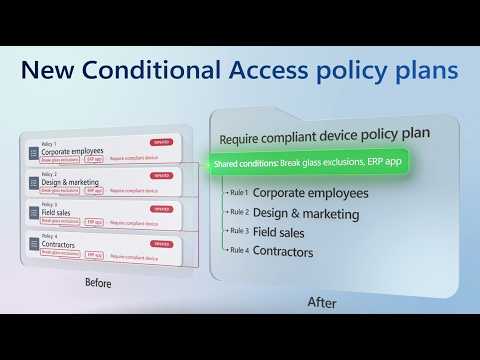
Microsoft Entra Conditional Access policy plans
Software Development Redmond, Washington
Conditional Access policy plans let identity admins group related rules and define their shared scope once.
Key insights
- Plans define shared identities, resources, and conditions once for their rules to inherit.
- Each rule adds its own conditions and grant or session controls.
- A headquarters example uses shared user-group assignments for MFA and compliant-device rules.
- The migration tool previews shared conditions and maps selected policies into rules.
- Existing policies remain enforced after migration until admins cut over.
Microsoft Entra Conditional Access policy plans group related access requirements under a shared objective, so administrators can define common assignments and conditions once instead of repeating them in separate policies. They are intended for identity and security admins managing overlapping controls, as well as architects organizing larger policy sets. Microsoft demonstrates creating plans, adding rules, and migrating existing policies in a YouTube walkthrough.
What's new
Traditional Conditional Access management presents policies as individual entries. As policy collections grow, administrators may rely on naming prefixes to understand which policies protect the same people or resources. Policy plans add a layer of organization above rules, grouping controls around a security objective or a persona such as employees, guests, or administrators.
Plan-level settings can include identities, resources and applications, user actions, authentication context, and shared conditions such as risk, devices, network locations, and client app types. Rules inherit the plan’s shared attributes, then add the specific conditions and grant or session controls needed for an access requirement. Plans also have a name, description, owner, and tags.
This structure is intended to reduce repeated configuration and make the relationship among controls easier to understand. It does not turn multiple rules into one universal decision: the demonstration presents each rule as an individual access requirement inside a common plan.
Who it is for and what you need
The feature is aimed at Microsoft Entra identity and security administrators who manage Conditional Access, and architects planning how to organize or migrate policies. It can also organize access controls for AI agent activity, as shown in a plan that applies a shared high-agent-risk condition to different rules.
The walkthrough does not state a required license, administrator role, region, or rollout stage. Although the accompanying research notes describe the capability as preview, no official feature documentation URL is supplied in the source list to verify that status or licensing. Check current Microsoft Entra guidance before planning a production rollout.
The Microsoft Entra admin center is the demonstrated management surface. The new Policy plans view appears under Conditional Access alongside the existing policy list. The walkthrough also shows a rule starting in Report-only mode, but does not establish that all plan scenarios or tenants have the same options.
How it works
To create a plan, an administrator sets its objective and selects the shared scope. The example plan targets headquarters users and excludes a break-glass group, so the rules in that plan inherit those assignments without repeating them. The administrator then adds rules for particular controls.
- In the Microsoft Entra admin center, open Conditional Access and choose the Policy plans view.
- Create a plan, add a name and description, and optionally add a tag. The demonstration shows the creator’s name filled in as owner.
- Set shared identities, resources, or conditions. For the headquarters example, select the HQ - All Users group and exclude Breakglass HQ.
- Create a rule with its own name and state. The example leaves the first rule in Report-only mode, assigns All resources, and requires Phishing-resistant MFA through authentication strength.
- Add another rule to the same plan. The compliant-device example assigns All resources and requires the device to be marked as compliant, while inheriting the plan’s user scope.
A plan can also be built from a template. In the agent example, high agent risk is a shared condition, while separate rules block high-risk agent users and high-risk autonomous agents. The latter rule also targets agent identities and uses a block control.
For existing policies, filter the policy list, select related entries, and choose the migration option. The preview identifies shared conditions and shows how the selected policies map to rules, including settings such as identities, locations, grant controls, and session controls. Review the proposed plan before creating it.
Limitations and open questions
Migration does not immediately replace or disable the selected policies. The demonstration says the original policies remain untouched and continue to be enforced according to their policy state. After reviewing and enforcing the new plan, administrators can turn off or delete the original policies as part of a planned cutover.
That overlap matters: migrating policies is not itself the moment to remove existing enforcement. The walkthrough does not provide a detailed testing procedure, licensing guidance, or a full explanation of how every combination of plan rules and standalone policies is evaluated. It also does not specify availability or preview status, so administrators should verify current official guidance before relying on the feature.
Shared scope makes rules easier to maintain, but also means a change to a plan-level assignment can affect its rules. Review inclusions and exclusions carefully, especially the break-glass exclusion in the example, before enabling a plan or changing its scope.
Sources
Frequently asked questions
How do Microsoft Entra Conditional Access policy plans work?
A plan holds shared assignments and conditions, and its rules inherit those settings. Each rule adds its own conditions and grant or session controls.
Can I migrate existing Conditional Access policies into a plan?
Yes. The migration experience previews shared conditions and how selected policies map to rules. The original policies remain in place and enforced until you manage the cutover.
What license do Conditional Access policy plans require?
The supplied demonstration does not state a license requirement. Check current Microsoft Entra documentation for licensing details.
Where do I find Conditional Access policy plans?
In the Microsoft Entra admin center, open Conditional Access and select the Policy plans view, which appears alongside the existing policy list.