Microsoft Sovereign Cloud Adds a Control Panel
Microsoft MVP | Author | Speaker | YouTuber
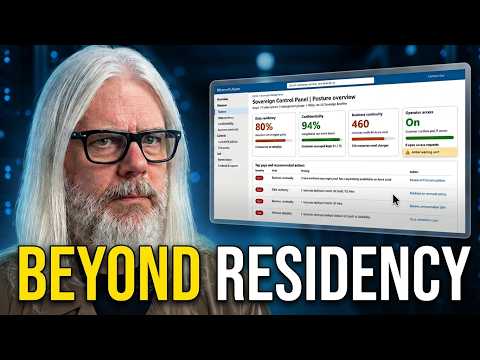
Peter Rising’s walkthrough introduces Microsoft’s Sovereign Control Panel and its role in helping administrators review their environment’s sovereignty posture.
Key insights
- Peter Rising’s session describes a technical walkthrough of the Microsoft Sovereign Control Panel.
- The control panel is presented as a way to get a clearer overview of an environment’s sovereignty posture.
- The session is aimed at IT administrators and compliance officers working with regulated environments.
- The description highlights data residency and governance, but does not provide detailed setup instructions.
Peter Rising [MVP] recently published a session about Microsoft Sovereign Cloud and the Microsoft Sovereign Control Panel. The description says the session includes a technical walkthrough and an overview of current capabilities for understanding an environment’s sovereignty posture. The takeaway for administrators is that the control panel is presented as a way to make sovereignty status more visible, although the published description does not specify its detailed controls, setup steps, or availability.
What's new
The session focuses on the Microsoft Sovereign Control Panel and how it relates to managing a sovereign cloud environment. The description frames the panel around a “posture overview”: a clearer view of an environment’s position against sovereignty requirements. It also says the session covers current capabilities and the functionality behind Microsoft Sovereign Cloud.
That is a useful distinction for readers assessing the announcement. The description supports the claim that the tool is intended to help users understand their environment, but it does not enumerate particular dashboard fields, settings, alerts, or remediation actions. Nor does it identify which services, regions, or subscriptions are covered. The material therefore signals a management and visibility focus rather than documenting a complete feature specification.
Research notes accompanying the source place sovereignty in a broader frame than the physical location of data alone, describing considerations such as access, operations, dependencies, resilience, and local or offline operation. Those notes also describe public-cloud, private-cloud, and partner-ecosystem approaches, and identify Azure Local in relation to private cloud. However, the published session description itself does not detail these options, so administrators should treat that broader context separately from the specific claims made about the panel.
Why it matters
The stated audience is IT administrators and compliance officers who need to understand how sovereignty tools operate in regulated environments. A posture overview could help those teams see the state of an environment more clearly while they consider data residency and governance requirements. The description presents this as a way to navigate those requirements, not as proof that an environment is compliant.
For administrators, the practical question is whether the control panel exposes information they already collect across separate tools in a more useful view. The available material does not explain the data sources behind the overview or say whether it recommends, enforces, or merely reports controls. Those distinctions matter: visibility can support assessment, but the description does not establish that the panel changes configurations or closes compliance gaps automatically.
For compliance staff, the topic may be relevant because the session specifically addresses strict data residency requirements and governance. For end users, no direct change to everyday work is described. The source does not mention licensing, prerequisites, rollout timing, tenant eligibility, or a preview stage, so teams cannot use it to determine whether they can access the panel now or what procurement or deployment work it might require.
How it works
At the level documented in the description, the workflow is intentionally high-level: use the control panel to get a clearer posture overview, then use that understanding to assess sovereignty and governance needs. Peter Rising says the session demonstrates how the tool operates, but the text supplied with the session does not spell out the on-screen sequence. It would be misleading to turn this into a click-by-click guide without the demonstrated steps.
- Review the sovereignty posture. The control panel is described as providing an overview of the environment’s current position.
- Relate that view to requirements. The session connects the capabilities to data residency and regulated-environment compliance needs.
- Use the information in governance work. The description says understanding the features can help organizations navigate residency and implement governance strategies; it does not specify particular actions or controls.
This is enough to identify the intended purpose, but not enough to reproduce the technical walkthrough. The source does not state what permissions are needed to view the panel, how it calculates posture, whether it covers individual workloads or a whole environment, or how administrators should interpret any status indicators. Readers who need those operational details should consult the original session and verify the current product documentation before planning a deployment.
Limitations and open questions
The available description is brief and does not include a transcript or a feature-by-feature account of the demonstration. It does not confirm a release date, preview or general availability status, supported regions, licensing, or specific configuration requirements. It also does not define what Microsoft means by a sovereignty status or explain whether the panel evaluates controls automatically.
As a result, this report can explain the stated purpose and audience, but cannot verify the panel’s precise capabilities or operational limits. The description does not establish that using the panel guarantees compliance, satisfies a particular regulation, or keeps data within a chosen boundary. Those outcomes depend on details that the supplied material does not provide.
For a decision about whether this matters to your organization, the immediate signal is the focus on a consolidated posture view for sovereignty-related governance. The next step is to establish whether that view covers the controls and workloads your organization must assess. The source does not answer that question, and it does not provide enough information to assess licensing or availability.
Sources
Frequently asked questions
What does the Sovereign Control Panel do?
Peter Rising describes it as a tool for getting a clearer overview of an environment’s sovereignty posture. The supplied description does not list its specific settings or reporting details.
Does the panel guarantee compliance with data residency rules?
No such guarantee is stated. The session description connects the panel with understanding sovereignty and governance, but does not claim that using it ensures compliance.
Is the control panel available now, and what license does it require?
The supplied material does not state its availability, rollout stage, or licensing requirements.