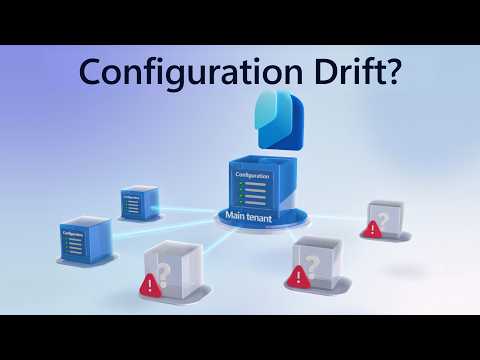
Microsoft Entra: Detect Tenant Drift Now
Software Development Redmond, Washington
Microsoft Entra Tenant Governance detects configuration drift and monitors Intune Exchange Teams Defender Purview
Key insights
- Find Configuration Drift in Microsoft Entra Tenant Governance detects when tenant settings change away from a defined state across Entra, Intune, Exchange, Teams, Defender, and Purview.
It ties into the preview Configuration management experience to help teams keep settings consistent. - Admins define a desired state as a baseline (JSON) and run a scheduled monitor that compares live resources to that baseline.
Monitors run on a six-hour cadence and produce a run summary while detailed drift objects list property-level differences. - In the admin center you inspect Monitor results for run status and open Configuration drifts to see which resource properties deviate from the baseline.
The drift details show the affected resource and use the Ensure property to indicate Present or Absent for expected items. - The feature surfaces related or external tenants using B2B, multi-tenant app, and billing signals so you can extend control beyond tenants you already manage.
Use role-based templates and complete a secure approval handshake to administer governed tenants from a single browser. - Benefits include fast detection of unauthorized changes, stronger and more consistent security and compliance across tenants, and reduced need for third-party drift tools.
Remediated drifts are marked fixed on the next monitor run, keeping reports up to date. - You access the capability from the Microsoft Entra admin center; it requires the appropriate tenant license and admin privileges and is currently in preview.
Filters let you view results by monitor, resource type, name, and detection time to simplify investigations.
Overview of the Microsoft video
The Microsoft YouTube video introduces Microsoft Entra Tenant Governance and focuses on the new Find Configuration Drift capability within the preview Configuration management experience. In the presentation, Jeff Staiman, a Microsoft Entra Principal Product Manager, walks viewers through how to capture tenant settings as code, monitor changes, and review detected drifts. Moreover, the demo highlights cross-tenant visibility and role-based governance workflows that extend control across B2B and multi-tenant relationships. Consequently, the video frames the feature as a centralized way for administrators to observe and act on configuration changes across many Microsoft 365 services.
The recording also summarizes key timelines and actions, such as creating baselines, running monitors, and inspecting drift objects. Importantly, Microsoft notes that monitors run on a scheduled interval and produce summaries and detailed differences at different levels of granularity. Therefore, the video emphasizes both the high-level overview and the property-level detail that administrators can use when investigating changes. Finally, the walkthrough situates the capability as a preview feature that integrates directly into the Microsoft Entra admin center.
How the feature works in practice
First, administrators define a desired state using a JSON baseline that represents approved settings across supported resources. Then, they create a monitor that compares live tenant resources against that baseline on a scheduled cycle, with Microsoft’s documentation indicating a six-hour interval for scanning. When the monitor runs, it outputs a result that summarizes execution status, duration, and the number of drifts found, while separate drift objects store the detailed property differences. Thus, the system separates run-level telemetry from the actionable drift details to help admins prioritize investigation.
When a specific resource no longer matches the baseline, Entra records a configuration drift that shows which properties diverged and how. For resources that go missing entirely, the report displays the Ensure property as Absent instead of Present, making disappearance explicit. Additionally, if teams remediate an issue, the next monitor run marks the corresponding drift as fixed, which creates a clear remediation trail. As a result, teams gain an auditable loop from detection to correction within the same governance experience.
What administrators will see and do
In the Microsoft Entra admin center, users can open Tenant Governance and navigate to Configuration management to view monitors and drift data. There, monitor results show run-level summaries while the configuration drifts view exposes affected resources and the exact properties that differ from the baseline. Administrators can choose either to update the live resource so it matches the baseline or to update the baseline if the new live state is the desired one. Consequently, the workflow supports both corrective actions and planned, intentional changes to governance definitions.
The video also demonstrates automatic discovery of related tenants to govern by using signals such as B2B relationships, multi-tenant app connections, and billing links. After requesting governance, teams complete a secure approval handshake in the admin center and then administer governed tenants from a single browser session using the roles created in that process. This design reduces friction for cross-tenant oversight while preserving role-based access controls and explicit consent. Therefore, admins can scale governance without granting broad, permanent access across every tenant.
Benefits and tradeoffs to consider
On the positive side, the built-in drift detection reduces reliance on third-party tools and centralizes compliance monitoring for many Microsoft services, which should streamline operations for IT teams. Moreover, property-level drift objects provide clear information to guide remediation, helping teams maintain consistent security posture across governed tenants. However, the preview nature of the feature means that support, resource coverage, and performance characteristics could evolve, so organizations must plan for change. Thus, teams should weigh the gains in native integration against the risks of adopting a preview capability for mission-critical compliance workflows.
Another tradeoff involves scan cadence and scale. While six-hour scans balance timeliness with system load, some organizations may require faster detection windows for high-risk settings, which could necessitate complementary monitoring or manual checks. Additionally, capturing baselines as JSON is powerful for automation but requires careful management of configuration-as-code artifacts to avoid mismatches between intent and implementation. Therefore, teams need solid processes to govern baseline updates, peer review, and change approvals to prevent false positives or governance gaps.
Challenges and practical recommendations
Adopting the capability raises challenges around permissions, tenant licensing, and operational workflows, because visibility requires appropriate privileges and tenant enrollment in Tenant Governance. Administrators should therefore validate role assignments and licensing before relying on the feature for broad compliance monitoring. Furthermore, integrating drift detection into incident response will take time; teams should map detection outputs to escalation paths and playbooks so that drift findings are handled consistently. As a result, process design becomes as important as the technical setup.
Finally, organizations should pilot the feature across a representative set of tenants and resources, monitor for false positives, and refine baselines incrementally. Regular reviews of baseline definitions, combined with automation for safe remediation, will reduce operational burden while preserving control. In conclusion, Microsoft’s video outlines a thoughtful approach to drift detection and cross-tenant governance, but successful adoption depends on clear processes, adequate permissions, and realistic expectations about preview features.

Keywords
Microsoft Entra tenant governance, Entra configuration drift detection, Microsoft Entra policy compliance, Entra tenant monitoring, tenant configuration drift remediation, Entra security and compliance, Azure AD governance best practices, Microsoft Entra drift reporting