Microsoft Bookings 2023: Comprehensive Tutorial in 20 Minutes
Consultant at Bright Ideas Agency | Digital Transformation | Microsoft 365 | Modern Workplace
Master Microsoft Bookings with our comprehensive tutorial - set up, schedule appointments & more in under 20 minutes, updated for 2023!
Tutorial: Kick-starting your journey with Microsoft Bookings: A 20-minute Guide (2023 Update)
The Microsoft Booking video tutorial created by "Nick DeCourcy (Bright Ideas Agency)" is designed to assist beginners in getting started with Microsoft Bookings. It offers a brisk walkthrough on setting up an account, adding clientele, and scheduling appointments, aiming to imbibe users with the skills necessary to commence appointments scheduling.
The video tutorial, as confessed by the author, uses fabricated user data for demonstration purposes, reassuring viewers about privacy concerns. Breaking down into various chapters, it encompasses topics from an 'Introduction' and 'First Time in Bookings' to negotiating 'Virtual Appointments app in Teams' and understanding 'Anonymous Teams links'.
Get more details on Microsoft Bookings from the source video: Click Here.
Microsoft Bookings: A Concise Overview
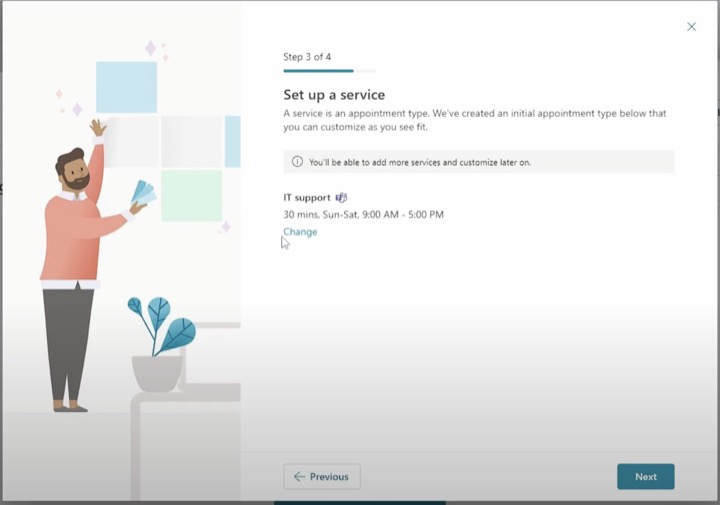
The video tutorial also cross-references an official Microsoft Article pertaining to its bookings service. It champions Microsoft Bookings as a convenient solution for scheduling and administering appointments. With a web-based scheduling calendar and Outlook integration, the service offers staff optimization and customer convenience.
Focused on business, Bookings also presents versatility in customization to tailor to different organizational needs. SMS and Email notifications have been put in place to minimize no-shows and enhance client satisfaction, thus reducing scheduling redundancy and saving time.
As an intriguing feature, Bookings enables the organization of virtual meetings via Microsoft Teams and Skype for Business, with each online appointment generating a unique link for attendees. The feature is also accessible as an application within Teams, giving users a singular platform to organize their calendars, schedule, and manage services.
- A customer-friendly booking page to navigate and book the appropriate service.
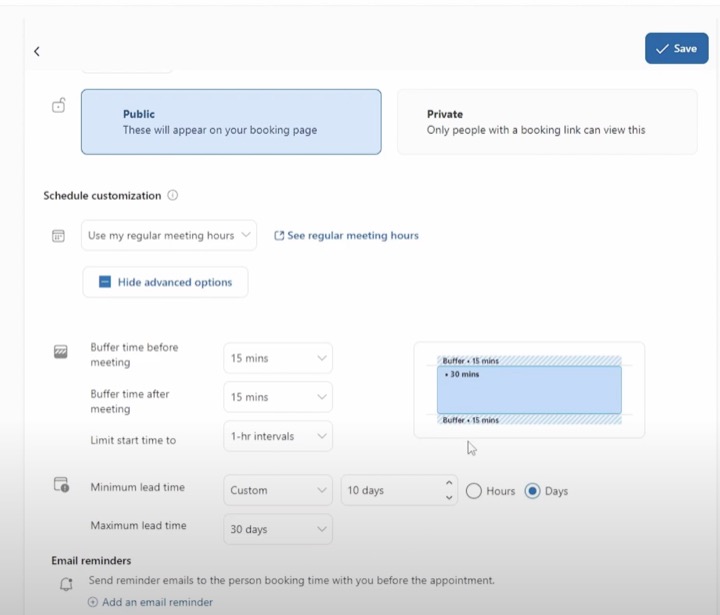
- A web application hosting business-centric pages for calendar owners and administrators, these permit in-depth customization, from setting business hours to defining meeting parameters.
Bookings is available in various subscriptions, including Office 365 and Microsoft 365, becoming a tool dedicated to small businesses for better appointment management.
For more information on Microsoft Bookings, and to learn how to turn it on or off for your organization, you may refer to the video source by clicking here.
More on Microsoft Bookings
Microsoft Bookings is a powerful tool, offering seamless assistance in the administration of appointments and managing customer relations. It is a unique development in the world of online scheduling applications developed by Microsoft. Specifically, catering to the needs of small businesses, the service promises efficiency and flexibility in appointment scheduling and other relevant tasks.
With integrated features supporting online meetings and multi-faceted customization, Microsoft Bookings elevates the quality of service for all businesses.
Learn about Microsoft Bookings Tutorial - Get started in 20 minutes (Fully updated for late 2023)
Are you keen on leveraging Microsoft's scheduling tool, Bookings? This tutorial will guide you through the primary steps to utilize this service, which includes setting up an account, adding clients, and scheduling meetings. It is an ideal place to start if you're new to Microsoft Bookings. Let's get acquainted with this service in less than 20 minutes!
In our guide, you'll learn how to activate your Bookings account, set appointments, and get ready to schedule meetings with your clients. We will provide you with a walk-through, covering the basic needs for a newbie to comfortably navigate through Bookings.
To make your navigation effortless, we've split our guide into a host of Chapters including:
- Introduction
- First time in Bookings
- Your Bookings Page
- Booking appointments
- Shared calendar pages
- How to set up virtual appointments in Teams
- Understanding anonymous Teams links and Other Help
Feel secure as you navigate. Any user data shared in our guide, including user accounts, passwords, were specifically generated for tutorial purposes. Let us reassure you that no individual or company's private data has been utilized!
Upgrading to Microsoft Edge ensures a smooth experience owing to its latest features, security updates, and technical support. The primary focus of Microsoft Bookings is on making the scheduling and management of appointments simple. Accordingly, it comes with a web-based booking calendar, integrated with Outlook to effortlessly manage your team's calendar. The tool ensures your clients freedom to book a time convenient to them. With features like Email and SMS text notifications, appointment absenteeism can be significantly reduced, uplifting your customer's satisfaction.
The Bookings calendar, the integral part of the tool, is a mailbox in Exchange Online. The flexibility to make your organization’s meetings virtual with online meetings via Microsoft Teams and Skype for Business fortifies the strength of the Bookings tool. Every appointment booked in the form of an online meeting issues a unique meeting link, sent to attendees to join via a web browser, phone dial-in, or the Skype or Teams app.
At the foundation of Bookings lies these components:
- A booking page for clients to schedule appointments
- A web app with business-facing pages for owners to manage schedules and appointment types
To begin your Bookings journey, ensure access to Microsoft Bookings. A host of subscriptions, including Office 365, and Microsoft 365, provide access to this service. If you're a small business owner, Bookings can be an effective tool to schedule and manage appointments with your clients. Now that we've covered the basics, you can confidently get started with Microsoft Bookings.
More links on about Microsoft Bookings Tutorial - Get started in 20 minutes (Fully updated for late 2023)
Keywords
Microsoft Bookings Tutorial, Get Started Microsoft Bookings, Microsoft Bookings 2023, Microsoft Bookings Guide, Learn Microsoft Bookings, Microsoft Bookings Basics, Quick Microsoft Bookings Tutorial, Updated Microsoft Bookings Tutorial, Microsoft Bookings Training, Microsoft Bookings Tips.