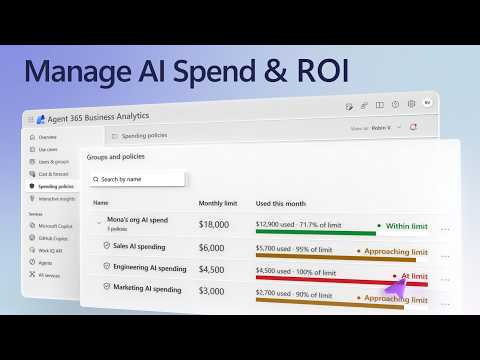
Copilot AI costs: track usage and set spending limits
Software Development Redmond, Washington
Users can review Copilot Credit use, while admins and budget owners can forecast costs and apply spending limits to AI services.
Key insights
- Copilot’s Usage details shows a seven-day view, remaining monthly limit and credits used for individual tasks.
- One Copilot Credit currently equals one cent in US dollars; more complex agent workflows use more credits.
- Agent 365 Business Analytics breaks down cost by service, model provider, use case and organizational view.
- Admins can scope spending policies to users, groups or shared resources such as an agent.
- Policies can set cumulative and per-user monthly limits; reaching a hard limit interrupts the service.
Microsoft Copilot Credit tracking and Agent 365 Business Analytics give organizations ways to monitor AI consumption, assess value and control usage-based spending. This matters to Copilot users, IT admins, budget owners and business leaders responsible for understanding or managing AI costs. Microsoft demonstrates how those roles can work with usage details, analytics and spending policies.
What's new
The approach connects personal usage visibility with organization-level reporting and budget controls. Individual users can inspect their recent Copilot Credit use, while managers and budget owners can review costs and usage across the parts of the organization they are permitted to see. IT admins can enable usage-based billing and configure spending policies in the Microsoft 365 admin center.
Copilot Credits are the unit used to measure consumption for advanced AI tasks. The demonstration states that one credit currently equals one cent in US dollars. Simpler tasks use fewer credits, while more complex agent workflows use more. A credit view can therefore help users understand the consumption associated with particular tasks rather than seeing only an aggregate figure.
Agent 365 Business Analytics adds views of usage and cost by service, model provider and use case. Its Cost and forecast area projects month-end cost and supports what-if scenarios, including a spending cap, wider access to services or a shift to lower-cost models. The Use cases view pairs sessions and cost with an estimate of AI value based on the time a person would take to do comparable work.
Who it is for and what you need
Users can check their own consumption in Copilot. Managers, budget owners and business leaders can use Agent 365 Business Analytics to review usage within their organization or area of responsibility, subject to their permissions. The available organizational views can include manager hierarchies, organizations and job functions.
IT admins are responsible for enabling usage-based billing and setting up policies. The billing setup uses an Azure subscription with either pay-as-you-go or prepaid billing. Budget owners outside IT can be assigned roles to manage policies through Agent 365 Business Analytics rather than needing Microsoft 365 admin center access.
The roles described for delegated policy work are Delegator, Writer and Reader. Writer and Delegator roles provide edit or delegation permissions, while Reader is view-only. These roles let an organization distribute budget-management work to people closer to the teams or services being funded.
How it works
For a personal usage check, open Copilot and use the More actions menu to find Usage details. The view covers a seven-day period and shows the remaining monthly limit; selecting a day reveals tasks and their credit use. This gives users a task-level view alongside the monthly allowance.
For organization-wide analysis, open Agent 365 Business Analytics and choose the relevant view based on your permissions. Cost breakdowns can identify spending by service and model provider. Combined view connects services with the models they use, while Use cases groups activity by business domain and shows sessions, cost and estimated AI value.
Cost and forecast helps budget owners compare current usage with modeled changes. A forecast can show how a spending cap, expanded access or a different model mix could affect projected month-end cost. For a policy adjustment, an authorized budget owner can edit the relevant policy in Business Analytics, change its limits or alerts, then review and save the update.
Admins configure the controls in the Microsoft 365 admin center:
- Enable usage-based billing for the tenant using an Azure subscription with pay-as-you-go or prepaid billing.
- Go to Cost Management and create a spending policy. Choose identity scoping for users or groups, or resource scoping for a shared resource such as an agent.
- Select services and set monthly cumulative limits for the scoped users or resources. You can also set per-user limits.
- Configure alerts and choose which models are allowed using templates, then review and add the policy.
- Assign Delegator, Writer or Reader roles to budget owners who need to manage or view policies.
Limitations and alternatives
Spending limits are hard limits, not just warning thresholds: when a configured limit is reached, the affected service is interrupted. Admins should consider both the cumulative policy limit and any per-user limit, as well as who should receive alerts, before applying a policy to a team or shared resource.
Analytics permissions determine which organizational data a person can view. A leader may have a filtered view rather than access to the entire organization. Budget owners who do not have Microsoft 365 admin center access can use Agent 365 Business Analytics when they have been assigned suitable policy roles.
Forecasts and AI value estimates are useful for comparing scenarios, but the value measure is based on the time a person would take to complete comparable work. Organizations can use the views to assess usage and cost by domain, but should interpret the estimate in the context of the task being measured. Users can also review their own credits in Copilot rather than relying only on an organization-level cost view.
Sources
Frequently asked questions
How do I check my Copilot Credit usage?
In Copilot, open the More actions menu and select Usage details. It shows a seven-day view, your remaining monthly limit and the credits used for tasks on a selected day.
How much is one Copilot Credit?
The demonstration states that one Copilot Credit currently equals one cent in US dollars. More complex agent workflows use more credits than simple tasks.
What billing setup is needed for AI spending policies?
An IT admin enables usage-based billing for the tenant with an Azure subscription using either pay-as-you-go or prepaid billing.
What happens when a Copilot spending limit is reached?
The limit is a hard limit, so the affected service is interrupted when it is reached. Policies can also include alerts and separate cumulative and per-user monthly limits.