Copilot Agents in SharePoint and OneDrive change
M365 Adoption Lead | 2X Microsoft MVP |Copilot | SharePoint Online | Microsoft Teams |Microsoft 365| at CloudEdge
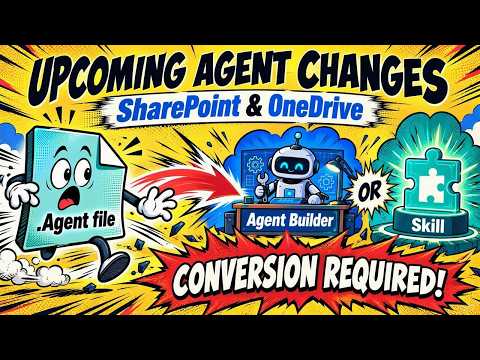
Ami Diamond explains Microsoft’s move from .agent files to Copilot Agent Builder for SharePoint and OneDrive agents.
Key insights
- New SharePoint and OneDrive agents will use Copilot Agent Builder from mid-November 2026.
- The .agent file format stays supported until March 2027, then stops working.
- Microsoft says the change aligns agents with the Copilot extensibility ecosystem.
- Existing agents can be upgraded with an Upgrade to Microsoft 365 Agent option.
Ami Diamond [MVP] recently highlighted major changes coming to Copilot agents in SharePoint and OneDrive. The core message is simple: Microsoft is moving new agents away from the file-based format and toward Microsoft Copilot Agent Builder, with a retirement date for the old model later in 2027. For anyone who manages SharePoint content, builds internal assistants, or relies on Copilot-connected experiences, this is a migration item rather than a cosmetic update.
What's new
The main change is that SharePoint and OneDrive agents using the file format will be upgraded to integrate with Microsoft Copilot’s extensibility ecosystem. According to the material, new agents will use Copilot Agent Builder starting in mid-November 2026. That means creating a new agent from SharePoint or OneDrive content will no longer produce a new file in those locations.
The source material also says existing files will remain supported until March 2027. After that point, they stop working. The upgrade path includes an Upgrade to Microsoft 365 Agent option, and Microsoft is also providing a capability to help move existing agent files.
Why it matters
This matters most to admins, SharePoint owners, and makers who have already built or deployed agents around documents, libraries, folders, or sites. If those agents are tied to the older file format, they will need attention before the March 2027 cutoff. The change affects how agents are created, managed, and governed, so it is not just a user interface change.
The material also points to a broader Microsoft Copilot ecosystem, including the Copilot app and the Microsoft plugin registry. For organizations, that suggests a more centralized way to publish and manage approved agents instead of handling them primarily as files in SharePoint or OneDrive. The source notes that SharePoint and OneDrive content remain valid knowledge sources, so the shift is about the agent container and management model, not the underlying content connection.
For end users, the practical effect should be that agents continue to work from the content they already know, but the way those agents are built and surfaced changes. The material also frames Copilot in SharePoint and OneDrive as permission-aware, meaning answers are based on content the user is already allowed to access.
How it works
The source material describes a migration from file-based agents to Microsoft 365 agents built in Copilot Agent Builder. In the older model, a user could create an agent from SharePoint or OneDrive content and save it as a file. In the new model, users create an agent through Copilot Agent Builder and use selected SharePoint or OneDrive content as knowledge.
The material shows the process at a high level:
- Create or upgrade the agent through Copilot Agent Builder or the Upgrade to Microsoft 365 Agent path.
- Select SharePoint or OneDrive content as the knowledge source.
- Use natural-language instructions and reusable skills to shape the agent’s behavior.
- Move existing files with the capability where needed.
The research notes add that SharePoint and OneDrive agents can still be grounded in sites, document libraries, folders, files, pages, and documents, plus related business information authorized for the user. That keeps the content model familiar while changing the platform approach behind it.
Limitations and open questions
The material is clear about the retirement timeline, but it does not explain the full rollout mechanics beyond the mid-November 2026 and March 2027 milestones. It also does not spell out which tenant types, licenses, or regions are included. We therefore cannot verify broader availability from the source alone.
The source says old files will stop working after March 2027, but it does not detail what happens to any custom configuration, sharing, or automation attached to those agents beyond the upgrade and conversion paths. It also does not provide step-by-step admin guidance for governance, so organizations will need to consult the linked documentation for the exact migration process.
Finally, the post is brief and mostly points to the Microsoft documentation. That means the article leaves out deeper implementation details such as policy controls, lifecycle management, or whether all existing agent behaviors map cleanly to the new model.
Sources
- Ami Diamond [MVP] video post on the SharePoint and OneDrive agent changes
- Microsoft documentation on upgrading SharePoint agents
Frequently asked questions
When do new SharePoint and OneDrive agents switch to Copilot Agent Builder?
The material says new agents use Copilot Agent Builder from mid-November 2026.
What happens to existing .agent files?
They continue to work until March 2027, and then they stop working.
Can old agents be upgraded?
Yes. The material says organizations can use an Upgrade to Microsoft Microsoft 365 Agent option, and SharePoint offers a convert-agent-file-to-skill capability.
Does the change remove SharePoint and OneDrive content as a knowledge source?
No. The material says SharePoint and OneDrive content remains available as knowledge sources.