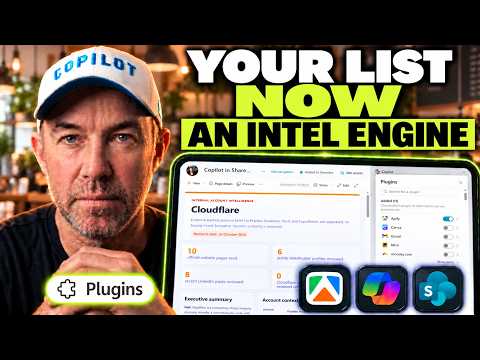
Copilot in SharePoint Builds Account Briefs from Lists
A Microsoft MVP 𝗁𝖾𝗅𝗉𝗂𝗇𝗀 develop careers, scale and 𝗀𝗋𝗈𝗐 businesses 𝖻𝗒 𝖾𝗆𝗉𝗈𝗐𝖾𝗋𝗂𝗇𝗀 everyone 𝗍𝗈 𝖺𝖼𝗁𝗂𝖾𝗏𝖾 𝗆𝗈𝗋𝖾 𝗐𝗂𝗍𝗁 𝖬𝗂𝖼𝗋𝗈𝗌𝗈𝖿𝗍 𝟥𝟨𝟧
Daniel Anderson demonstrates a SharePoint workflow that researches a selected list account, creates an intelligence brief and updates its record.
Key insights
- The demo starts with a Microsoft List containing company names, websites, account owners and relationship notes.
- Copilot in SharePoint calls the Apify plugin to gather external website and company information.
- The prompt saves a Markdown research file, creates an HTML brief and updates the list item.
- The brief matches accounts to a service-offerings library and includes mapped stakeholders and five discovery questions.
- Anderson reports 52 cents in Apify usage for the Culture Amp enrichment shown.
Daniel Anderson [MVP] recently demonstrated an account-research workflow built around Microsoft Lists and Copilot in SharePoint. In the video, a selected account record supplies context for a prompt that calls the Apify plugin, produces saved research and updates the list. The takeaway for SharePoint makers is that a list item can serve as the starting point for a repeatable research process, rather than just a place to store account details.
What's new
This is a practical build demonstration, not an announcement that Microsoft Lists has gained a new, generally available account-research feature. Anderson shows a list called Account Intelligence, with company names, websites, account owners and relationship notes. His prompt asks Copilot in SharePoint to enrich an account using Apify, save the findings as Markdown, create an HTML brief and update the list when the run finishes.
The output shown for Culture Amp is a report page linked from the list item. The brief contains website content records, public information, recent LinkedIn posts, dated developments and hiring signals. It also uses a service-offerings library on the same SharePoint site to identify potential matches and present evidence for those matches.
Other parts of the report draw on a stakeholder map and the account context already stored in the list. The displayed brief includes stakeholders, five discovery questions and a conversation opener. The list is updated with an enriched status and a last-enriched date, while the Markdown file is retained in a document library.
Why it matters
For makers and SharePoint site owners, the example connects several existing pieces of work: structured list data, a site library, a prompt, a plugin and a reusable skill. The result keeps the research process close to the account record and saves the underlying Markdown output as well as a readable HTML brief. This could be useful to teams that already keep account context and service information on a SharePoint site, though the video does not establish that it replaces a dedicated CRM or research system.
For account owners, the one-click interaction is the clearest workflow change. Anderson turns the prompt into a site-wide skill and adds a quick step button to the list; selecting that action opens the Copilot panel and runs the account-research process. Instead of opening Copilot chat and pasting the full prompt each time, a user can start the process from the row.
The demonstration also gives a concrete usage figure: Anderson checks Apify's run records and totals 52 cents for the Culture Amp enrichment. That is the cost he reports for that particular run, not a general price estimate for other accounts or future use. The video does not specify Copilot licensing, tenant requirements or broad availability, so administrators should treat this as a demonstrated configuration rather than a universal capability.
Teams that work with Microsoft 365 and SharePoint may find the pattern relevant if they need repeatable preparation briefs. In particular, the service-offerings library and stakeholder map show how a generated report can combine external research with information already maintained on the site. The workflow's value therefore depends not only on web research, but also on the quality and usefulness of the site's internal reference material.
How it works
Start with an account item in the Microsoft List. The example includes a company, website, account owner and relationship notes, which give the prompt an internal starting context.
Run the enrichment prompt in Copilot in SharePoint with the Apify plugin enabled. Anderson describes Apify as a web-scraping, crawling and browsing tool that retrieves information for the process.
Ask for Markdown first, then an HTML intelligence brief. In the example, Copilot gathers external information, creates the saved Markdown file, builds the page from it and updates the list to record the enrichment.
Use site information to shape the report. The prompt compares the account with a service-offerings library and consults a stakeholder map; the resulting brief shows matches and evidence alongside questions and a conversation opener.
Convert the prompt into a site skill and add a quick step column. Anderson creates a site-wide skill, then configures a button called “Enrich Account Data” with a prompt to research the account and create a brief using that skill.
Once that button is available in the list, Anderson selects Canva as another account example. The action opens Copilot in a side panel, where the prompt invokes the skill and, in turn, the Apify plugin. The video also shows the retained Markdown files in Documents, named with an account-research prefix and the list item's ID.
Limitations and open questions
The video shows one configured site and example runs; it does not document a standard Microsoft feature rollout or confirm that the same plugin and quick step configuration is available to every tenant. It also does not state the required licenses, administrator settings or regional availability. Those details cannot be inferred from the demonstration.
External research in a generated brief should be checked before people rely on it for decisions or share it outside the team. Anderson's output includes researched claims and identified signals, but the video does not describe a fact-checking process or explain how Apify validates sources. The reported 52-cent figure applies only to the specific run he reviews, and should not be treated as a forecast for another account.
Administrators considering this pattern will also need to assess the permissions and data handling appropriate to their site and plugin configuration. The video shows where the outputs are saved and how the list is updated, but does not explain security controls, retention settings or how errors are handled. Those operational details remain open in the material.
Sources
Frequently asked questions
Is this a built-in Microsoft Lists feature?
The video demonstrates a workflow assembled with Copilot in SharePoint, the Apify plugin, a prompt, a site skill and a quick step button. It does not say that Microsoft Lists has added a standard account-research feature.
What does the generated account brief contain?
The Culture Amp example includes researched website and company information, developments and hiring signals, service-offering matches with evidence, mapped stakeholders, five discovery questions and a conversation opener.
How much did the demonstrated enrichment cost?
Anderson totals 52 cents in Apify usage for the Culture Amp run. The video does not establish that this amount applies to other accounts or runs.
What licenses or setup does this require?
The video shows a configured SharePoint site with the Apify plugin, a service-offerings library and a stakeholder map. It does not specify licensing, tenant settings or general availability.