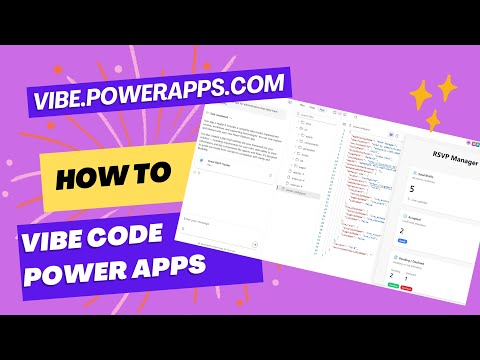
Power Apps: Vibe Code in 5 Steps
Microsoft MVP | User Adoption, Dynamics 365 + Power Platform Expert at Reenhanced
Microsoft expert tour of vibe.powerapps.com in Power Apps setting preferred solution, env settings and live code demo
Key insights
- Vibe Coding overview: Vibe Code in Power Apps (accessed at vibe.powerapps.com) uses AI to turn plain language into a full-stack app with a React frontend and Dataverse backend in minutes.
- How it works: You describe the app in natural language or images, and built-in AI agents generate requirements, create the data model, and produce runnable frontend code automatically.
- Key benefits: It boosts speed for prototypes and production apps, improves collaboration between business makers and developers, and fits enterprise needs for secure data and scale.
- New app type and tooling: This adds Code Apps alongside Canvas and Model-Driven apps, with a unified workspace that supports inline code editing and integration with tools like VS Code and CLI workflows.
- Availability and limits: The feature is in preview, currently scoped to specific regions (notably the US region) and non-default environment types; expect early-stage rough edges and permission requirements.
- Practical demo notes and steps: Video covers Set Preferred Solution (0:00), Environment Settings (1:20), and a full Live demo (1:53); before trying, set the right environment, confirm permissions, and plan for iterative refinement.
The YouTube video presented by Heidi Neuhauser [MVP], titled How to Vibe Code Power Apps Using the new vibe.powerapps.com experience in Power Apps!, walks viewers through a new generation of app building on Microsoft’s Power Platform. The clip is unedited and runs start-to-finish, showing steps such as setting a preferred solution, adjusting environment settings for Power Apps code apps, and a live demo that illustrates the workflow. Consequently, the video provides a practical look at the end-to-end experience and highlights what works and where the early preview still feels rough.
Overview of the Vibe Coding Demonstration
In the video, Neuhauser demonstrates a developer-focused workspace hosted at vibe.powerapps.com, which she uses to generate full-stack applications from natural language prompts. She explains that the new experience centers on a concept Microsoft calls Vibe Coding, or creating Code Apps, where AI agents interpret plain-language requirements and produce a React frontend tied to a Dataverse backend. Moreover, the presenter emphasizes speed: prototypes and production-ready code appear in minutes rather than days, which she shows during the live demo.
Importantly, Neuhauser shows how the system integrates planning, data modeling, and code generation into one chat-driven interface. As she walks through environment selection and permissions, viewers can see the practical prerequisites and the non-default environment restrictions that apply in early availability. Therefore, the video is useful for both business makers and pro developers who want to assess readiness for their teams.
How the Technology Works
Neuhauser outlines several technical components that power the experience, starting with natural language and image prompts that define application logic and UI. Then, AI "agents" handle tasks such as writing user requirements, refining the data model, and generating the React code that connects to Dataverse. She also highlights that the generated project supports common developer tools like VS Code and the Power Platform CLI, which lets experienced developers inspect and extend the output.
She further demonstrates inline preview and split-view editing, showing how the workspace lets users inspect generated pages and modify code directly. Meanwhile, the underlying AI model—identified in background notes as GPT-5—contributes to faster, more complex generation than earlier releases. Consequently, the process reduces manual configuration typical of Canvas or Model-Driven apps, while producing a modern React-based interface ready for further development.
Advantages and Practical Use Cases
Throughout the demo, Neuhauser stresses that this approach significantly reduces development time and lowers the barrier to entry. For example, business analysts can drive initial specifications with natural language and then hand off the generated code to developers for refinement, enabling tighter collaboration. Furthermore, the ability to preview, edit, and deploy from the same workspace supports iterative workflows in both prototyping and production scenarios.
The experience also aims for enterprise readiness by leveraging Dataverse for data management and by supporting offline capabilities and modern responsive design. Consequently, organizations that need faster internal tools or customer-facing apps may find this approach particularly appealing. However, Neuhauser points out that early access is limited by region and environment permissions, so companies should plan for staged adoption rather than immediate enterprise-wide rollout.
Tradeoffs and Key Challenges
Despite the clear productivity gains shown in the video, Neuhauser acknowledges tradeoffs that teams must consider. For instance, while AI accelerates initial creation, generated code can still require human review for performance, security, and long-term maintainability. Therefore, teams should weigh immediate time savings against potential costs of debugging, customization, and integration with complex legacy systems.
She also discusses governance and permissions as practical constraints, noting that the preview runs in specific regions and in non-default environments which may complicate deployment. Moreover, the AI-driven approach introduces new testing and validation needs because automated changes can cascade across data models and code. Consequently, organizations should invest in change control, versioning, and QA practices to manage risk as they adopt this new workflow.
What to Expect Going Forward
Finally, Neuhauser’s live demo suggests that Microsoft intends to blend AI planning and traditional developer controls rather than replace developers. Moving forward, viewers can expect tighter integration with source control systems like GitHub and more mature editing and deployment tooling in subsequent releases. Meanwhile, Microsoft appears to be iterating on offline defaults, responsive templates, and broader regional availability.
In summary, the video by Heidi Neuhauser [MVP] offers a practical and balanced look at Vibe Coding for Power Apps, showing compelling speed and collaboration benefits while honestly addressing governance, maintenance, and regional constraints. Thus, organizations should pilot the experience with clear guardrails and treat it as a powerful accelerant rather than a complete replacement for disciplined software engineering practices.
Keywords
Power Apps tutorial, Power Apps coding, Vibe Code Power Apps, Power Apps for beginners, Power Apps low-code development, Power Apps canvas app tutorial, Power Apps formulas and expressions, Power Apps integration with Power Automate