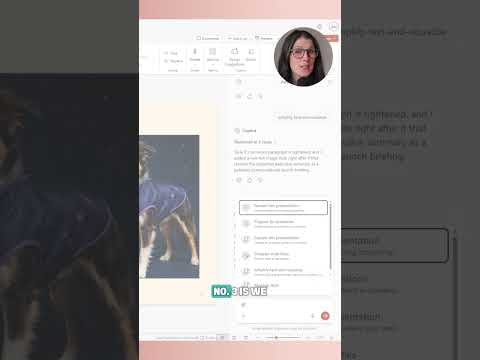
PowerPoint Copilot Skills offer reusable workflows
Office Skills with Amy highlights Copilot Skills in PowerPoint, which package repeatable presentation tasks into reusable instructions.
Key insights
- Built-in examples include reviewing a presentation, preparing for questions, and visualizing a slide.
- A Skill provides specialized instructions and repeatable steps for a particular task.
- The documented workflow selects a Skill from the Copilot prompt field.
- The source material does not confirm licensing, rollout status, or the exact PowerPoint interface shown.
Office Skills with Amy recently published a 44-second YouTube Short titled “How to Use Copilot Skills in PowerPoint.” Its description contains no detailed transcript, so the clip’s specific on-screen steps cannot be confirmed from the supplied material. Background notes describe Skills as reusable instructions for presentation workflows, intended to reduce the need to rewrite a complex prompt for each task.
What's new
Copilot Skills in PowerPoint are described as task-specific instructions that can guide Copilot through repeatable work on a presentation. The examples in the research notes include reviewing a presentation, preparing for questions, and visualizing a slide. The notes also describe workflows connected to presentation creation and editing, including templates, brand assets, and organizational content.
A built-in Skill can provide slide-by-slide and executive-level feedback, help anticipate questions, or turn slide content into a visual, image, or infographic, according to those notes. These examples explain the feature’s intended uses; the supplied Short description does not confirm which examples appear in the video. For readers who work primarily in PowerPoint, the central idea is to reuse a defined workflow rather than compose the full instruction from scratch each time.
Why it matters
For presenters and other end users, a review Skill could organize feedback around a presentation, while a question-preparation Skill could help them get ready for a talk. The research notes say that organizations can publish approved Skills to selected users, groups, or an entire organization, which could support consistent workflows across teams. That is a described capability, not confirmation of availability for every organization.
Admins and makers may care about how repeatable instructions are shaped and shared, but the available material does not specify administration controls, licensing, or rollout stage. It also does not establish that using a Skill will produce the same results across different presentations.
How it works
The research notes give this selection path for a built-in Skill:
- Open a presentation in PowerPoint and open Copilot from the ribbon or pane.
- Select the plus sign in the prompt field, then choose “Choose skills.”
- Pick a Skill, review Copilot’s response, and apply or revise suggested changes.
The notes also describe invoking a Skill by using an @mention in a prompt. Menu labels may differ by PowerPoint build, configuration, and organizational rollout, according to the research notes. These are background instructions; the brief published description does not confirm that the Short walks through those steps.
Limitations and open questions
The Short’s supplied description is only “You Tube Short Video,” so it does not independently establish the feature’s interface, behavior, or current availability. The background notes describe Skills and example workflows but leave licensing and rollout details unspecified. Readers should treat the selection path as documented background, not as a verified, frame-by-frame account of this clip.
Sources
- Office Skills with Amy’s YouTube Short
- Short page titled “How to Use Copilot Skills in PowerPoint”
- Office Skills with Amy channel
Frequently asked questions
What can a PowerPoint Copilot Skill do?
The research notes give examples including presentation review, preparing for questions, and visualizing a slide. The supplied Short description does not confirm which tasks it demonstrates.
How do I select a Skill?
The notes describe opening Copilot, selecting the plus sign in the prompt field, choosing “Choose skills,” and selecting a Skill. The video description does not verify that this exact interface appears in the clip.
Is this available with a particular license or to all organizations?
The supplied material does not specify licensing or confirm availability for all organizations.