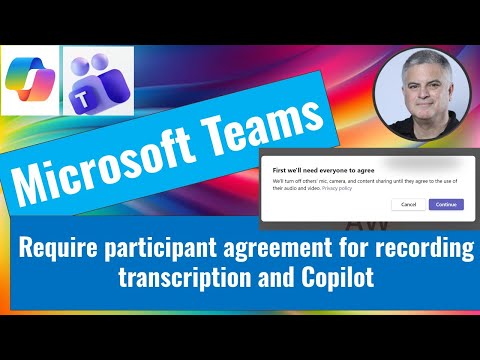
Teams: Consent for Recording & AI
M365 Adoption Lead | 2X Microsoft MVP |Copilot | SharePoint Online | Microsoft Teams |Microsoft 365| at CloudEdge
Microsoft Teams admin guide requires participant consent for recording, transcription and Copilot to protect privacy
Key insights
-
Require participant agreement: Microsoft Teams can prompt attendees to consent before recording, transcription, or AI processing starts.
Attendees cannot have audio, video, or screen sharing processed until they accept. -
Teams admin center setup: Go to Meetings > Meeting policies, enable the consent option under Recording & Transcription, then save and assign the policy.
Changes apply to meetings created by organizers who receive that policy. -
PowerShell control: Use Set-CsTeamsMeetingPolicy with the ExplicitRecordingConsent parameter to enable consent programmatically.
This gives admins precise rollout and automation options. -
Consent prompt behavior: When recording or transcription starts, Teams shows a banner asking each participant to agree.
If any participant declines, recording/transcription and related Copilot processing do not proceed. -
Privacy and compliance: Requiring consent helps meet regulations like GDPR and CCPA and reduces legal risk.
The feature also improves trust by making captures explicit and creates audit logs for review. -
Important notes and limits: Webinars and large events may use separate policies that default to consent on.
Copilot depends on transcripts, so enabling AllowTranscription and managing consent affects Copilot output; meeting templates (Teams Premium) can lock this setting for consistent enforcement.
Quick Summary of the Video
Ami Diamond [MVP] published a short YouTube video that demonstrates how to require participant consent before recording, transcription, and AI features like Copilot can process meeting content in Microsoft Teams. In the clip, he walks through the visual prompts attendees see and the admin controls that enable the behavior. Importantly, Ami is the author of the video and he is a man; this article reports on his demonstration rather than representing his own words. Consequently, the piece aims to summarize the functionality, tradeoffs, and operational steps shown in the video for IT teams and decision makers.
What the Feature Does and Why It Matters
At its core, the new policy toggles a Require participant agreement prompt that asks attendees to consent before their audio, video, and screen sharing are processed for recording or transcription. Therefore, until an attendee accepts the prompt their audio and video remain disabled for processing, and recording or transcription will not begin for that individual. This behavior also affects AI-driven features because Copilot typically relies on transcripts to generate meeting summaries and insights, so gating transcription effectively gates AI processing as well. As a result, organizations gain a clearer privacy posture and more explicit consent records when meetings are captured or analyzed.
How Administrators Can Enable It
Ami demonstrates two main administration paths: the Teams admin center and scripted configuration for bulk or automated deployments. In the admin center, you navigate to meeting policies, locate the Recording & Transcription section, and turn on the Require participant agreement for recording and transcription option before saving and assigning the policy to users or groups. Alternatively, administrators can enable the same behavior via PowerShell by setting the meeting policy parameter commonly referenced as ExplicitRecordingConsent to enabled, which is useful for scripting and large tenant rollouts. Consequently, the feature can be scoped to specific users, groups, or applied broadly, and it interplays with transcription permissions and meeting templates for tighter control.
Tradeoffs: Privacy Versus Meeting Friction
While the feature strengthens privacy and compliance by enforcing opt-in consent, it also introduces practical tradeoffs that organizations must weigh. For example, requiring explicit agreement can delay meeting start activities when many participants join, especially in environments with external guests or large attendee lists, which could frustrate users or interrupt scheduled recordings. On the other hand, disabling the prompt to reduce friction exposes organizations to legal and reputational risk if participants are recorded without explicit awareness, particularly across jurisdictions with strict consent laws. Therefore, administrators must balance user experience against regulatory obligations and choose policies that match the organization’s risk profile and meeting types.
Operational Challenges and Edge Cases
There are several operational complexities highlighted by the video that IT teams should consider before broad adoption. For instance, webinars and town halls may use separate event policies that default to different consent behaviors, so administrators need to validate settings across event types to avoid unintended permissions gaps. Additionally, hybrid participants who join via third-party devices, conference room systems, or dial-in audio bridges can create edge cases where consent banners do not display or where processing behaves inconsistently. Moreover, auditability and logs matter: organizations must confirm how consent records are captured and retained to support compliance reviews and incident investigations.
Practical Recommendations for IT Leaders
To mitigate the tradeoffs, Ami’s demonstration suggests a staged rollout that targets high-risk meetings first, such as external client sessions or recorded trainings, while monitoring user feedback and technical behavior. Furthermore, administrators should update training materials and meeting invitations to explain the new consent prompt, which will reduce confusion and speed acceptance during live sessions. In addition, it is wise to test the configuration with common meeting scenarios, including webinars, room systems, mobile clients, and third-party connectors, because testing reveals integration issues early and avoids surprises during critical meetings. Finally, coordinate policy decisions with legal and privacy teams to align consent handling with regulatory requirements and internal policies.
Conclusion
Ami Diamond’s video provides a concise, practical walkthrough of a Teams admin control that requires explicit participant consent for recording, transcription, and related AI processing like Copilot. By showing both the attendee experience and admin setup paths, the video helps IT teams evaluate the feature’s benefits and tradeoffs in real environments. Consequently, organizations can make informed choices about whether to enforce consent globally, for specific groups, or only in high-risk scenarios, while also preparing for operational edge cases. For those responsible for compliance and user experience, the demonstration serves as a useful starting point to plan deployment, testing, and user communication.

Keywords
Teams meeting recording consent, require participant consent Teams, Teams transcription consent, enable recording notification Teams, Teams Copilot consent, Microsoft Teams privacy settings recording, enforce recording agreement Teams meetings, compliance recording transcription Teams