SharePoint Knowledge Base: First Look
A Microsoft MVP 𝗁𝖾𝗅𝗉𝗂𝗇𝗀 develop careers, scale and 𝗀𝗋𝗈𝗐 businesses 𝖻𝗒 𝖾𝗆𝗉𝗈𝗐𝖾𝗋𝗂𝗇𝗀 everyone 𝗍𝗈 𝖺𝖼𝗁𝗂𝖾𝗏𝖾 𝗆𝗈𝗋𝖾 𝗐𝗂𝗍𝗁 𝖬𝗂𝖼𝗋𝗈𝗌𝗈𝖿𝗍 𝟥𝟨𝟧
Early look at SharePoint knowledge bases: create, import markdown, wiki linking and frontmatter for Copilot and agents
Key insights
- Knowledge base
First-look hands-on video of the new SharePoint knowledge base feature, currently in Frontier preview.
It’s designed for people and for Microsoft Copilot and agents to read and use as grounding data. - Creation methods
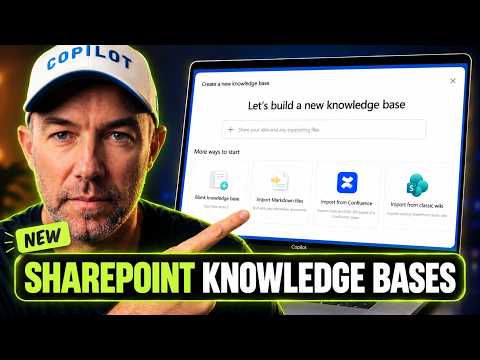
You can create a blank knowledge base, import markdown files, or migrate from Confluence or classic SharePoint wikis.
The demo shows importing a whole folder or an entire structure at once (84 pages in one import). - Editor & source files
Pages support both a visual editor and a markdown source editor, plus version history for edits.
Under the hood the site uses a special document library that stores pages as .md files. - Wiki linking & imports
Pages link wiki-style to each other for easy navigation and context building.
You can add pages by hand or import many markdown files in one operation to preserve structure and links. - Page properties & frontmatter
Each markdown file stores properties like tags, descriptions, and sources in its frontmatter.
These properties improve organization, search, and AI grounding. - AI grounding & benefits
Copilot and agents can reference the knowledge base to answer team-specific questions and reduce repeated searches.
The feature supports SharePoint sites tied to Teams channels and Microsoft 365 groups and lets people contribute curated knowledge for reuse across the organization.
In a new hands-on video, Daniel Anderson [MVP] offers a first look at the recently introduced SharePoint knowledge base feature and demonstrates how teams can build and manage one today. The video focuses on practical steps: creating a blank knowledge base, adding and linking pages, using both visual and source editors, and importing large sets of content. Importantly, Anderson shows a real-world import of 84 pages in a single operation, giving viewers a clear sense of how migration and ingestion work at scale. Consequently, the clip serves as an early guide for organizations exploring AI-grounded knowledge management in Microsoft 365.
What the Video Demonstrates
First, Anderson walks through the basic creation paths for a new knowledge base, explaining options to start from a blank template, import markdown files, or migrate content from Confluence and classic SharePoint wikis. Then he demonstrates the editor experience, switching between a visual editor and the raw markdown source to show how authors can work in the format they prefer. He also highlights wiki-style linking between pages and the page version history, which helps teams track edits and revert changes when needed. As a result, the tutorial makes clear that the feature aims to support both manual curation and bulk content import.
Under the Hood: Files, Frontmatter and Editors
Anderson inspects the underlying storage model and reveals that a knowledge base is essentially a special document library of .md files. Moreover, each page stores metadata such as tags, descriptions, and sources in the file frontmatter, which makes properties machine-readable and useful for agents. He points out that this design optimizes the content both for people to read and for AI tools like Copilot to ground on, since frontmatter gives agents structured cues about context and provenance. Therefore, the implementation blends human-friendly pages with metadata that supports automated retrieval and relevance ranking.
Creation and Import Options
Anderson demonstrates several ways to populate a knowledge base, noting that importing a single folder or an entire folder structure at once can dramatically speed migration. He also explains tradeoffs: while importing markdown preserves content and structure, teams may need to standardize frontmatter and tags to ensure consistent search and agent grounding. Additionally, choosing to build pages by hand gives more control over presentation and metadata but requires more editorial effort and governance. Consequently, organizations must balance speed and consistency when deciding whether to import en masse or craft pages individually.
Benefits and Tradeoffs
The video outlines clear benefits, such as a single shared layer of team knowledge that reduces duplication and improves context for AI assistants. Furthermore, by making knowledge readable to both people and agents, the system can help Copilot and other agents provide answers grounded in an organization’s own documentation, which improves relevance and trust. However, Anderson cautions that the feature is in Frontier preview, so menus and behavior may change before general availability, creating uncertainty for early adopters. Thus, teams should pilot the capability while preparing policies for metadata, permissions, and content lifecycle management.
Challenges and What to Watch
Several practical challenges appear during the demo, including the need to maintain consistent frontmatter, reconcile tags across imported sources, and manage permissions to avoid exposing sensitive content. Additionally, scaling to large organizations may surface performance and governance questions that require planning, such as how to index heavily linked content and how to audit agent access. There is also an operational tradeoff between central control and local ownership: centralized curation helps consistency, but decentralized contribution encourages up-to-date content. Therefore, teams should plan governance, training, and periodic cleanup as part of any rollout.
Next Steps and Practical Advice
Anderson positions this video as the first in a series, and he recommends that teams experiment with small pilot projects to test import flows and metadata strategies before wider deployment. Meanwhile, administrators should document tagging conventions and test how frontmatter interacts with search and agent behavior to ensure predictable results. Finally, because the feature is evolving, organizations should stay flexible and treat early work as formative rather than final, updating procedures as Microsoft refines the experience. In short, this first look gives practical insight while highlighting the governance work that successful adoption will require.

Keywords
SharePoint knowledge base, create knowledge base SharePoint, build knowledge base in SharePoint, SharePoint knowledge management, SharePoint knowledge base tutorial, SharePoint knowledge base template, Microsoft 365 knowledge base SharePoint, knowledge base SharePoint first look