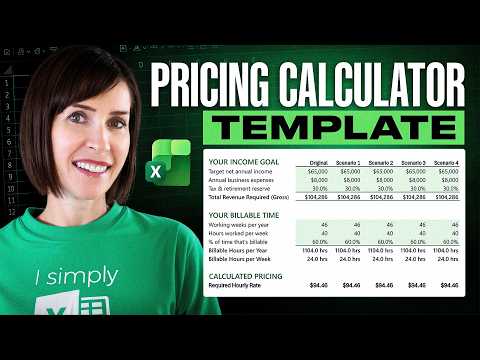
Excel Pricing Calculator: Free Template
Microsoft Excel pricing calculator: What-If Analysis and Goal Seek to set profitable service rates with free template
Key insights
- Excel pricing calculator and What-If Analysis: The tutorial walks through a ready-made spreadsheet that lets service providers plug in real numbers (costs, hours, taxes) and instantly see price and profit outcomes.
- Billable time and hourly rate: It shows how to calculate the portion of your work that is billable, then convert an income goal into the hourly rate you actually need. This reveals common undercharging mistakes.
- Scenario comparison and Goal Seek: The file compares multiple scenarios side-by-side and uses Excel’s Goal Seek to reverse‑engineer the rate required to meet a target, helping you test “what if the market won’t pay” or “what if I work more hours.”
- Core formulas: Key patterns include unit price, total cost = quantity × unit price, and per-unit cost = (fixed + variable costs) ÷ total units. These basics make the calculator transparent and easy to audit.
- Build for reliability: Use Excel Tables, named ranges, and structured formulas to avoid fragile cell links. Document assumptions, lock summary formulas, and test scenarios to keep the workbook stable as you change inputs.
- Microsoft context: Microsoft does not publish this exact Excel template; for cloud services use the Azure Pricing Calculator. Microsoft is emphasizing template-driven calculation for general planning while maintaining the Azure tool for cloud cost estimates.
Overview of the video
In a clear, step-by-step tutorial, Mynda Treacy (MyOnlineTrainingHub) [MVP] walks viewers through creating a practical pricing calculator in Excel for service-based businesses. She frames the problem by questioning common hourly-rate thinking and then proposes a model built on real inputs such as costs, billable time, and income goals. As a result, the video aims to help freelancers and small business owners move from guesswork to data-driven pricing. Furthermore, the presentation emphasizes hands-on work with a downloadable example file so users can follow along.
How the calculator is built
First, Mynda sets out the required inputs: fixed costs, variable costs, target income, and realistic estimates of billable hours. Next, she shows how to structure these inputs in a clean worksheet so that formulas remain readable and maintainable. Then, the calculator computes the hourly rate necessary to meet the income target after accounting for non-billable time and overhead, which reveals how often intuition underestimates true cost.
Additionally, the tutorial stresses using Excel Table features and named ranges to keep the spreadsheet flexible and easier to update over time. These choices reduce the chance of broken formulas when rows or columns change, and they make the model reusable across different projects or business scenarios. Consequently, users who adopt that structure can scale the spreadsheet without rebuilding it from scratch.
Techniques: What‑If Analysis and Goal Seek
The video demonstrates two key techniques for scenario planning: side-by-side comparisons and Excel’s built-in What‑If Analysis tools, including Goal Seek. By showing multiple scenarios together, Mynda highlights how small changes in billable hours or cost assumptions can shift the required rate substantially. She then uses Goal Seek to reverse-engineer a rate or a workload level that meets a defined income goal, which helps the viewer explore realistic pathways to profitability.
Moreover, the tutorial points out that these tools are not magic; they depend entirely on the accuracy of the inputs. As a result, sensible estimates and periodic review are essential. Therefore, the model's usefulness grows when owners update assumptions regularly and test different market or workload conditions to see how sensitive their pricing is to each variable.
Balancing pricing factors and tradeoffs
The video carefully explores tradeoffs between setting a higher hourly rate and increasing billable hours. For example, raising the rate can protect work-life balance and reduce client churn risks, but it may price some prospects out of the market. Conversely, working more hours might meet income goals in the short term, yet it can lead to burnout or reduce time for growth activities such as marketing or product development.
In addition, Mynda addresses market limits: even if a calculator shows a particular hourly rate is necessary, the market might not accept it. She recommends testers and staged increases as practical responses, while advising to combine data-driven pricing with market feedback. Ultimately, the best approach blends quantitative targets from the calculator with qualitative insights from client conversations and competitor awareness.
Practical takeaways and common challenges
The tutorial concludes with clear, practical advice: keep the spreadsheet simple, document assumptions, and protect important formulas to avoid accidental changes. Yet, Mynda also warns about common pitfalls, such as confusing gross revenue with take-home pay or failing to account for non-billable time. These mistakes can produce misleading rates that feel correct on paper but fall short in practice.
Finally, the video encourages continuous improvement by treating the pricing calculator as a living tool rather than a one-time project. Regular updates, scenario testing, and careful review help businesses adapt pricing to changing costs and market conditions. In short, the tutorial offers a balanced, actionable framework that helps service providers make more informed pricing decisions while acknowledging the practical limits and tradeoffs involved.

Keywords
how much to charge calculator, excel pricing calculator template, free pricing calculator excel, service pricing calculator, freelance rate calculator excel, pricing calculator template, how to price services calculator, hourly rate calculator excel