Power Apps
Mar 18, 2025 9:00 AM
Power Apps: Enhance Your Gallery with Auto Numbering, Row Highlighting, and Alternation Tips
by HubSite 365 about Power BI Professionals
Welcome to the channel dedicated to #PowerBIDesign and #DAX tutorials! Join us as we explore the world of data visualization, guiding you through the process of creating stunning dashboards
Power Apps, Power Platform
Key insights
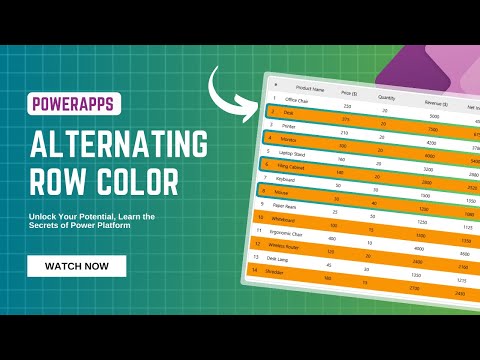
- Power Apps Gallery Features: The tutorial covers auto-numbering items, alternating row colors, and highlighting specific rows in Power Apps galleries to enhance visual appeal and functionality.
- Key Concepts: Learn how to use the ForAll function with Sequence for dynamic row numbering, apply conditional formatting for alternating row colors, and highlight rows based on specific conditions.
- User Experience Enhancement: These features improve navigation and understanding of complex data sets by making applications more intuitive and user-friendly.
- Customization Benefits: Developers can tailor the appearance and behavior of galleries to meet specific business needs, enhancing the overall user interface.
- Dynamic Data Handling: Auto-numbering and color alternation adjust dynamically with data changes, ensuring responsiveness and accuracy in applications.
- New Approach Highlights: Improved formula capabilities, integration with Dataverse for sophisticated data management, and enhanced customization options are part of the evolving Power Apps platform.
Introduction to Power Apps Gallery Auto Numbering, Alternating, and Highlighting Rows
Power Apps is a versatile platform that empowers users to create custom business applications without requiring extensive coding knowledge. One of its standout features is the ability to enhance galleries with dynamic elements such as **auto-numbering**, **alternating row colors**, and **highlighting specific rows**. This tutorial delves into the intricacies of this technology, its advantages, the basics of implementation, and the latest advancements in this approach.What is This Technology About?
This technology focuses on enhancing galleries in Power Apps by dynamically displaying row numbers, alternating row colors, and highlighting specific rows based on conditions. Galleries serve as a fundamental control in Power Apps, allowing users to display data in a table-like format. By incorporating row numbers and alternating colors, users can create applications that are more intuitive and user-friendly.- Auto-Numbering: This feature automatically assigns numbers to rows, making it easier for users to reference and navigate through data.
- Alternating Row Colors: By applying different colors to successive rows, users can improve readability and visual appeal.
- Highlighting Rows: Specific rows can be highlighted based on certain conditions, drawing attention to important data.
Advantages of Using This Technology
The use of auto-numbering, alternating row colors, and row highlighting in Power Apps offers several advantages:- Enhanced User Experience: These features make it easier for users to navigate and understand complex data sets.
- Customization: Developers can tailor the appearance and behavior of galleries to meet specific business needs, thereby improving the overall user interface.
- Dynamic Data Handling: The ability to dynamically update row numbers and colors based on data changes ensures that the application remains responsive and accurate.
Basics of the Technology
Implementing these features involves using Power Apps formulas and functions:- Auto-Numbering: This can be achieved by using the ForAll function in combination with Sequence to generate row numbers dynamically. For example, a formula like ForAll(Sequence(CountRows(colMyCollection)), Patch(Last(FirstN(colMyCollection, Value)), {RowNumber: Value})) can be used to add row numbers to a collection.
- Alternating Row Colors: Conditional formatting based on row numbers can be utilized to apply different colors to odd and even rows. An If statement can be used for this purpose.
- Highlighting Rows: Specific rows can be highlighted based on conditions using similar conditional logic.
What is New About This Approach?
The approach to dynamically adding row numbers and alternating colors in Power Apps galleries has evolved with the platform's updates. Here are some new aspects:- Improved Formula Capabilities: Power Apps continues to enhance its formula language, simplifying complex operations like dynamic row numbering and conditional formatting.
- Integration with Microsoft Dataverse: The use of autonumber columns in Dataverse (formerly Common Data Service) facilitates sophisticated data management, including automatic generation of unique identifiers for records.
- Enhanced Customization Options: The platform offers greater flexibility in customizing the appearance and behavior of galleries, allowing developers to create more engaging and interactive user interfaces.

Keywords
Power Apps Gallery Auto Number Alternating Rows Highlighting Rows Power Apps Tutorial PowerApps Guide App Development Microsoft Power Platform
HubSite 365 Apps