Microsoft Entra
Mar 29, 2025 1:03 PM
Entra ID - BYOD Security + Conditional Access Policies
by HubSite 365 about Merill Fernando
Product Manager @ Microsoft 👉 Sign up to Entra.News my weekly newsletter on all things Microsoft Entra | Creator of cmd.ms & idPowerToys.com
Microsoft Entra environments, BYOD, conditional access, administrative units, operational groups, automation, security.
Key insights
- BYOD Security: Nathan McNulty discusses realistic approaches to securing Bring Your Own Device (BYOD) environments, highlighting the limitations and practical strategies for better security.
- Conditional Access Policies: The episode introduces a "castle" framework for building effective conditional access policies, emphasizing structured and secure access management.
- Administrative Units: Insights on using administrative units to partition permissions efficiently are shared, allowing for more organized and controlled environment management.
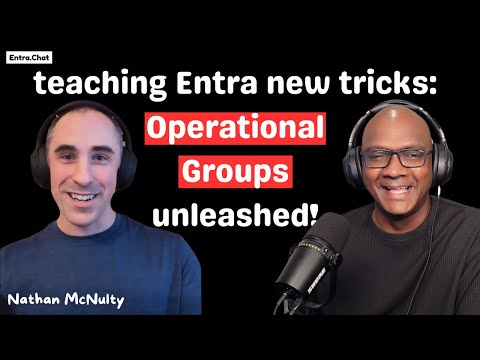
- Operational Groups Automation: Nathan reveals his innovative technique of automating user classification by authentication methods through "operational groups," reducing manual effort in security controls.
- Authentication Methods Migration: Strategies for migrating authentication methods smoothly without disrupting users are explored, focusing on modernizing security practices.
- Cloud Automation Techniques: The discussion covers modern cloud automation approaches that replace traditional server-based scripts, enhancing efficiency in managing Microsoft Entra environments.
Entra Mastery with Nathan McNulty: A Deep Dive into Microsoft Entra Security
In an insightful episode of the Entra.Chat Podcast, Nathan McNulty, a Senior Security Solutions Architect at Patriot Consulting, shares his extensive experience in deploying and securing Microsoft Entra environments. With a diverse background spanning civil engineering, education, and critical infrastructure, Nathan brings a wealth of practical wisdom from managing environments with over 50,000 users and 90,000 devices. This article will explore the key insights from Nathan's discussion, focusing on securing BYOD, building effective conditional access policies, leveraging administrative units, and more.Securing BYOD: Limitations and Realities
The first topic Nathan addresses is the challenge of securing Bring Your Own Device (BYOD) environments. In today's digital landscape, organizations often allow employees to use personal devices for work, which introduces security vulnerabilities. Nathan emphasizes the importance of understanding the limitations and realities of BYOD security.- **Balancing Flexibility and Security:** Organizations must strike a balance between providing employees the flexibility to use their devices and ensuring robust security measures are in place.
- **Implementing Conditional Access:** By implementing conditional access policies, companies can control access based on device compliance, location, and user risk.
- **Challenges:** One of the main challenges is ensuring that personal devices meet security standards without compromising user privacy.
Conditional Access Policy Approach: Building the Castle
Nathan introduces the concept of building a "castle" framework for conditional access policies. This approach involves creating layers of security that protect organizational resources.- **Layered Security:** The castle framework emphasizes layered security, where each layer acts as a barrier to unauthorized access.
- **Granular Control:** By using conditional access policies, organizations can achieve granular control over who can access what resources and under what conditions.
- **Tradeoffs:** While this approach enhances security, it requires careful planning and configuration to avoid disrupting legitimate user access.
Administrative Units: Partitioning the Entra Kingdom
Another key topic discussed is the use of administrative units to partition permissions within Microsoft Entra environments. Nathan explains how this technique can improve security and streamline management.- **Efficient Permission Management:** Administrative units allow organizations to segment permissions, making it easier to manage large environments.
- **Scalability:** This approach is particularly beneficial for organizations with a large number of users and devices, as it allows for scalable permission management.
- **Challenges:** Implementing administrative units requires a clear understanding of organizational structure and access needs.
Operational Groups: Automating User Classification
Nathan reveals his innovative "operational groups" automation technique, which helps classify users by authentication methods. This approach enables granular security controls without manual effort.- **Automation Benefits:** Automating user classification reduces administrative overhead and ensures consistent security policies.
- **Granular Security Controls:** By classifying users based on authentication methods, organizations can apply tailored security measures.
- **Implementation Challenges:** While automation offers significant benefits, it requires careful planning and testing to ensure accuracy.
Authentication Methods Migration: Avoiding User Disruption
Migrating authentication methods is a critical aspect of managing Microsoft Entra environments. Nathan discusses strategies for minimizing user disruption during this process.- **Smooth Transition:** Nathan emphasizes the importance of planning and communication to ensure a smooth transition.
- **User Education:** Educating users about new authentication methods can help reduce confusion and resistance.
- **Challenges:** Organizations must balance the need for enhanced security with the potential impact on user experience.
Cloud Automation: Moving Beyond Server-Based Scripts
In the final section, Nathan discusses modern cloud automation approaches that replace traditional server-based scripts. This shift offers numerous benefits for managing Microsoft Entra environments.- **Increased Efficiency:** Cloud automation streamlines management tasks, reducing the need for manual intervention.
- **Scalability:** Automated solutions can easily scale to accommodate growing environments.
- **Tradeoffs:** While cloud automation offers significant advantages, it requires investment in new tools and training.
Keywords
Entra Mastery, Nathan McNulty, SEO tips, digital marketing, online success, search engine optimization, content strategy, keyword research
HubSite 365 Apps