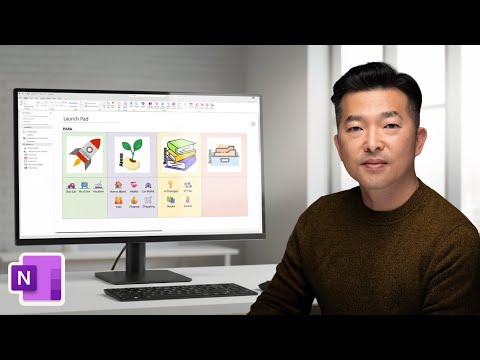
OneNote: Create a Clickable Launchpad
This channel is about productivity and project management. New videos will be uploaded weekly, so check back regularly!
MS pro turns OneNote into a PARA launch pad with clickable dashboard linking projects, files, OneDrive and Office
Key insights
- Clickable OneNote Launch Pad
Define a single hub page inside OneNote that holds links to pages, sections, notebooks, websites, and files so you can jump anywhere with one click.
Build the hub as a visual dashboard that replaces manual browsing through many notes. - Links
Create internal page and section links, and add links to cloud files or web resources to make navigation instant and reliable.
Prefer cloud file links when you need consistent access across devices; use local file links carefully, as they may break on other machines. - PARA
Organize notebooks with the PARA structure (Projects, Areas, Resources, Archives) to keep the launch pad focused and easy to scan.
Map each PARA category to sections or a dedicated table on your hub for fast access to relevant pages. - Layout and Visuals
Use tables, emojis, and images to group links and create clear visual sections that guide attention and speed clicks.
Keep the design clean: consistent labels, short link names, and logical ordering improve usability. - Add-ins (OneTastic)
Use add-ins or macros to automate repetitive tasks, generate index pages, or create custom views that enhance the launch pad’s functionality.
Test macros on a copy of your notebook before running them on important data. - Co-pilot and Navigation
Combine OneNote’s new layout options and AI features like Co-pilot to surface summaries, tasks, or smart links on the launch pad.
Leverage vertical or horizontal tab layouts and built-in toolbars to make navigation feel like a control center.
Overview of Andy Park’s Tutorial
In a recent YouTube video, Andy Park demonstrates how to build a OneNote Launch Pad that turns a notebook into a clickable control center. He walks viewers through a PARA-based notebook structure and shows how links, tables, emojis, and images create a clean visual dashboard. Consequently, the video aims to shift OneNote from a passive note storage space into an active navigation hub that saves time and reduces friction when working across projects.
Moreover, Park’s approach mixes native OneNote features with optional third-party tools to expand functionality. He highlights practical steps so both new and experienced users can follow along and reproduce the setup. Therefore, the tutorial positions itself as a build-along guide that connects organization theory with everyday productivity practices.
Key Steps Demonstrated
First, Park outlines the underlying structure using the PARA method to separate Projects, Areas, Resources, and Archives. He then creates a central page that contains links to pages, sections, and external files so users can jump anywhere in a single click. By arranging links into tables and adding images and emojis, he shows how a dashboard-like page can stay visually organized while remaining highly functional.
Additionally, the video details how to create internal OneNote links and how to link to files stored on a local machine or in the cloud. Park also recommends naming conventions and page ordering that support quick scanning and reliable navigation. As a result, the method serves both visual thinkers and people who prefer keyboard-driven workflows.
Tools and Integrations Covered
Park mentions built-in OneNote linking tools alongside optional third-party tools such as OneTastic, which can add macros and extra views. He also references modern OneNote features that integrate AI capabilities, here called Co-pilot, which can generate summaries and help populate dashboard content automatically. These integrations aim to reduce manual upkeep while enriching the dashboard with contextual information.
However, Park treats third-party tools as optional enhancements rather than requirements, emphasizing that the core launch pad works with native OneNote functionality. This distinction helps viewers choose a minimal setup first and then layer on advanced features at their own pace. Consequently, the tutorial remains accessible and adaptable to different comfort levels and toolchains.
Tradeoffs and Practical Challenges
While a centralized OneNote Launch Pad improves navigation, it also introduces maintenance overhead because links and file paths can change over time. For instance, local file links may break when notes move between devices or when cloud folders rename, so users must decide between convenience and portability. Furthermore, more visual dashboards can slow down large notebooks, so creators must balance aesthetics with performance.
Another consideration involves third-party macros and AI tools: they offer power but add dependency and potential privacy concerns when external code or cloud processing handles sensitive notes. Therefore, users must weigh automation benefits against control and data governance. Ultimately, the best approach depends on individual workflows, platform consistency, and the types of content being linked.
Practical Tips and Recommendations
Park recommends starting with a simple hub page and testing a few key links before scaling the dashboard, which helps prevent widespread breakage. He also suggests keeping a consistent folder and notebook naming scheme, using relative links where possible, and limiting the number of embedded images to preserve loading speed. These small choices help sustain reliability across devices and reduce long-term upkeep.
Finally, Park encourages viewers to iterate: build a basic launch pad, use it for a week, and then refine based on actual habits. By balancing simplicity, design, and automation, users can create a dashboard that speeds their workflow without becoming a maintenance chore. In short, his tutorial offers a practical blueprint, while also making clear the tradeoffs so teams and individuals can adapt the setup to their needs.
Keywords
OneNote launch pad, Clickable OneNote dashboard, OneNote navigation hub, OneNote quick links, Clickable OneNote links, OneNote productivity setup, Create OneNote launcher, OneNote page linking tutorial