Copilot Studio joins one managed runtime
Software Development Redmond, Washington
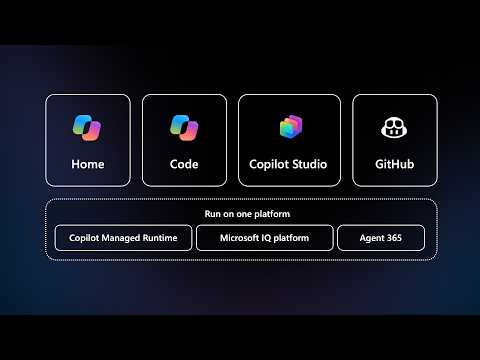
Microsoft showed how Copilot Studio, Cowork, and Code can all deploy to one managed runtime for governed AI apps and workflows.
Key insights
- Ryan Cunningham showed an app moving from Cowork to Code to Copilot Studio.
- The same project can be extended in GitHub or the CLI.
- Microsoft says the tools deploy to one managed runtime that comes with Copilot.
- Microsoft handles uptime, compliance, and security in the runtime.
- Admins can set policies for these apps in the Microsoft Admin Center.
Microsoft recently published a short video showing Ryan Cunningham walking through a single idea: an app can start in Cowork, grow in Code, and pick up AI workflows and agents in Copilot Studio. The takeaway is straightforward: Microsoft is trying to move AI app building and AI app operations into one managed runtime instead of leaving teams to stitch tools and hosting together themselves.
The video also points readers to a longer breakdown on the Microsoft Tech Community blog. That matters because the clip is brief and focuses on the flow between tools, not on every technical detail of the runtime or the admin controls around it.
What's new
According to Microsoft, apps built across Cowork, Code, and Copilot Studio now deploy to one managed runtime that comes with Copilot. The company says developers can extend the same project in GitHub or the CLI, which suggests Microsoft is trying to keep low-code and pro-code work on the same path.
Microsoft also says the runtime is managed by the company itself. In the video description, Microsoft says it handles uptime, compliance, and security, while admins can set policies for these apps in the Microsoft Admin Center. That puts the focus on enterprise control rather than just app creation.
Why it matters
For makers, this reduces the gap between building an app quickly and handing it over to IT for controlled operation. The message is that the same solution can begin as a business-led idea, then gain more structure as the work becomes more complex or more sensitive.
For admins, the important point is governance. If Microsoft is hosting the runtime and says admins can apply policies in the Microsoft Admin Center, then the operational model is closer to a managed platform than a one-off app deployment. That can matter when teams want to avoid shadow IT while still letting users build useful internal tools.
For developers, the video suggests they do not need to abandon the project when they move beyond the initial experience. Microsoft says the same project can be extended in GitHub or the CLI, so there is a bridge from conversational or low-code creation into more traditional development workflows.
The broader context, based on the accompanying notes, is that Microsoft is presenting this as a public preview and as a way to run apps, agents, and workflows in one controlled environment. That makes it relevant for organizations that want AI-assisted building, but also want a clearer operating model for what gets deployed.
How it works
The video describes a simple progression. A project can begin in Cowork, where work is initiated and coordinated. It can then grow in Code, where the solution is extended with more traditional development tools. Finally, it can pick up AI workflows and agents in Copilot Studio.
Microsoft says all of these tools deploy to one managed runtime that comes with Copilot. In the research notes, that runtime is described as a shared platform for deploying, hosting, running, and governing applications created with Microsoft Copilot experiences and supported third-party tools.
- Start the solution in Cowork.
- Extend the same project in Code or continue in Copilot Studio.
- Optionally extend it further in GitHub or the CLI.
- Deploy the result to the managed runtime.
- Apply organizational policies in the Microsoft Admin Center.
Microsoft’s description says it handles uptime, compliance, and security in that environment. The notes also say the runtime is designed to operate within the Microsoft 365 tenant boundary, which implies it is meant to fit into existing tenant-based identity and governance structures.
The article linked from the video adds that the platform is meant to host applications, agents, and workflows built with Microsoft Copilot experiences and supported third-party development tools. In other words, the runtime is not only for one type of app; it is meant to be the place where several kinds of business solutions live once they are ready to run.
Limitations and open questions
The video is short, so it does not explain the full feature set, pricing, or licensing model. It also does not spell out which organizations can use the managed runtime, which regions are included, or how broad the rollout is.
The public materials available here do not list the exact admin policy controls, the supported third-party tools beyond the general references to GitHub and the CLI, or the full lifecycle model for apps after deployment. The notes describe governance and data access at a high level, but the clip itself does not walk through those settings.
Microsoft also does not show a detailed end-user experience in the video. The emphasis is on the build-and-deploy path, not on how a finished app appears to users once it is running.
Sources
- Microsoft YouTube video: Cowork, Code, and Copilot Studio on one managed runtime
- Microsoft Tech Community blog: Copilot Studio updates and managed runtime
Frequently asked questions
What did Microsoft show in the video?
Microsoft showed an app moving from Cowork to Code and then into Copilot Studio, all on one managed runtime.
Who manages the runtime?
Microsoft says it handles uptime, compliance, and security in the runtime. The notes also say admins can set policies in the Microsoft Admin Center.
Can developers keep working in other tools?
Yes. Microsoft says the same project can be extended in GitHub or the CLI.
Is this a full rollout announcement?
The materials here do not say that. The notes describe it as public preview, but the video itself does not give rollout details.