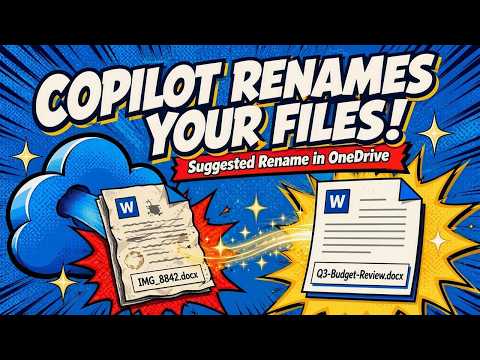
Copilot: Smart File Renames in OneDrive
M365 Adoption Lead | 2X Microsoft MVP |Copilot | SharePoint Online | Microsoft Teams |Microsoft 365| at CloudEdge
Copilot in OneDrive uses AI to auto-rename Word Excel PowerPoint PDFs and images, saving time and boosting productivity
Key insights
- Copilot Suggested Rename brings AI to OneDrive to suggest clearer file names based on a file’s contents.
It aims to replace vague names like “Finalv2” with descriptive titles so you find files faster. - Supported file types: Word (DOCX), Excel (XLSX), PowerPoint (PPTX), PDFs, Markdown files, and images.
The feature analyzes these formats to generate meaningful name ideas. - Availability: Microsoft plans a web-only rollout first with a roadmap target of June 2026, and it will cover both personal and business OneDrive accounts initially.
Desktop and mobile support are not confirmed yet. - How it works: Copilot reads file content, then offers three name options you can accept, keep, or dismiss.
The suggestions appear in the rename dialog and sometimes in a post-upload notification. - Benefits: Faster organization, better searchability, and fewer placeholder names in folders.
The feature integrates into the usual rename flow, so adoption requires little extra effort (low-friction). - Unknowns and cautions: Exact rollout timing, regional or tenant differences, and desktop/mobile plans remain unclear.
Also note potential considerations around content analysis and permissions when AI reads file contents.
Introduction
The newsroom reviewed a YouTube video by Ami Diamond [MVP], who demonstrates a new OneDrive feature called Copilot Suggested Rename. In the clip, Ami — who is male and identifies as an MVP — walks viewers through how the tool proposes clearer file names by reading file content. Consequently, the video frames this change as a small but practical update that can reduce common file-name clutter. Overall, the presentation focuses on real-world examples and a hands-on walkthrough to show the feature in action.
Moreover, Ami emphasizes that the feature works across several file types and appears in the OneDrive web interface during uploads and renames. He explains that Copilot provides multiple suggested names rather than renaming files automatically, which preserves user control. As a result, the experience remains familiar while offering helpful suggestions. The video’s tone is practical and aimed at everyday productivity gains.
What the Video Demonstrates
Ami steps through examples with files that typically receive poor names, such as “Final” or “PresentationNew_NEW,” and shows how the AI proposes better alternatives. He displays suggestions for documents, spreadsheets, presentations, PDFs, markdown files, and images, thereby highlighting the feature’s range. Furthermore, Ami demonstrates the choice interface where users can pick one of three suggestions, keep the original name, or dismiss the prompts. This walkthrough makes it clear how the feature integrates into normal file management flows.
In addition, Ami points out that suggestions can appear immediately after uploading a file and also when a user opens the rename dialog. He shows how the suggested names often pull key phrases or context from the file to create more meaningful labels. Consequently, users can find files faster without opening many documents. The video also briefly shows how the feature behaves across personal and business OneDrive accounts in a web browser.
How the Feature Works and Supported Files
According to Ami’s demonstration, Copilot Suggested Rename analyzes file content to infer what a file is about and then proposes a concise label that reflects that content. He lists support for common formats: Word, Excel, PowerPoint, PDF, Markdown, and images. Therefore, the tool aims to help a broad set of everyday file types rather than a narrow niche. Ami notes that the experience shown is web-only for now, reflecting the initial rollout plan.
Moreover, the video makes clear that the suggestions are generated on the fly and presented as options instead of applying changes automatically. That design helps balance helpful automation with user consent, especially for sensitive or official documents. Ami also mentions a Microsoft roadmap date indicating a planned rollout around June 2026, though he warns that availability can vary by tenant and region. Thus, viewers are advised to expect phased availability rather than an immediate global release.
Benefits and Tradeoffs
The video argues that the main benefits include faster organization, improved searchability, and reduced time wasted opening files to find the right one. Ami shows examples where descriptive names simplify long-term folder maintenance, which can save users minutes or hours over time. However, he also candidly discusses tradeoffs: automated suggestions may not always match a user’s naming conventions, and too many small edits can frustrate users who prefer strict control. Therefore, the suggestion-only approach aims to reduce friction while leaving final decisions to the user.
Additionally, the feature can improve corporate file hygiene without requiring administrators to enforce strict rules, which is a practical tradeoff for many teams. On the other hand, organizations with strict compliance needs may want tighter controls about how content is scanned or used to generate names. Ami highlights that opting to accept a suggestion remains a simple action, and that this manual choice mitigates risks from incorrect or unwanted names. Thus, the balance between automation and control is central to the feature’s appeal.
Challenges and Considerations
Ami addresses several challenges that could affect adoption, including privacy concerns, language and regional differences, and the technical complexity of analyzing diverse file types like images and scanned PDFs. He notes that accurate suggestions depend on reliable content parsing and language support, which can vary across file formats and tenant configurations. Moreover, enterprise policies and region-based rollout constraints could delay availability for some users. Therefore, organizations should evaluate how the feature fits within their governance and compliance frameworks.
Furthermore, Ami suggests that Microsoft may need to refine algorithms to avoid overly long or ambiguous names, and to respect existing metadata and user taxonomies. He explores alternatives such as client-side analysis versus server-side processing and points out the privacy tradeoffs each approach entails. Consequently, IT teams will need to weigh convenience against control and data protection needs when enabling the feature for large groups.
Conclusion and Implications
In summary, Ami Diamond’s video provides a clear, practical tour of Copilot Suggested Rename and explains why the feature could ease everyday friction in OneDrive. He shows that the tool offers helpful naming options across many file types while preserving user choice, which could improve search and reduce clutter. At the same time, the video responsibly flags rollout timing, regional availability, and governance questions that organizations should consider. Therefore, viewers receive a balanced view that highlights both immediate value and the challenges to address.
Finally, the demonstration makes a persuasive case that small AI-driven features can yield meaningful productivity gains when they respect user control and privacy. Ami’s hands-on examples and clear narration help readers understand practical tradeoffs and next steps. Consequently, teams planning to adopt the feature can better judge when and how to enable it in their environments. The video thus serves as a useful primer for users and IT decision-makers alike.
Keywords
Copilot suggested file rename OneDrive, OneDrive AI file rename, Copilot OneDrive rename suggestions, OneDrive rename automation, Microsoft Copilot file management, AI-powered file renaming OneDrive, OneDrive auto rename feature, Copilot rename files feature