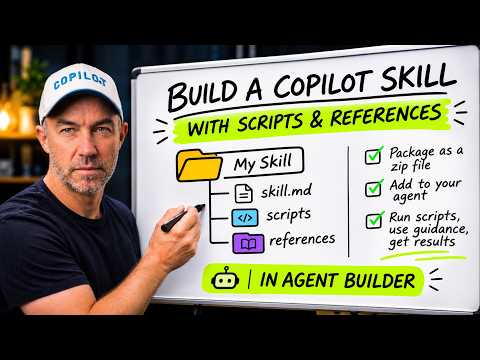
Copilot Agent Builder skills can run Python scripts
A Microsoft MVP 𝗁𝖾𝗅𝗉𝗂𝗇𝗀 develop careers, scale and 𝗀𝗋𝗈𝗐 businesses 𝖻𝗒 𝖾𝗆𝗉𝗈𝗐𝖾𝗋𝗂𝗇𝗀 everyone 𝗍𝗈 𝖺𝖼𝗁𝗂𝖾𝗏𝖾 𝗆𝗈𝗋𝖾 𝗐𝗂𝗍𝗁 𝖬𝗂𝖼𝗋𝗈𝗌𝗈𝖿𝗍 𝟥𝟨𝟧
Copilot Agent Builder skills can bundle Python scripts and reference files to produce repeatable outputs for tasks such as SharePoint library audits.
Key insights
- A skill can include SKILL.md, Python scripts, and reference files rather than instructions alone.
- The demonstrated agent audits a SharePoint document library using a CSV export.
- The example produces a summary, HTML report, flagged-files CSV, and raw audit JSON.
- The skill package is uploaded to Agent Builder as a ZIP file.
- The example separates agent instructions about who the agent serves from skill instructions about how it works.
Copilot Agent Builder skills can include Python scripts and reference files alongside SKILL.md, letting an agent perform repeatable processing and return files as well as a written response. This is relevant to makers and teams building agents for structured tasks, including SharePoint library audits. Daniel Anderson [MVP] demonstrates a skill-based audit workflow that takes a CSV export and produces several report outputs.
What it does
A skill is a package of instructions and supporting material an agent can use for a particular task. The demonstrated package contains a SKILL.md file, Python scripts, and references, showing that the skill is more than a single instruction document. The file and script arrangement lets the agent’s task guidance sit alongside code that performs the audit work.
In this example, the target is a SharePoint document library. The library is exported to CSV, and the Python scripts process the exported data and build an HTML report. A reference guide supplies a fix list, while the agent returns a summary, the report, a CSV of flagged files, and raw audit JSON.
The practical distinction is between describing a task and encoding repeatable processing for it. Agent instructions establish the agent’s role, while the skill provides the task-specific method. The demonstration reports the same result when the agent runs again, an outcome useful for a standardized audit workflow; it does not establish that every skill or script will produce identical outputs for every input.
Who it is for and what you need
This pattern is aimed at people building agents in Agent Builder who have a task involving structured inputs and defined outputs. SharePoint administrators or consultants may find the example relevant if they need an audit report from a document library export. The demonstration does not establish that the technique is limited to SharePoint.
For the illustrated workflow, you need the skill package, the library data exported as a CSV, and an agent configured to use the skill. The package shown includes SKILL.md, scripts, and a reference file; it is uploaded as a ZIP. The video description does not specify required Copilot or Microsoft 365 licenses, tenant settings, permissions, regions, or whether the capability is in preview or generally available.
Those missing details matter before planning a production rollout. The available material does not provide a licensing matrix or administrator setup instructions, so it is not possible to say which tenants or plans can use Python-running skills. Check the applicable Microsoft product documentation and tenant experience before relying on the workflow for a business process.
How it works
The workflow starts with the data and package rather than asking the agent to infer the whole audit from a prompt. The CSV supplies the library information to process, the script performs the audit and creates outputs, and the reference guide provides the fixes. The agent then presents the results to the user.
- Prepare a skill folder with a SKILL.md file, the Python scripts, and any reference material the agent needs.
- Export the SharePoint document library to CSV so the audit has structured input.
- Package the skill folder as a ZIP and upload the package to Agent Builder.
- Give the agent instructions that define its role, while the skill describes the audit procedure and supporting files.
- Run the agent with the library data and review the summary, HTML report, flagged-files CSV, and raw audit JSON.
In the example, the scripts run under a “Coding” and “executing” status. That is evidence of the behavior in this particular demonstration, not a full description of the execution environment or a guarantee about controls available in every tenant. The material also does not provide the scripts themselves, their dependency list, or the exact columns expected in the input CSV.
Before using a similar package with business data, confirm what data the export contains and what your organization permits the agent to process. Test the output against known examples, and review flagged items rather than treating an automated report as a final decision. These are practical checks for an audit workflow; the demonstration does not document a formal approval or governance process.
Limitations and open questions
The example shows a useful pattern, but it is not a complete deployment guide. It does not explain how to create or validate the scripts, what libraries are available, whether package installation is supported, how errors are handled, or how sensitive information is governed. It also does not verify the audit’s accuracy against a separate assessment.
The scope of the evidence is one workflow using a CSV export of a SharePoint library. It does not show an agent connecting directly to a library, replacing SharePoint permissions, or applying fixes automatically. The output includes a fix list in reference material, but the described process is an audit and reporting workflow rather than a demonstrated remediation process.
Availability and licensing remain unclear from the supplied material. No Microsoft documentation URL is included in the source list, so readers should confirm current product requirements and administrative controls in official documentation before adopting Python scripts in an agent. For now, the example’s clearest takeaway is the package structure and division of responsibilities: agent instructions set context, while the skill carries task-specific instructions, code, and references.
Sources
Frequently asked questions
Can Copilot Agent Builder skills include Python scripts?
The described example packages Python scripts alongside SKILL.md and reference files, then uploads the skill as a ZIP to Agent Builder. Licensing and tenant availability are not specified.
What files can a Copilot skill produce in a SharePoint audit?
The example returns a written summary, an HTML report, a CSV of flagged files, and raw audit JSON from a library CSV export.
Does the demonstrated agent fix SharePoint library issues automatically?
The described workflow audits the CSV and reports flagged files, with a reference guide holding a fix list. It does not demonstrate applying fixes automatically.
What license is required to run Python scripts in Agent Builder skills?
The supplied material does not specify a required license, tenant setting, or rollout status. Confirm current requirements in Microsoft documentation before deployment.