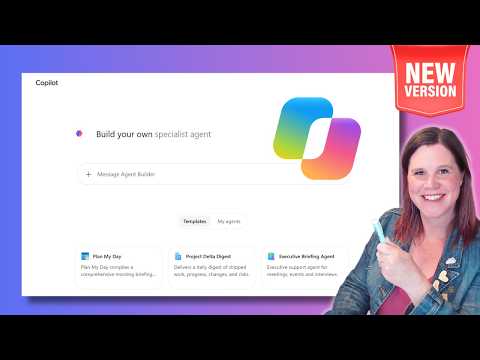
Microsoft Copilot Studio Agent Builder update explained
Evangelist at Barhead Solutions | Microsoft Business Applications MVP | Content Creator
Lisa Crosbie’s October 2026 update shows how Copilot Agent Builder now creates workplace agents from prompts and adds monitoring, sharing, and skills.
Key insights
- Lisa Crosbie’s tutorial is a beginner guide to the October 2026 Agent Builder update.
- The builder can create an agent from a natural-language description, with name, instructions, knowledge, skills, and prompts.
- The update adds templates for common workplace scenarios and a Monitor tab for tracking usage.
- Skills can be added in natural language, but they are still preview and limited to Frontier participants.
- The video also covers sharing, permissions, and when to move to Copilot Studio.
Lisa Crosbie [MVP] recently published a beginner tutorial on Microsoft Copilot Agent Builder, framed as an October 2026 update with new capabilities. Her one-sentence takeaway is straightforward: you can now describe an agent in plain language and let Copilot assemble much of the starting configuration for you, without code.
The video focuses on everyday workplace productivity. It shows how to create an agent, add skills, work with knowledge, and decide when a more advanced platform such as Copilot Studio is the better next step.
What's new
The main change in this update is the shift toward conversational setup. Instead of filling in every field by hand, a maker can describe the agent they want and Copilot generates an initial version, including the name, description, instructions, knowledge sources, skills, and suggested prompts. That makes the first draft faster to create and easier to refine.
The tutorial also highlights templates for common workplace scenarios. The research notes describe eight templates, including AI Learning Advisor, Executive Briefing Agent, My Company Policy, Personal News Digest, Plan My Day, Project Delta Digest, SME Finder, and Status Update Agent. These templates give users a starting point rather than a blank page.
Another update is the ability to add skills through natural language. The video’s examples include skills for thought models such as Six Thinking Hats, SWOT Analysis, Pre-mortem, and 5 Whys, as well as a custom “Assumption Stress Test” skill. The material also notes a Monitor tab for tracking actual usage and a way to publish approved agents to an organizational Agent Store.
Why it matters
This matters most to makers and business users who want a focused assistant for work without building a full application. Agent Builder is presented as a no-code experience, so it lowers the barrier for people who need something practical for tasks such as status updates, decision support, policy questions, or knowledge retrieval.
It also matters to admins and governance teams because the material calls out sharing and permission behavior. Agents can be shared with individuals or groups, but users still need access to the SharePoint files and folders that provide knowledge for the agent. That means the agent’s usefulness depends on the permissions already in place behind the scenes.
For teams that need more than a simple declarative agent, the video gives a clear boundary: Copilot Agent Builder is for quick, scenario-specific work, while Copilot Studio is the next step for custom orchestration, external actions, complex workflows, or broader application integration. The research notes also say skills remain a preview capability and are limited to organizations in Microsoft’s Frontier program.
How it works
The video’s examples show the process in a simple pattern. First, you describe the agent you want in natural language. In the tutorial, one prompt asks Copilot to create a “Thinking Partner” agent that helps users work through problems, decisions, and ideas in a practical and thoughtful way.
After that, Copilot produces an initial agent configuration. According to the source material, that can include the agent’s name, description, instructions, knowledge setup, skills, and suggested prompts. The maker then reviews and edits those pieces before publishing or using the agent.
The tutorial then adds skills to shape how the agent responds. One prompt asks for skills that let the user choose different thought models, with separate skills for:
- Six Thinking Hats, for exploring a difficult decision
- SWOT Analysis, for assessing a business situation
- Pre-mortem, for working out how a plan could fail
- 5 Whys, for investigating a root cause
The third prompt creates a custom “Assumption Stress Test” skill. It asks the agent to identify the intended outcome, separate evidence from assumptions, rank assumptions by importance and uncertainty, suggest low-cost tests, and end with a recommendation to proceed, modify, test first, or stop. That example shows how skills can encode a repeatable thinking process rather than a single static reply.
Finally, the video covers use, iteration, and sharing. The research notes say the updated experience includes a Monitor tab, improved publishing workflows, and more precise sharing and permissions. The material also points out that knowledge access still follows the underlying SharePoint permissions, and that automatic sharing of SharePoint files and folders is only supported for specific security groups.
Limitations and open questions
The source material is clear that this is a beginner-friendly, no-code experience, but it does not show every technical detail of how the underlying agent model works. It also does not provide a full list of licensing requirements beyond stating that the tutorial covers both the basic free and premium paid Copilot licenses for work.
Skills are described as a preview capability, and the research notes say they are limited to Frontier participants. The material does not explain how broad that rollout is beyond that point, so readers should treat skill creation as constrained for now.
There are also limits around knowledge access. The agent can only use content users are already allowed to reach, and the notes say automatic sharing of SharePoint files and folders is not universal across the organization. If you need external actions, complex orchestration, or deeper integration, the source points to Copilot Studio instead of Agent Builder.
Sources
Frequently asked questions
Is Copilot Agent Builder code-free?
Yes. The source material describes it as a no-code experience that does not require technical skill.
What does Copilot generate for a new agent?
The notes say Copilot can generate the agent’s name, description, instructions, knowledge sources, skills, and suggested prompts from a plain-language request.
Are skills fully available to everyone?
No. The material says skills are still a preview capability and are limited to organizations participating in Microsoft’s Frontier program.
When should someone use Copilot Studio instead?
The material says Copilot Studio is the better fit for custom orchestration, external actions, complex workflows, or broader application integration.