Microsoft 365 Copilot Skills Use SKILL.md Playbooks
Enterprise Architect and Microsoft MVP specializing in Microsoft Teams, Yammer, Virtual Events, and Metaverse.
John Moore’s short introduces SKILL.md as a way to give Copilot agents repeatable, task-specific instructions.
Key insights
- A SKILL.md file can describe a skill's purpose and the situations in which Copilot should use it.
- The Markdown body can set out a procedure, rules, output format, and limitations.
- A skill may include supporting resources such as templates, reference documents, or scripts.
- Compatibility and execution limits depend on the host Copilot experience.
John Moore [MVP] recently published a 75-second YouTube Short titled “Build Your First Copilot Skill (SKILL.md) | Microsoft 365 Copilot.” The published description and transcript supplied here contain no details, so the short’s specific on-screen steps cannot be confirmed from that material. The accompanying background notes describe SKILL.md as a way to give a Copilot agent a repeatable, task-specific playbook rather than relying only on a user’s prompt.
What's new
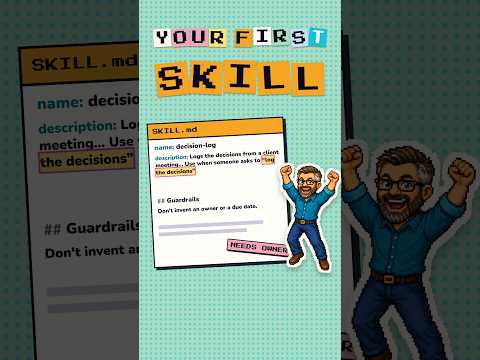
The central idea is a reusable skill defined in a Markdown file. Its front matter contains a name and description, which identify the job and explain when the skill is relevant. The Markdown body can then provide the procedure, rules, response format, and limitations.
A skill can also include supporting resources, such as templates, reference documents, scripts, and other files. The notes describe skills as capabilities that can be selected when a user request matches their purpose; they do not establish that every Copilot experience supports every skill or resource.
Why it matters
For makers and teams documenting a recurring task, this format offers a way to separate the process from the agent that applies it. A narrowly defined job, with clear inputs and an expected output, is easier to describe than a broad business function.
For users, the intended change is more consistent task handling: the agent has written steps and constraints to follow when the skill applies. The notes give examples ranging from reviewing expenses to preparing reports, but they do not verify a particular organizational deployment, licensing requirement, or rollout stage.
How it works
The background notes describe a basic structure. First, the metadata names the skill and describes its purpose and activation context. Then the Markdown body lays out the task procedure and any rules, output requirements, or actions the skill must avoid.
- Define a specific job, including expected inputs, output, success criteria, and actions the skill must not take.
- Write a descriptive name and purpose in the file’s front matter.
- Add clear procedural instructions and, if needed, supporting files.
- Use the skill with a compatible host agent, subject to that host’s permissions and execution limits.
The notes identify Copilot Studio, Microsoft 365 Copilot, Copilot Cowork, and supported Microsoft applications as possible host experiences. They also say compatibility, permissions, file types, tools, and execution limits need to be checked for each host.
Limitations and open questions
The supplied Short description and transcript do not include a demonstration, sample file, setup instructions, or a list of supported hosts. The research notes outline the concept, but do not establish current availability, licensing, tenant requirements, or whether a single skill works unchanged across different hosts.
That makes this a useful introduction to the file-based approach, not enough evidence to plan a production rollout. The video’s precise steps and any limits it may discuss could not be verified from the supplied material.
Sources
Frequently asked questions
What is a Copilot skill in this context?
The research notes describe it as a reusable set of task instructions, with optional supporting resources, that an agent can apply to matching requests.
What goes in a SKILL.md file?
Its front matter includes a name and description. The Markdown body can define the procedure, rules, output format, and limitations.
Does the short confirm which Copilot experiences support skills?
The supplied video description and transcript provide no details. The background notes name possible hosts but say compatibility and limits should be checked for each one.