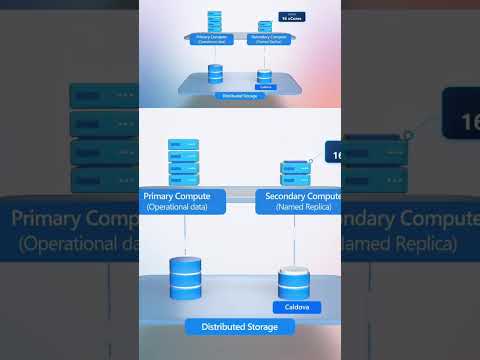
Azure SQL Hyperscale named replicas for read scaling
Software Development Redmond, Washington
Azure SQL Hyperscale named replicas route read-heavy work to independent endpoints without adding that workload to the primary database.
Key insights
- A named replica is read-only and shares the primary database’s page servers and log service.
- Each named replica can have its own compute capacity, service objective, database name, and endpoint.
- Microsoft documents support for up to 30 named replicas per primary Hyperscale database.
- Named replicas are for read scaling, not primary-database failover.
Azure SQL Hyperscale named replicas let you send read-heavy workloads to separate, read-only database endpoints instead of running them on the primary database. They matter to database administrators and application teams that need to separate reporting, analytics, search, or dashboard queries from transactional activity. Microsoft demonstrates the named-replica concept in a YouTube Short.
What's new
A named replica is an additional compute replica for an Azure SQL Hyperscale database. It shares the primary database’s page servers and log service, rather than maintaining a separate full copy of the database. The primary remains the only replica that accepts writes.
Each named replica has its own database name and connection endpoint, and can use its own compute size and service objective. That lets teams assign capacity to a read workload without making the primary use the same configuration. Microsoft documents support for up to 30 named replicas for each primary Hyperscale database.
Who it is for and what you need
This approach is aimed at teams whose read workloads compete with application transactions for database compute. For example, reporting or analytics queries can use a named replica while the primary handles application reads and writes.
It is also useful when different read workloads need different capacity or endpoints. The replicas are read-only, so they are not a replacement for a writable database or a failover target.
How it works
Applications connect to the primary for write activity and to a named replica for the read workload assigned to it. Changes committed on the primary are propagated to secondary replicas through Hyperscale’s shared log and storage architecture.
- Create a named replica for the Hyperscale primary database.
- Choose the replica’s compute configuration and service objective for its workload.
- Configure the application or reporting tool to connect to the replica’s endpoint for read-only queries.
- Adjust the replica’s compute configuration independently when that workload’s capacity needs change.
Limitations and alternatives
Named replicas accept read-only workloads and cannot serve as failover targets for the primary. For high availability and failover, Hyperscale uses high-availability replicas, which serve a different purpose.
Plan which workloads should use each endpoint and ensure applications that need to write continue to connect to the primary. A named replica’s separate endpoint and configuration make it possible to isolate reads, but do not change the replica’s read-only role.
Sources
Frequently asked questions
Are Azure SQL Hyperscale named replicas read-only?
Yes. Named replicas serve read workloads; the primary replica remains the only one that accepts writes.
How many named replicas can an Azure SQL Hyperscale database have?
Microsoft documents support for up to 30 named replicas per primary Hyperscale database.
Can a named replica be used for Azure SQL failover?
No. Named replicas are for read scaling and cannot be failover targets for the primary. High-availability replicas serve the failover role.
Can Azure SQL named replicas have different compute sizes?
Yes. Each named replica can have its own compute capacity and service objective, independently of the primary.